EasyManua.ls Logo

BASF 6106 - Page 27

Default Icon
72 pages
Print Icon
To Next Page IconTo Next Page
To Previous Page IconTo Previous Page
Loading...
[
t
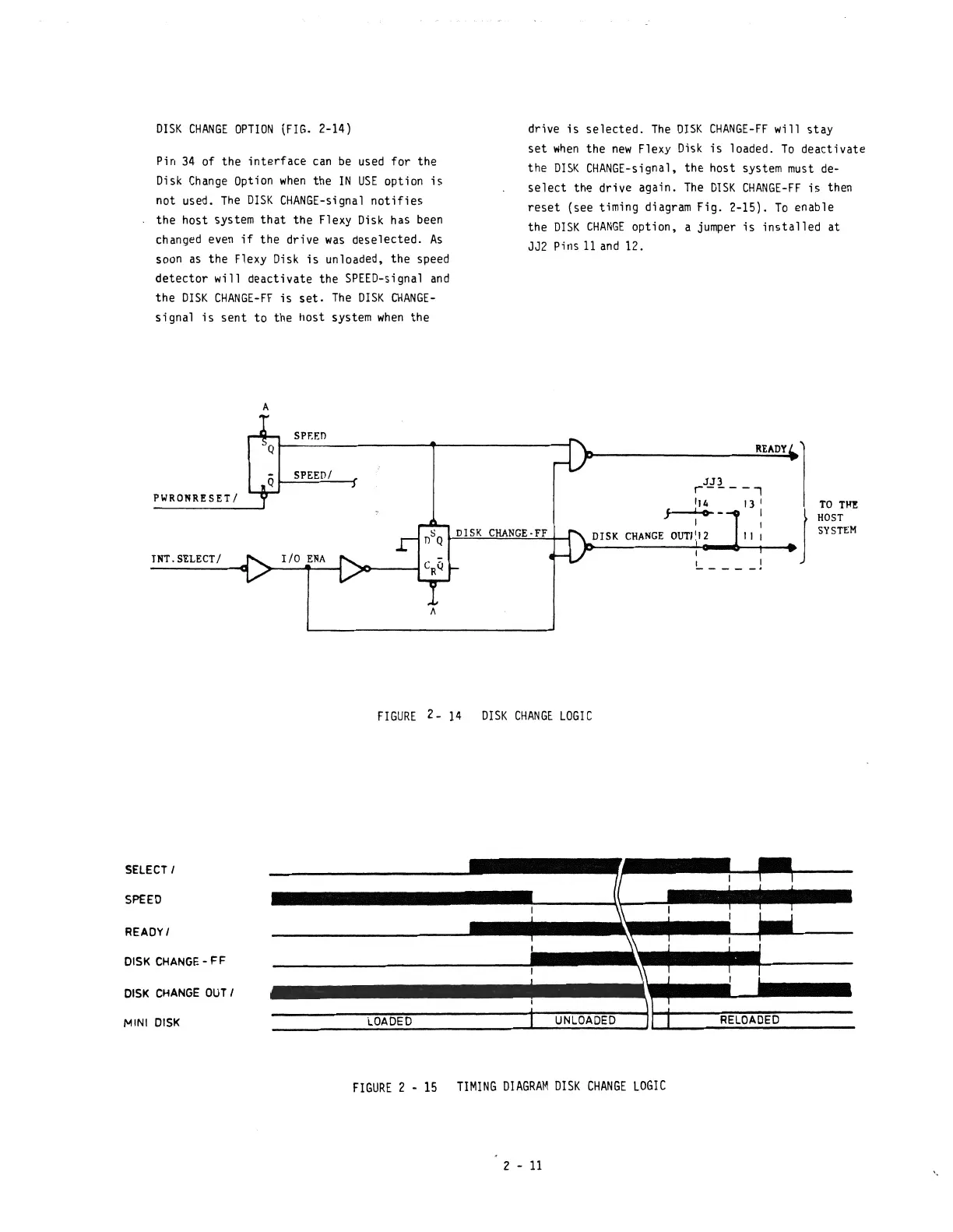
DISK
CHANGE
OPTION
(FIG.
2-14)
Pin
34
of the
interface
can
be
used
for the
Disk
Change
Option
when
the
IN
USE
option
is
not used.
The
DISK
CHANGE-signal
notifies
the host system
that
the Flexy
Disk
has
been
changed
even
if
the drive
was
deselected.
As
soon
as
the Flexy
Disk
is
unloaded, the speed
detector
will deactivate the
SPEED-signal
and
the
DISK
CHANGE-FF
is
set.
The
DISK
CHANGE-
signal
is
sent
to
the host system
when
the
A
SPEED
SPEED/
PWRONRESET/
TNT.SELECT/
A
drive
is
selected.
The
DISK
CHANGE-FF
will
stay
set
when
the
new
Flexy
Disk
is
loaded.
To
deactivate
the
DISK
CHANGE-signal,
the host system
must
de-
select
the drive again.
The
DISK
CHANGE-FF
is
then
reset
(see timing diagram Fig. 2-15).
To
enable
the
DISK
CHANGE
option, a
jumper
is
installed
at
JJ2 Pins
11
and
12.
READY
JJ3
r----.,
'14
13
'
J---4--
I
1 ,
DISK
CHANGE·FF
DISK
CHANGE
OUT/'12
11
I
TO
TIfII:
HOST
SYSTEM
FIGURE
2-
14
DISK
CHANGE
LOGI
C
SELECT
I
SPEED
READYI
DISK
CHANGE
- F F
DISK
CHANGE
OU
T I
MINI
DISK
LOADED
UNLOADED
RELOADED
FIGURE
2 -
15
TIMING
DIAGRAM
OrSK
CHANGE
LOGrC
2 -
11

Other manuals for BASF 6106