Baumer Interfaces | 5
V1 | PA408 Operating Manual 13
Mode PROG (programming mode)
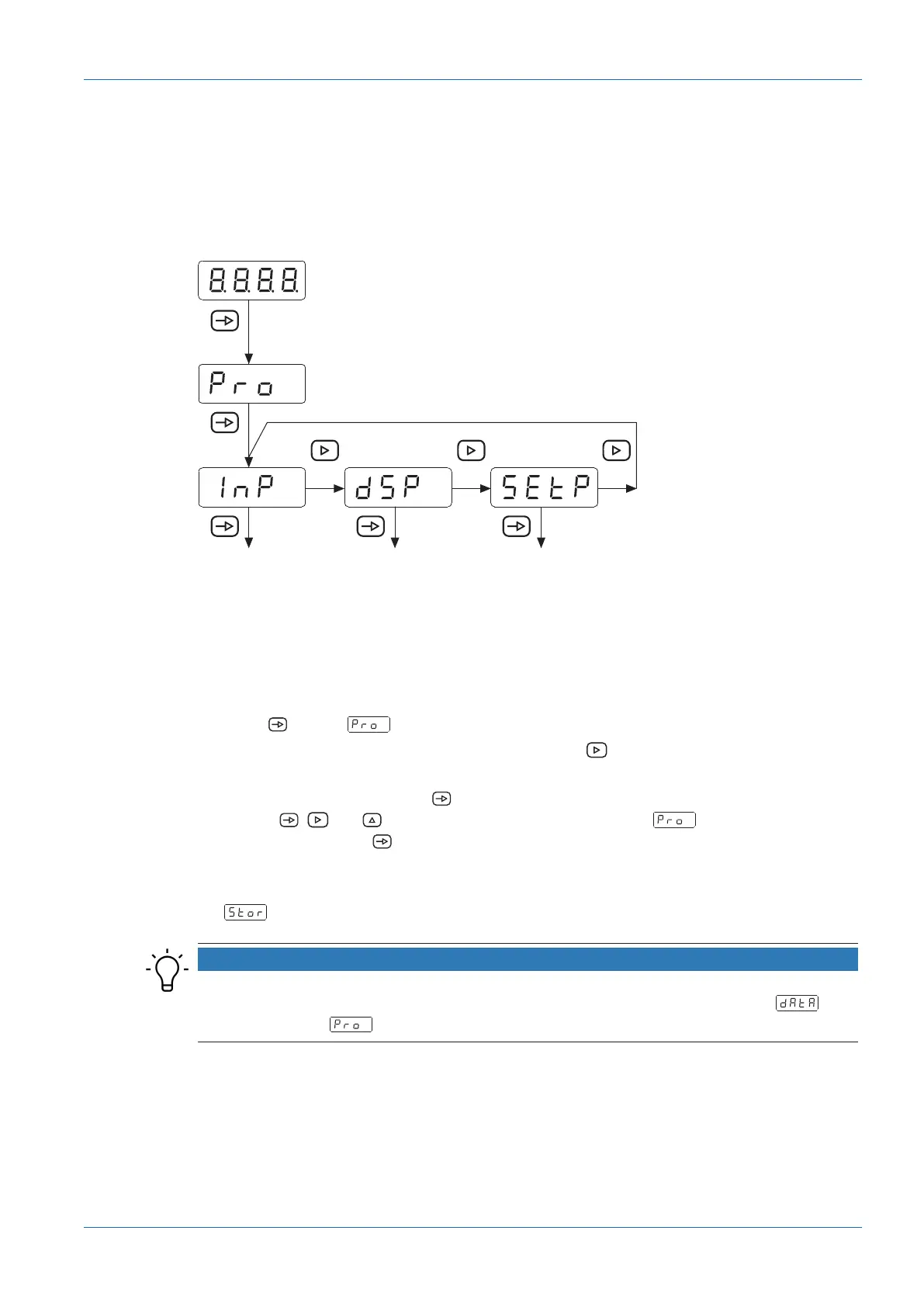
The programming mode allows the complete configuration of the process display. It comprises
several configuration modules:
n
Configuration input signal
n
Display configuration
n
Limit value output configuration *
Configuration
Input signal
Configuration
Display
* Configuration
limits
Ill.1: Block diagram of the configuration modules
* * As an option, according to product variant (see data sheet)
Programming procedure
Instruction:
a) Press to have appear on the display as initial view of the programming level.
b) Select the required configuration module with button . The individual modules provide
short descriptions. (InP, dSP, etc.).
c) Confirm selected module with and start parameterization of the desired functions using
buttons , and . Having confirmed the final parameter, appears again on the
display. Press button to select another configuration module or to exit the programming
level.
Result:
ü appears briefly on the display and parameterization is being saved.
NOTICE
Access to programming can be blocked at programming level. The various programming lines
can then only be visualized but not changed. When entering the programming level, then
appears instead of .


 To Next Page