EasyManua.ls Logo

baxter OV310G - Service Manual

baxter OV310G
16 pages
Print Icon
To Next Page IconTo Next Page
Loading...
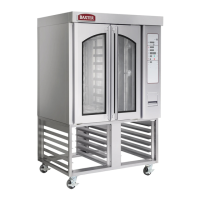
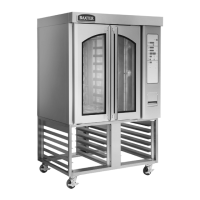
OV310G MODEL SHOWN
OV310 Series Mini Rack Oven
Installation Instructions
OV310G ML-132515
OV310E ML-132516
- NOTICE -
This Manual is prepared for the use of trained Baxter Service
Technicians and should not be used by those not properly
qualified.
This manual is not intended to be all encompassing. If you have
not attended a Baxter Service School for this product, you should
read, in its entirety, the repair procedure you wish to perform to
determine if you have the necessary tools, instruments and skills
required to perform the procedure. Procedures for which you do
not have the necessary tools, instruments and skills should be
performed by a trained Baxter Service Technician.
The reproduction, transfer, sale or other use of this Manual,
without the express written consent of Baxter, is prohibited.
This manual has been provided to you by ITW Food Equipment
Group LLC ("ITW FEG") without charge and remains the property
of ITW FEG, and by accepting this manual you agree that you will
return it to ITW FEG promptly upon its request for such return at
any time in the future.
SERVICE MANUAL
A product of Baxter MFG. Co., Inc 19220 State Route 162 East Orting, WA 98360
F25422 Rev. B (0917)


Other manuals for baxter OV310G

Questions and Answers

  • M
    Miranda BurnsAug 12, 2025
    What to do if burners will not light in my baxter OV310G Oven?
    • S
      Sherry BradleyAug 12, 2025
      If the burners in your Baxter gas oven won't light, try the following steps: * Press the ON/OFF button to turn the power off, then wait 5 minutes. * Ensure the gas shutoff valve is in the ON position. * Press the ON/OFF button to turn the oven back on. If the issue persists, turn the gas shutoff valve to the OFF position and call your authorized Bakery System service agency.
  • C
    Christopher ClineAug 16, 2025
    Why does my baxter OV310G Oven control beep rapidly?
    • D
      Dr. Billy Haynes IIAug 16, 2025
      The rapid beeping on your Baxter Oven controls indicates a temperature alert for Kosher Mode. To resolve this, turn VENT off if it's activated. For gas ovens, check that the burner is firing. If the burner isn't firing, briefly open and close the door to reset the temperature control.
  • S
    Susan BrennanAug 20, 2025
    How to fix uneven bake in baxter Oven?
    • B
      bakermelissaAug 20, 2025
      If you're experiencing uneven baking in your Baxter Oven, the shutters may need to be adjusted to achieve the desired results.
  • C
    Christy CarpenterAug 23, 2025
    What to do if rack will not rotate in baxter OV310G?
    • E
      Edward MooreAug 23, 2025
      If the rack in your Baxter Oven isn't rotating, check to make certain that the doors are properly closed.
  • T
    thopkinsAug 27, 2025
    What to do if burners will not light on my baxter OV310G (Gas Ovens only)?
    • L
      leedeniseAug 27, 2025
      First, ensure the gas shutoff valve is in the ON position. Next, press the ON/OFF button to turn the oven on. If the gas shutoff valve was turned off after a second attempt to light the burners, turn the gas shutoff valve to the OFF position and call your authorized Bakery System service agency.
  • F
    Frederick OliverAug 31, 2025
    What to do if baxter OV310G Oven controls beeps rapidly?
    • P
      Paula Thompson DDSAug 31, 2025
      If your Baxter oven controls are beeping rapidly, and the temperature alert is active for Kosher Mode, turn VENT off, if activated. For gas ovens, check that the burner is firing. If it is not firing, briefly open and close the door to reset the temperature control.
  • B
    Brandon HensleySep 4, 2025
    What to do if baxter OV310G Oven rack will not rotate?
    • D
      Dr. Nicole Robinson DVMSep 4, 2025
      If the rack in your Baxter oven will not rotate, check to make certain that the doors are properly closed.
  • S
    Steven BurnsSep 7, 2025
    What to do if my baxter OV310G display shows ‘LOC OUT’?
    • J
      Jacob RossSep 7, 2025
      If your Baxter oven display shows ‘LOC OUT’, the oven is in Kosher Lock-Out Mode. Contact your local Bakery service office.

Summary

Important Safety Information

General Oven Information

Gas Supply Piping System Testing

Procedures for testing gas supply piping integrity and pressure for gas ovens.

Installing the Oven

Mounting the Oven

Instructions for securely placing and fixing the oven onto its designated mounting surface.

Leveling the Oven

Steps to ensure the oven is properly leveled for optimal performance and safety.

Initial Start-Up Procedures

Procedures for the first power-on and initial configuration of the oven.

Ignition Sequence Check

Verifying the proper sequence of ignition for gas-powered ovens.

Gas Pressure Adjustment

Fine-tuning gas pressure for optimal burner operation in gas ovens.

baxter OV310G Specifications

General IconGeneral
ModelOV310G
MaterialStainless Steel
Power SourceElectric
Power Consumption1000W
ThermostatDigital
TimerDigital
Temperature Range200° - 500°F (93° - 260°C)

Related product manuals