EasyManua.ls Logo

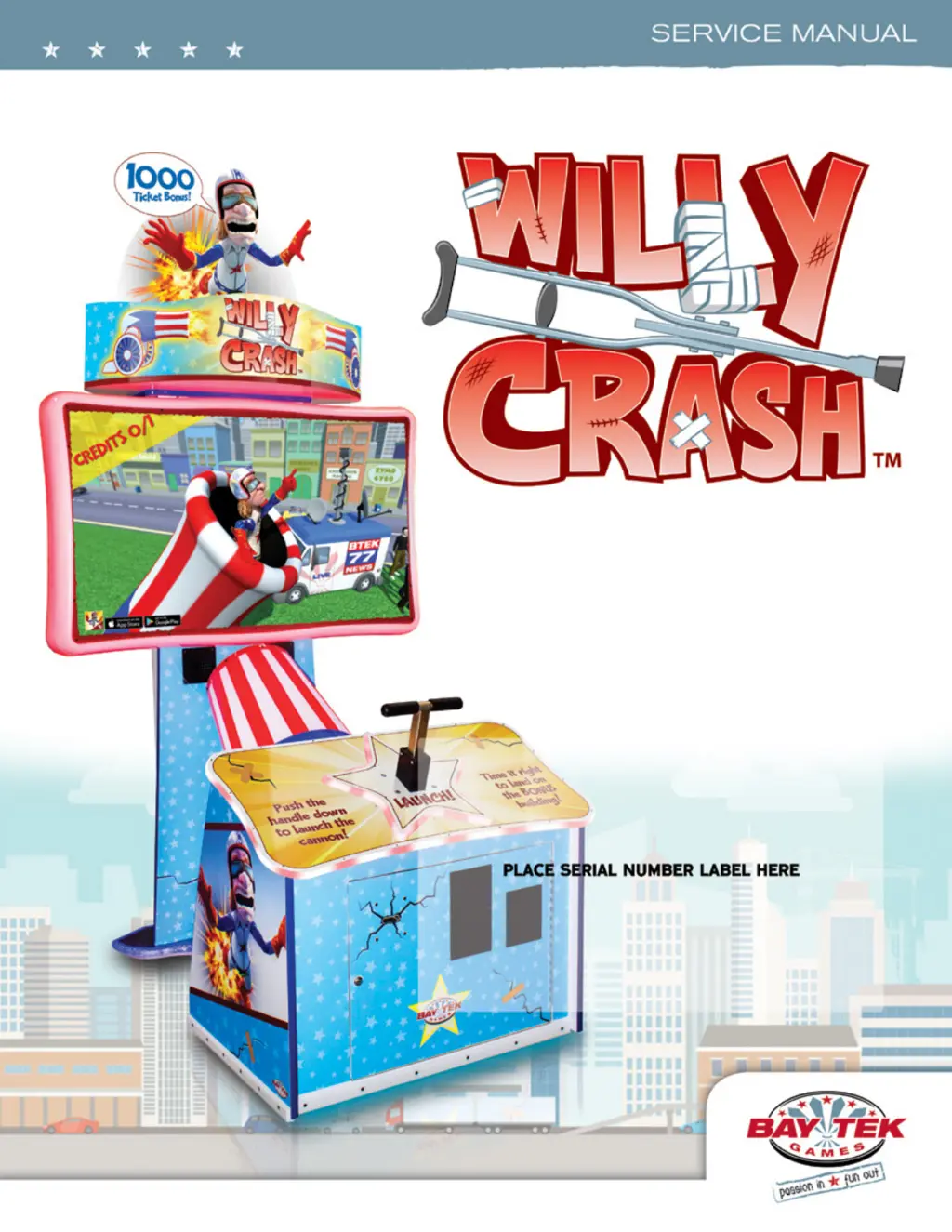
Bay Tek Games Willy Crash - User Manual

Bay Tek Games Willy Crash
37 pages
Print Icon
To Next Page IconTo Next Page
Loading...
1

Questions and Answers

  • C
    Cheryl HuffAug 17, 2025
    What to do if colored LEDs around the monitor do not work on my Bay Tek Games Arcade Game Machines?
    • J
      joseph44Aug 17, 2025
      If the colored LEDs around the monitor of your Bay Tek Games Arcade Game Machine aren't working, start by checking the connection from the Light Board to the LED strips, ensuring continuity. Refer to the 'Light Board Wiring Diagram'. Make sure the A5CORD58 cable is connected to the motherboard USB socket; red and yellow LEDs should be lit. If needed, replace the LED strip AACE8011 or the Light Board (AACB8001). The possible causes are: faulty cable, no USB communication, faulty LED, or a faulty Light Board.
  • T
    Todd FarrellAug 19, 2025
    What to do if floor LEDs do not work on my Bay Tek Games Willy Crash?
    • J
      John SmithAug 19, 2025
      If the floor LEDs on your Bay Tek Games Arcade Game Machine aren't working, check the connection from the Light Board to the LED strips and ensure continuity. Refer to the 'Light Board Wiring Diagram'. Verify that the A5CORD58 cable is connected to the motherboard USB socket; red and yellow LEDs should be on. Try swapping connectors on the board. If necessary, replace the LED strip AACE8010 or the Light Board (AACB8001). Possible causes include a faulty cable, lack of USB communication, a faulty LED, or a faulty Light Board.
  • P
    Patricia JohnsonAug 22, 2025
    What to do if cannon LEDs do not work on my Bay Tek Games Willy Crash Arcade Game Machines?
    • M
      Misty HartmanAug 22, 2025
      If the cannon LEDs on your Bay Tek Games Arcade Game Machine are not working, check the connection from the Light Board to the LED strips, ensuring continuity. Refer to the 'Light Board Wiring Diagram'. Ensure the A5CORD58 cable is connected to the motherboard USB socket; red and yellow LEDs should be on. Try swapping the connectors on the board. Replace the LED strip AACE8026 or AACE8027 if needed. As a last resort, replace the Light Board (AACB8001). Possible causes include a faulty cable, no USB communication, a faulty LED, or a faulty Light Board.
  • M
    Melanie McclainAug 26, 2025
    Why is colored player console lighting not working on my Bay Tek Games Willy Crash Arcade Game Machines?
    • K
      karen92Aug 26, 2025
      If the colored player console lighting on your Bay Tek Games Arcade Game Machine is not working, and all colored cabinet lights are affected, check the Light Board (AACB8001). Verify power to the Light Board from the Power Distribution Board using cable # AACE8016. Also, check the USB cable connection to the Light Board from the motherboard using cable # A5CORD58. Ensure a proper connection from the Light board to the LED strips, checking continuity. Refer to the 'Light Board Wiring Diagram'. Verify 5 volts DC on cable AACE8000 from the Power Distribution board to the end of the AACE8013 cable. Replace the LED (AACE8013 or AACE8012) or the Light Board (AACB8001) if necessary.
  • J
    Jason HayesAug 28, 2025
    Why is the cannon firing all by itself on my Bay Tek Games Willy Crash Arcade Game Machines?
    • B
      Brenda ReedAug 28, 2025
      If your Bay Tek Games Arcade Game Machine cannon is firing by itself, make sure the LED is OFF and the opto beam isn't being blocked by the plunger arm. Clean the emitter and detector on the sensor board. If the issue persists, replace the sensor board with AACB3850A. This usually happens because the Opto Sensor is blocked, dirty, or faulty.
  • J
    James WoodsAug 30, 2025
    What to do if tickets do not dispense or wrong amount dispensed from my Bay Tek Games Willy Crash?
    • R
      rfrazierAug 31, 2025
      If the tickets aren't dispensing correctly from your Bay Tek Games Arcade Game Machine, or the amount dispensed is wrong, blow dust from the sensor and clean it with isopropyl alcohol. Try replacing the dispenser with a working one to see if that isolates the problem, using part A5TD1. Flip the tickets and load them upside-down so the large cut notch faces the opto sensor. Check the connectors from the ticket dispensers to the Newgen board and verify continuity using cables AACE8006. Also, remember that dipswitches affect ticket payout, so refer to the Dip Switch Setting page. If all else fails, replace the I/O Board with AACB9604. The issue might stem from the tickets displayed on the monitor not matching what's coming out of the game.
  • M
    Mark TravisSep 2, 2025
    What to do if I see a low tickets message on my Bay Tek Games Arcade Game Machines?
    • A
      Adam BrooksSep 2, 2025
      If your Bay Tek Games Arcade Game Machine displays a 'Low Tickets' message, first, load tickets into the tray and make sure they hold down the micro switch wire. Check the connectors from the low ticket switch to the I/O board and verify continuity using cable AACE8006. Inspect the switch and replace it if necessary using part AASW200. Also, check the dipswitches on the I/O Board. If the problem continues, replace the I/O Board with AACB9604. This issue can arise if the ticket tray is empty, there's a faulty cable (disconnected, loose, or broken wires), a faulty low ticket switch, or a faulty I/O Board.
  • C
    cboydSep 5, 2025
    How to fix the plunger if it does not fire the cannon on my Bay Tek Games Willy Crash Arcade Game Machines?
    • L
      lmorrisSep 5, 2025
      If the plunger on your Bay Tek Games Arcade Game Machine isn't firing the cannon, make sure the arm is breaking the beam; the LED on the board should light up when the beam is blocked. Check the connections from the opto sensor to the I/O board using Cable # AACE8002 and AACB3850A. The button should switch to ON when pressed. If not, replace the sensor with AACB3850A.
  • S
    stephaniefrancisSep 8, 2025
    How to fix inside LED cabinet lighting that is not working on my Bay Tek Games Willy Crash Arcade Game Machines?
    • C
      Christopher HardinSep 8, 2025
      If the inside LED cabinet lighting on your Bay Tek Games Arcade Game Machine is not working, check for a proper connection from the power supply to the Power Distribution Board, and then to the LED strips. Verify continuity using parts AACE8025, AACE8017, AACB5156, and AAPS1013-PTL. Refer to the 'AC In, Power Supply Wiring Diagram section'.
  • B
    Barbara JoyceSep 12, 2025
    What to do if monitor is not working on my Bay Tek Games Willy Crash Arcade Game Machines?
    • K
      Kyle LamSep 12, 2025
      If the monitor on your Bay Tek Games Arcade Game Machine isn't working, power down the system, wait 5 minutes, and then power it up again. Possible causes include: the monitor HDMI cable being unplugged from the video card (the game won't boot if disconnected), faulty or loose RAM on the motherboard AAMB10-HD, a large power connector unplugged on the motherboard, a small power connector unplugged on the motherboard, a faulty power supply (refer to the Power Supply diagnostic section), a faulty Graphics Card (replace with A5CB8000), or a faulty motherboard (replace with AAMB10-HD).

Summary

Bay Tek Games: Factory Contact Information

Willy Crash: How to Play

Willy Crash: Game Specifications

Willy Crash: Safety Precautions

Important safety notices, dangers, warnings, and cautions for operating the game.

Willy Crash: DIP Switch Settings

DIP Switch Function Descriptions

Details the function of each dip switch for game configuration.

Willy Crash: Game Setup Guide

Willy Crash: Main Menu Functions

Willy Crash: Game Settings

Willy Crash: Payout Settings

Willy Crash: Game Diagnostics

Willy Crash: Circuit Board Layout

Willy Crash: Wiring Diagram (Coin Mech, Menu, Counter)

Willy Crash: Wiring Diagram (Speakers, Motherboard Comm.)

Willy Crash: Wiring Diagram (Sensors, LEDs)

Willy Crash: Wiring Diagram (AC In, Power Supply)

Power Supply Connections

Details AC power input, power distribution board, and output to components.

Willy Crash: Troubleshooting (Power, Bill Acceptor)

Troubleshooting Power Issues

Addresses problems like no power or only the Bill Acceptor being on.

Troubleshooting Bill Acceptor Functionality

Solutions for when the Dollar Bill Acceptor is not functioning correctly.

Willy Crash: Troubleshooting (Game Functionality)

Troubleshooting Game Coin-Up and Sound

Solutions for when the game doesn't coin up or has no sound.

Willy Crash: Troubleshooting (LED Lighting)

Willy Crash: Troubleshooting (Tickets, Plunger)

Troubleshooting Ticket Dispensing

Solutions for tickets not dispensing or dispensing the wrong amount.

Willy Crash: Troubleshooting (Monitor, I;O Board)

Troubleshooting Monitor Not Working

Solutions for monitor showing 'No Signal' or blank screen.

Willy Crash: Power Supply Diagnostics

Verifying AC Power and Connections

Steps to verify AC power, connections, and switch settings for the power supply.

Willy Crash: Bill Acceptor Diagnostics

Willy Crash: Parts List

Component Part Numbers

Detailed list of all game components and their corresponding part numbers.

Willy Crash: Technical Support

Willy Crash: Warranty

Bay Tek Games Willy Crash Specifications

General IconGeneral
BrandBay Tek Games
ModelWilly Crash
CategoryArcade Game Machines
LanguageEnglish

Related product manuals