EN | UltraQ | Operating instructions EN | UltraQ | Operating instructions
09 USING THE MOBILE APP
Search for „BBQ Guru“ in the Google Play or Apple
Store and install the BBQ Guru app. Once the
installation is complete, open the app and follow
the instructions to set this up. You will be prompted
to give your controller a name of your choice to
distinguish it from other controllers.
1. On the main screen, touch the corresponding tem-
perature values to set the desired cooking chamber
and food temperatures. The default temperature
for the cooking chamber is 120 ° C , the default
temperature for food is 85 ° C . As long as the
controller is within Bluetooth range, the application
always displays the desired target temperature be-
low the actual temperature value. The temperature
can be switched between ° C and ° F in the menu
settings.
STEP 1
Monitoring and adjustment of
the temperature
1. This function allows the set temperature to be qui-
ckly recovered after the lid has been opened. The
„open lid“ detection is set to ON by default. When
the lid is opened, the temperature drops, which can
cause the fan to overheat the coals. The controller
detects when the lid or door is open. In this case, it
minimises the power of the fan.
NOTE: When the lid or the door of the grill are opened
and closed, there is always a certain overshooting of
the temperature.
To deactivate this function, switch off Open Lid in the
controller settings in the menu.
STEP 2 “OpenLid” Function
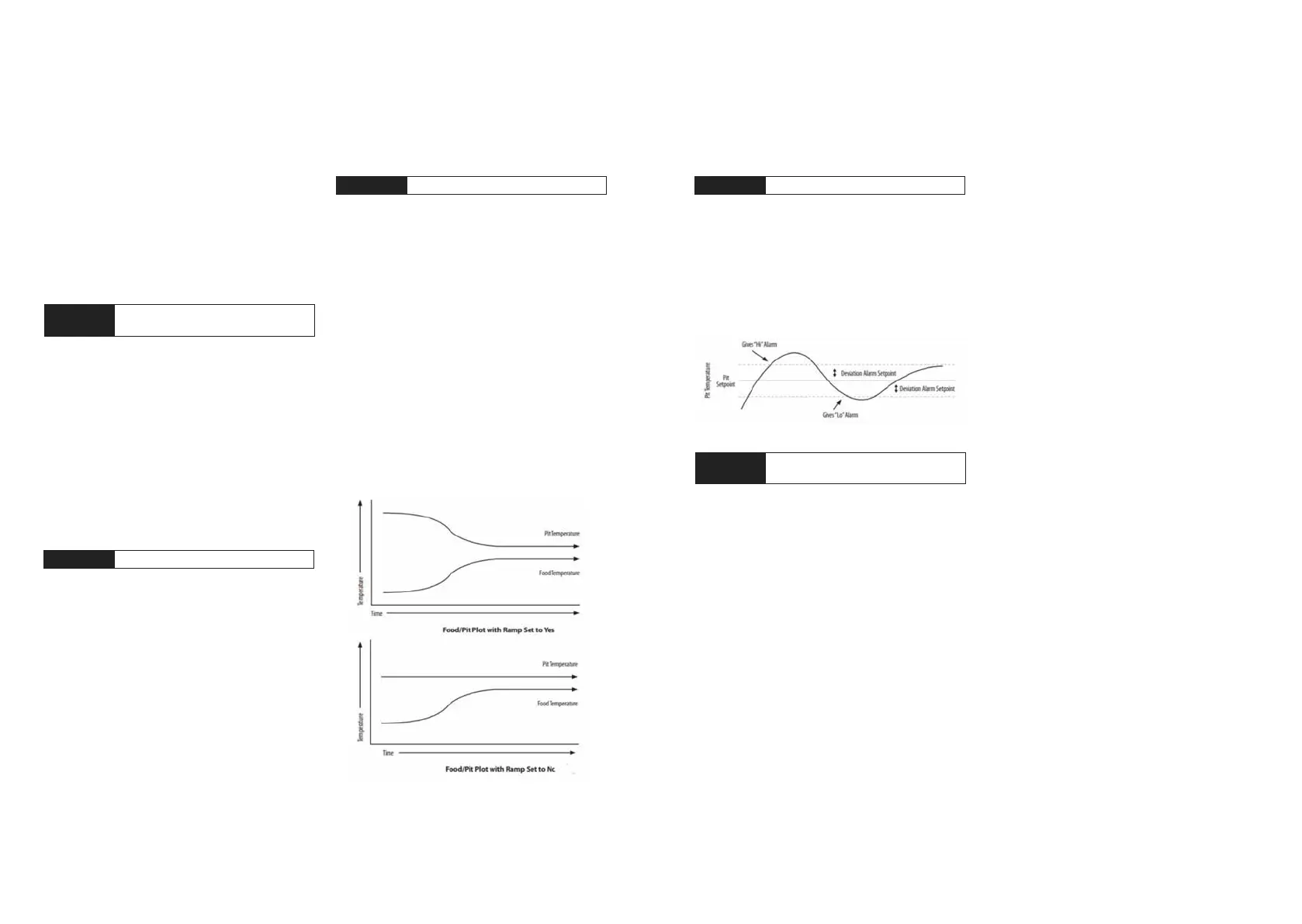
1. When the „RampMODE“ is activated, the aim is to
prevent overcooking of food. This function lowers
the cooking chamber temperature
TIP: For the „RampMODE“ to work properly, the set
point for the cooking chamber temperature must be
more than 1 ° C above the desired core temperature
of the food.
The factory setting is „RampOFF“, so this must be
activated to use it. By selecting the specic food
temperature probe from which the „RampMODE“
should work, the function can be selected.
NOTE: The „RampMODE“ can be based on one of
the 3 food temperature probes. If a probe is not
connected, the „RampMODE“ will not start.
1. If the temperature of the grill changes by a point
set to alert you of this, an alarm is displayed in
the application. The alarm deviation is adjustable.
Change the alarm deviation from the user settings
in the menu.
STEP 4 Alarm
UltraQ‘s adaptive cook control strategy is designed to
work with a variety of grills by continuously learning
how the grill operates. To adapt to many factors,
including ambient temperature, amount of charcoal,
damper settings and more. For the UltraQ to work
properly and determine how to adjust, the grill needs a
constant temperature. Lid or door must remain closed.
If the lid or door is opened frequently, especially at
start-up, the control will not be able to maintain the set
point.
If the lid remains closed for about 10 to 20 minutes,
the temperature should become stable after the cont-
roller has settled. If the lid remains closed for at least
20 to 30 minutes and the temperature still rises and
falls considerably (± 10 ° C or more), the fan damper
needs to be closed more.
NOTE: The grill may run up or down a few
degrees due to various conditions, the control
will bring it back to set point. Grill temperatures
of 1-2 ° C +- rarely affect the quality of food.
The Smart Cook function allows you to change
the adaptive algorithm to your specic grill with
3 preset options.
1. Smart Cook Setting 1: Standard setting. This
setting is ideal for small and medium grills (thin-
walled), traditional Weber water smokers and small
smokers. This version of the algorithm is the most
popular for typical grills and uses average values.
2. Smart Cook Setting 2: This setting is ideal for
insulated grills that are very ecient, such as
the Monolith Kamado, other ceramic grills or the
Weber Summit. Here, the fan operates at 100 %
for less time.
3. Smart Cook Setting 3: This setting is ideal for
noninsulated grills or grills with multiple cooking
chambers (large smokers) that are less tempera-
ture stable. Weber Smokey Mountain or ordinary
horizontal smokers. Setting 3 allows the fan to
operate at 100% for longer, To change the Smart
Cook function, select option 1, 2 or 3 from the user
settings in the menu.
4. Smart Cook Setting 4: This is a customisable
setting to adjust the algorithm for specic situa-
tions. When this option is selected, the app will
prompt you to enter a cycle time between 5 and 12
seconds and a range (proportional band) between
0°C and 10°C. The Smart Cook function can be
changed via the controller settings in the menu.
STEP 5
Adaptive Smart Cook
function
STEP 3 RampMODE –bbq guru


 To Next Page
 Loading...