EN | UltraQ | Operating instructions EN | UltraQ | Operating instructions
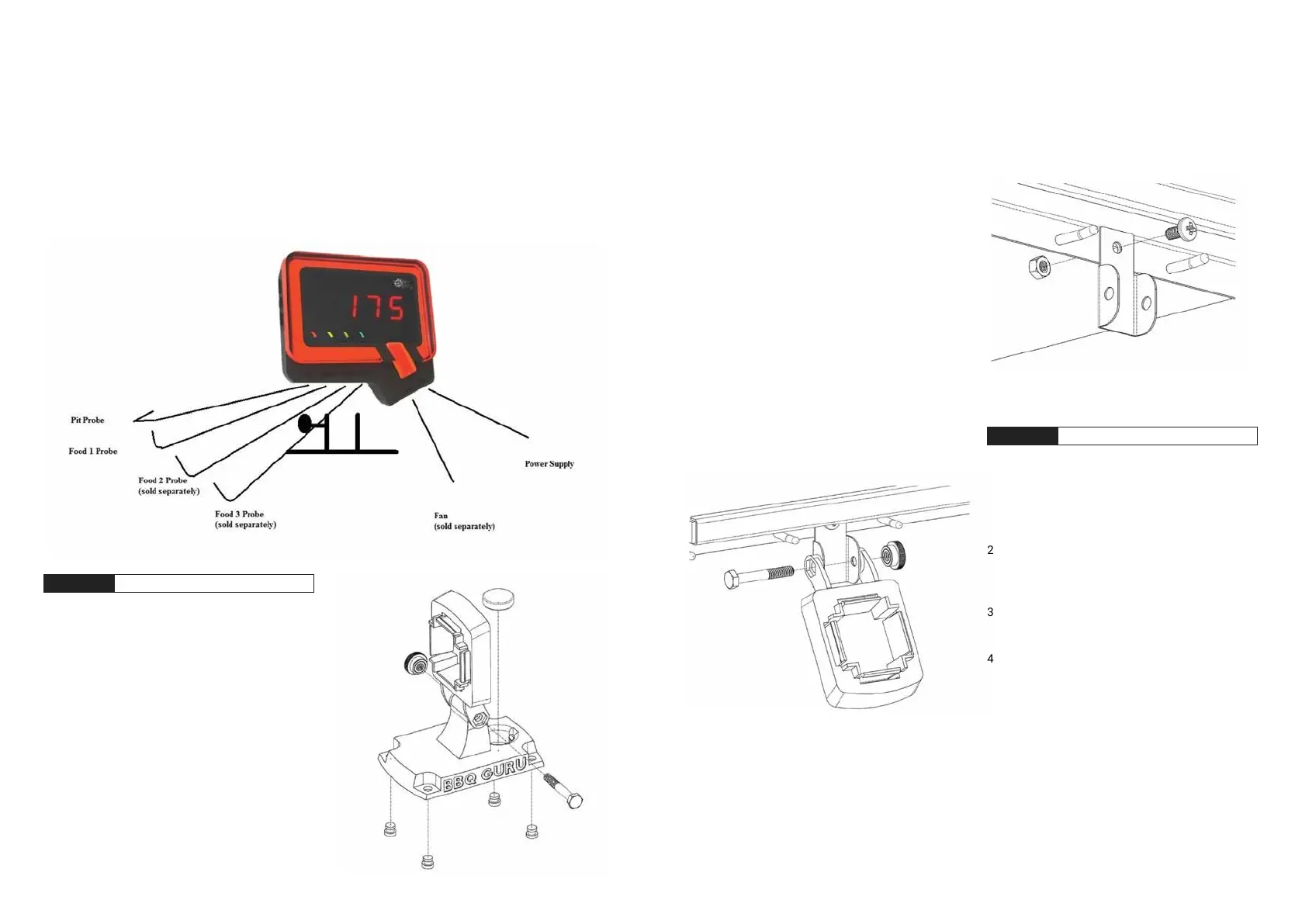
The UltraQ should be placed in a stable position in the
holder. The controller can be rotated in any direction
andby tightening the twist nut. The control unit must
be protected from the weather!
05 5-IN-1 CONTROLLER MOUNT
STEP 1 Mounting the Holder
1. Secure the lower stand platform to the upper
control bracket using the hexagonal bolt and twist
nut provided.
2. From the bottom of the lower stand platform, press
the rubber feet into the holes to prevent the stand
from slipping.
3. Engage the controller in the upper control bracket.
4. Turn the upper control bracket to the desired angle
and tighten the twist nut to hold the bracket in the
selected position.
NOTE: The additional bracket required to attach the
control to the side table is only included with the
Monolith grill in the rack.
This assembly requires a Phillips screw, hex nut and
the upper control bracket from the 5-in-1 magnetic
bracket, hex screw and twist nut supplied with the
control.
1. Attach the sheet metal holder to the left-hand side
shelf by inserting the Phillips screw through the
existing hole in the lower side table rail and tighten
the nut provided.
2. Attach the upper control bracket to the sheet metal
bracket with the hexagon screw and twist nut from
the 5-in-1 magnetic bracket.
3. Engage the controller with the Q-tail diagonally to
the right on the upper control bracket.
4. Tilt the upper control bracket to the desired angle
and tighten the twist nut on the hexagon screw to
hold the bracket in the selected position.
STEP 2
Mounting on a MONOLITH GRILL
*Attachment only included in the BBQ Guru Edition.


 To Next Page