ENGLISH
1716
Operating Instructions
Isolating multiple victims: Complexmultipleburialsarerarein
recreational settings and usually can be treated as a series of single burials
performed in normal search mode. The only time multiple burials can
becometrulycomplexiswhenit’snotpossibletoturnotherstvictim’s
transceiver,whenthevictimsareincloseproximity(≤10m)toeachother,
or if there are three or more victims.
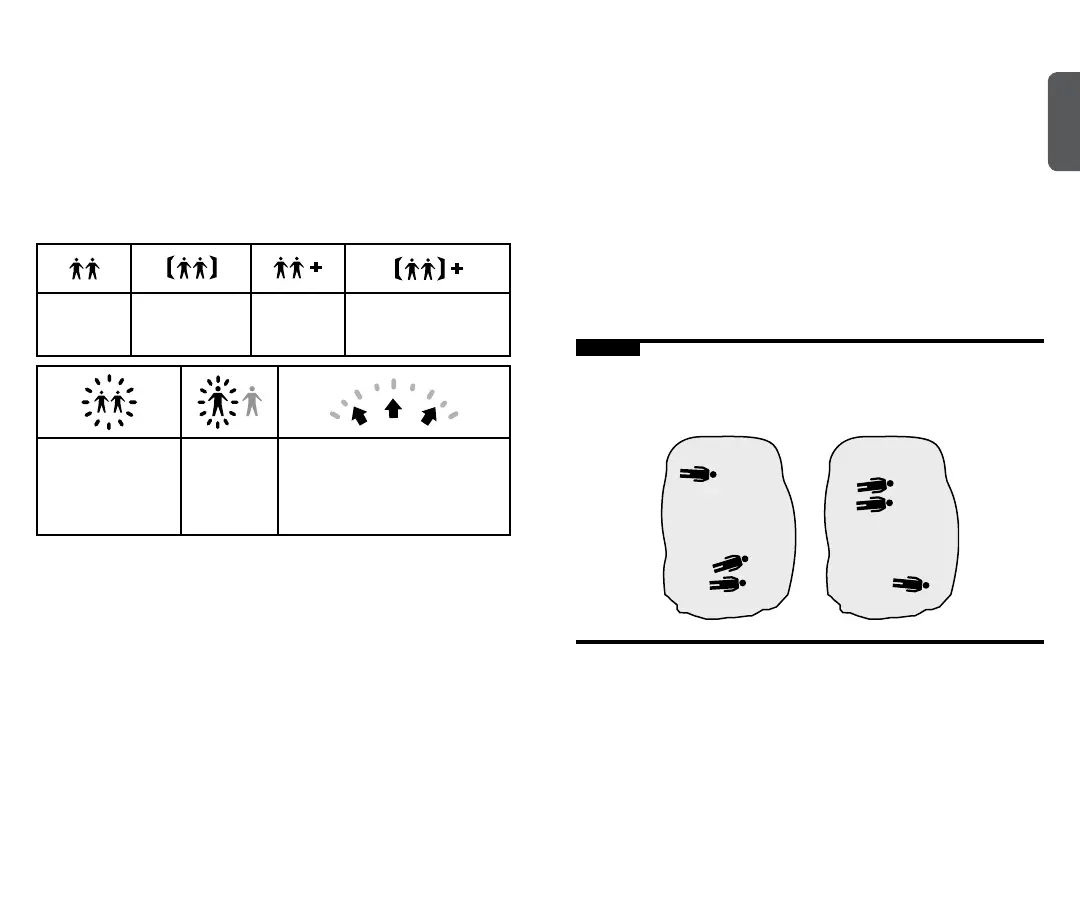
The following icons help to determine how many buried victims are within
rangeoftherescuerandwhethertheyareincloseproximitytoeachother:
More than
one signal
within range.
Two victims both
withinsixmeters
of the searcher.
More than
two signals
within range.
More than two signals
within range and at least
twowithinsixmeters.
Bothvictimsashing
atthesametime:
Not enough data
for suppression.
Both victims
ashing
alternatively:
Signal
suppression.
Three middle directional arrows
areashingwhileinsuppression:
Overlapping signals.
Keep moving in the direction
you’ve been traveling.
Ifit’snotpossibletoturnoavictim’stransceiver,useSignalSuppression
tondthenextclosestvictim.Pressandimmediatelyreleasethe
Optionsbutton(6).“SS”willbeshowninthedisplayandtheiconsinthe
multipleburialindicatorwillashbackandforth.Followthedistanceand
directiontothenextvictim.Rememberthattherstvictim’ssignalwillbe
suppressed for one minute, at which time the icons in the multiple burial
indicatorwillstopashing.Togobacktonormalsearchmodebeforeone
minute has elapsed, simply press the Options button.
It is important to note that Signal Suppression, marking, and other
formsofsignalisolationarenot100percentreliable,especiallywhen
searching for older analog transceivers. This is due to the possibility
of overlapping signals, especially when more than two transmit signals
are within range. Due to their imprecise transmit signals, analog
transceivers can sometimes trigger multiple burial indications. For these
reasons, it’s important to learn some of the backup techniques described
at www.backcountryaccess.com/tracker-resources.
Operating Instructions
Using Big Picture Mode: Big Picture mode is a valuable feature that can
beusedtogainanoverviewofthescenarioandoptimizetheeciency
of your search. It can be used at the beginning of a scenario to assign
rescuers to each displayed signal. It is also valuable in situations involving
more than two signals within range.
Remember,Tracker S suppresses only one signal at a time. When you
suppressasecondsignal,itwillthenshowyouthenextclosestsignal–
evenifthatvictim’ssignalwassuppressedearlier.Ifvictim#3iscloser
tovictim#2thanvictim#1(scenarioA,below),thensuppressingvictim
#2’ssignalwilltakeyoutovictim#3automatically.However,ifvictim#1is
closerthanvictim#3,(scenarioB),Tracker S will bring you back to victim
#1.Ifthisisthecase,useBigPicturemodetondthegeneraldirectionto
the third signal. After moving closer to the third signal, release the Options
button and Tracker S will automatically isolate that third signal.
Figure K
TrackerSsuppressesonesignalatatime.Whensuppressingvictim#2’s
signal,ifvictim#3isfurtherawayfromvictim#2than#1(scenarioB),then
useBigPicturemodetomovetoward#3.
Scenario A
#1
#1
#2
#2
#3
#3
Scenario B


 To Next Page