MX945GME
Mainboard
Back Panel
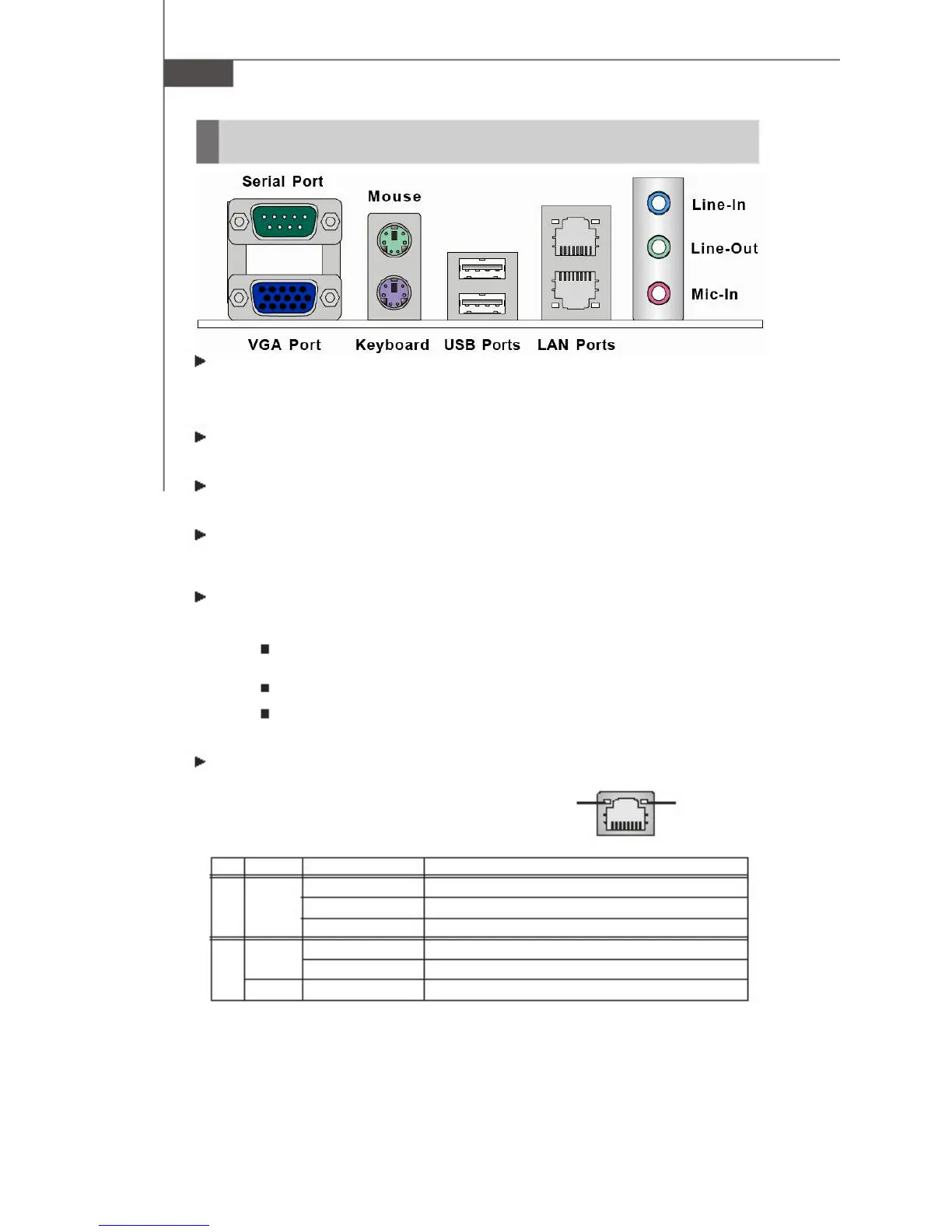
Serial Port
Mouse
LAN Port
Line-In
Line-Out
Mic-In
VGA Port
Keyboard USB Ports LAN Ports
Serial Port Connector
The serial port is a 16550A high speed communica-
tions port that sends/ receives 16 bytes FIFOs. You
can attach a serial mouse or other serial devices
directly to the connector.
VGA Connector
The DB15-pin female connector is provided for VGA
monitors.
The standard PS/2® mouse/keyboard DIN connector is for
a PS/2® mouse/keyboard.
Mouse/Keyboard Connector
USB Connectors
The OHCI (Open Host Controller Interface) Universal
Serial Bus root is for attaching USB devices such as
keyboard, mouse, or other USB-compatible devices.
Audio
Port Connectors
These audio connectors are used for audio devices.
You can differentiate the color of the audio jacks
for different audio sound effects.
Blue audio jack - Line In is used for external CD player,
tapeplayer or other audio devices.
Green audio jack - Line Out, is a connec-
tor for speakers or headphones.
Pink audio jack - Mic In, is a connector for
microphones.
LAN (RJ-45) Jack
The standard RJ-45 jack is
For connection to single
Local Area Network (LAN).
You can connect a network
cable to it.
LED Color LED State
Off
Left
Orange On (steady state)
Link Indicator
Condition
LAN link is not established.
LAN link is established.
On (brighter & pulsing) The computer is communicating with another computer on the LAN.
Green
Right
Orange
Off
On
On
10 Mbit/sec data rate is selected.
100 Mbit/sec data rate is selected.
1000 Mbit/sec data rate is selected.
2-8



 To Next Page