6 | BDIUSA.COM CORRIDOR 6521
STEP 1. ATTACH THE BASE
STEP 1. ATTACH THE BASE
ASSEMBLY
ASSEMBLY
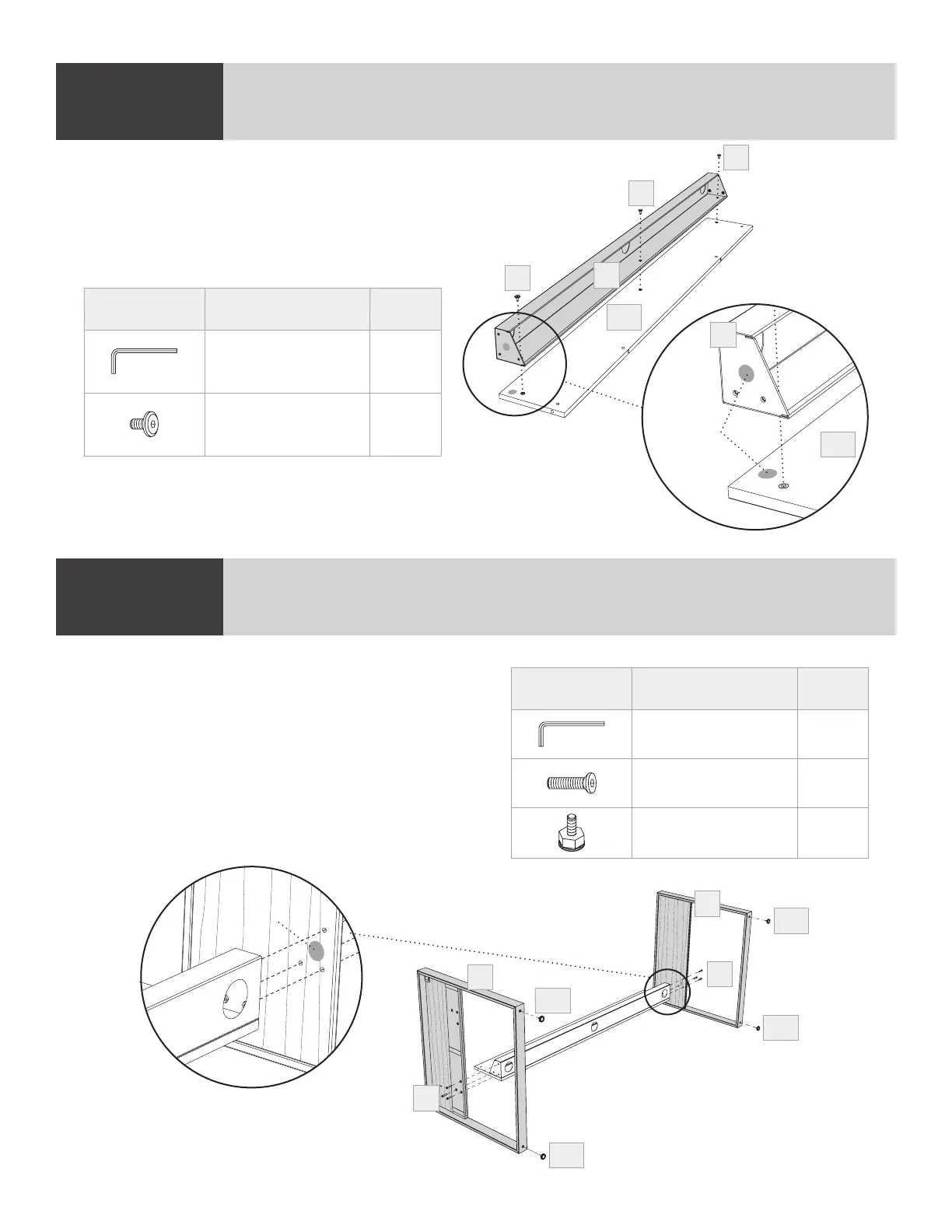
STEP 1. ATTACH WIRE MANAGEMENT TROUGH
STEP2. INSTALL LEGS & LEVELERS
ASSEMBLY
ASSEMBLY
Aligning the colored dots on the same side, attach
(A4) Wire Management Trough to (C10) Modesty
Panel using (H1) Screw and (T1) Hex Wrench.
NOTE: Keep screws loose until Step 6.
Match colored dot on (A3) Right Leg with colored
dot on Modesty Panel Assembly and attach using
(H5) Screws and (T1) Hex Wrench.
NOTE: Keep screws loose until Step 4.
Repeat to attach (A2) Left Leg to Modesty Panel
Assembly. Install (H13) Levelers to the bottom of
(A2 & A3) Legs. With the help of another person,
turn desk upright onto its base.
PART/DESCRIPTION QTY
T1-HEX WRENCH 1
H1-SCREW 3
PART/DESCRIPTION QTY
T1-HEX WRENCH 1
H5-SCREW 6
H13-LEVELER 4
A4
H1
H1
H1
C10
Colored
dots
A4
C10
A2
A3
H13
H13
H13
H13
H5
H5
Colored
dot


 To Next Page