22
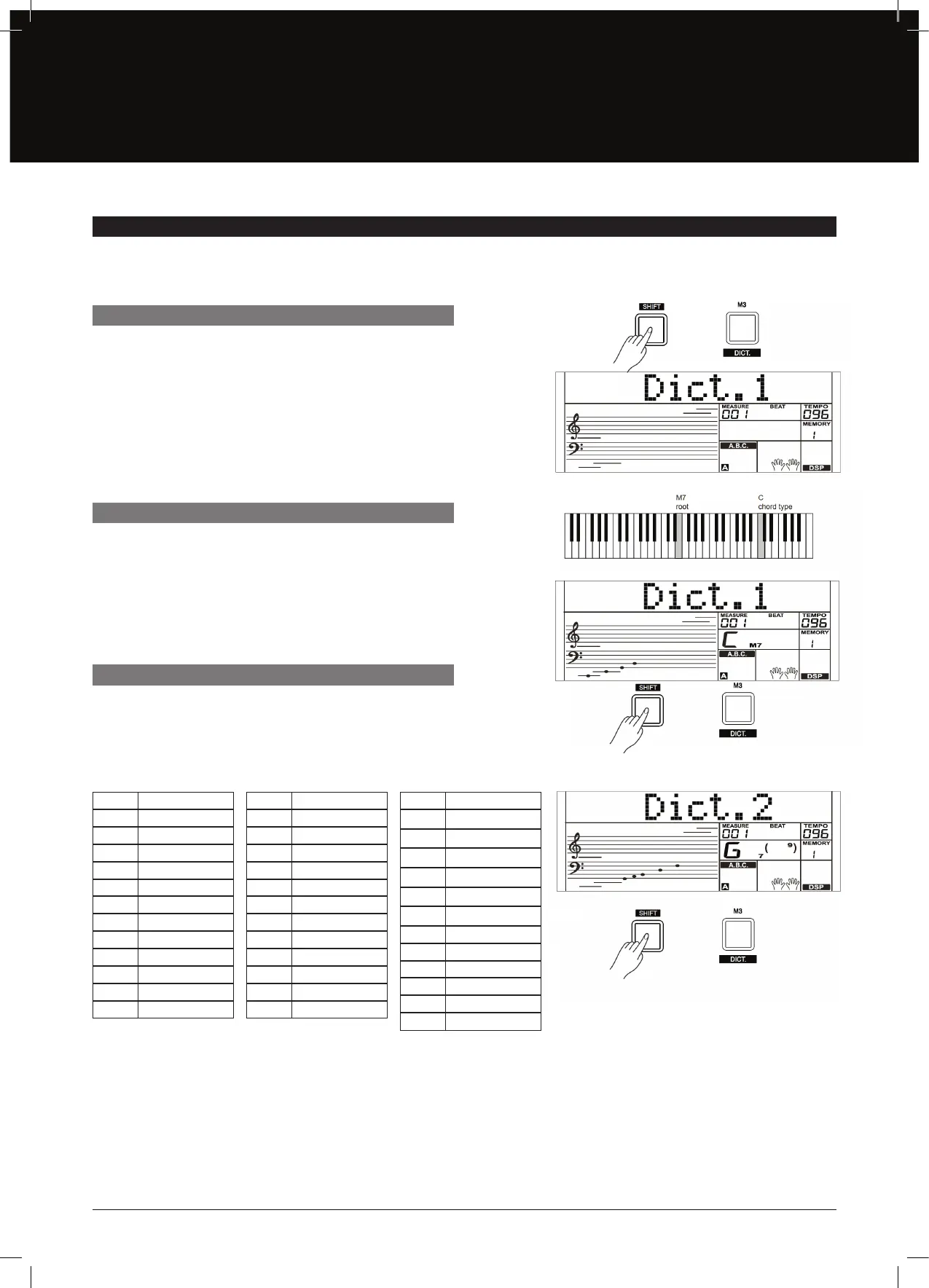
Press and hold the [SHIFT] button and then press the [DICT.]
button to enter the DICT 1 Mode. The LCD will display “Dict.1”, and
the A.B.C. is automatically switched on. In DICT 1 Mode, the keys
C4–B5 are used to assign the Chord Type, the keys C6–B6 are used
to assign the Chord Root. When the Chord Type and Chord Root
are conrmed, the chord notes will be displayed on LCD. You will
hear a prompt sound if you correctly play the note in the left hand
section.
In DICT 2 Mode, press and hold the [SHIFT] button and then press
the [DICT.] button again to turn o the Chord Dictionary.
24 Chord Types in the chord dictionary are as follows:
In DICT 1 Mode, press and hold the [SHIFT] button and then press
the [DICT.] button to enter the DICT 2 Mode. In DICT 2 Mode, you
can have a chord test. The LCD will display a chord name in a
random order. If the chord fails to be played in 3 seconds, its notes
will appear on the LCD. Once the chord is played correctly, a new
chord name will appear after a few seconds.
CHORD DICTIONARY
DICT 1 (CHORD LEARNING MODE)
EXIT CHORD DICTIONARY
DICT 2 (CHORD TESTING MODE)
If you know the name of a chord but don’t know how to play it, you can use the Chord Dictionary function. You can learn the chord and
test in this feature.
NOTE CHORD ROOT
C6 C
C#6 C#/Db
D6 D
Eb6 Eb/D#
E6 E
F6 F
F#6 F#/Gb
G6 G
Ab6 Ab/G#
A6 A
Bb6 Bb/A#
B6 B
NOTE CHORD TYPE
C4 M
C#4 M(9)
D4 6
Eb4 mM7
E4 M7
F4 m
F#4 m(9)
G4 m6
Ab4 m7(9)
A4 m7
Bb4 m7b5
B4 7
NOTE CHORD TYPE
C5 7(b9)
C#5 7(9)
D5 7(#9)
Eb5 7(b13)
E5 7(13)
F5 7(#11)
F#5 dim7
G5 dim
Ab5 7aug
A5 aug
Bb5 7sus4
B5 sus4


 To Next Page