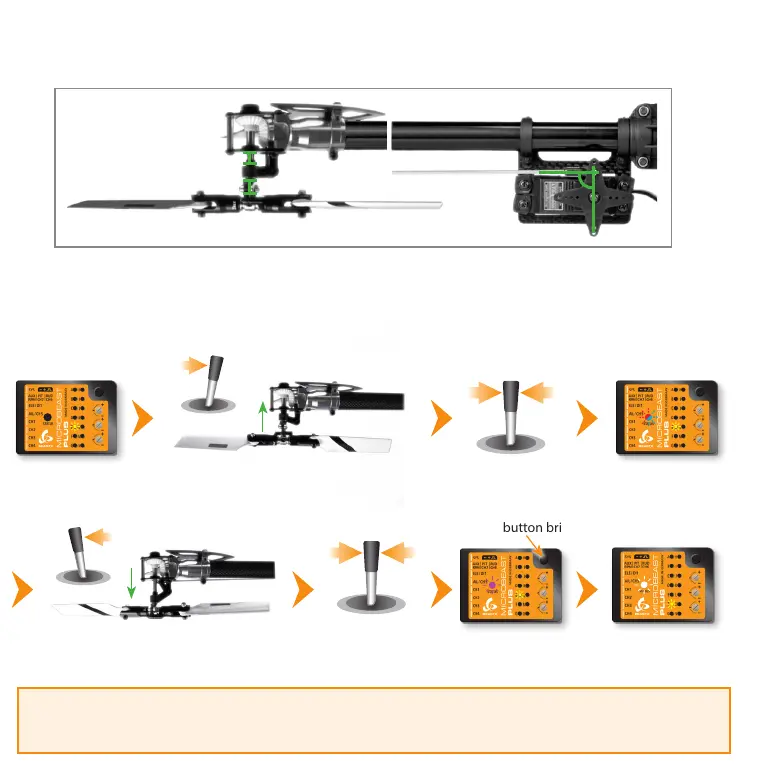
Menu LED E solid
Status LED off
Use rudder stick to move the servo to
the maximum allowed deflection
Release rudder stick
Status LED
blue or red
Use rudder stick to move the servo to the
minimum allowed deflection
Release rudder stick
Status LED
purple
Press button briefly
Menu LED F solid
(= Menu point F)
Setup menu point E - Rudder servo limit
Plug the rudder servo connector into CH4 output of MICROBEAST PLUS. Put the servo arm on the servo so that it forms roughly
an angle of 90 degrees with the rudder linkage rod and adjust the length of the linkage rod as described in the helicopter
manual.
When moving the rudder stick check if the servo is moved into the correct direction so that the helicopter will be moved
correctly in flight. If this is not the case use the servo reverse function of your transmitter and reverse the channel output that
controls the rudder function.
Push and hold the rudder stick into one direction to move the rudder servo and release the stick when the servo reaches the
maximum or mimimum allowed servo throw. Using the rudder stick you can reposition the servo at any time to adjust the
exact servo limit. If you do not touch the rudder stick for several seconds the current servo position will be saved as maximum
or minimum (the Status LED will flash and then light up solid in blue or red color). Then move the servo to the opposite
direction and wait until also this position gets stored (Status LED becomes purple).



 To Next Page