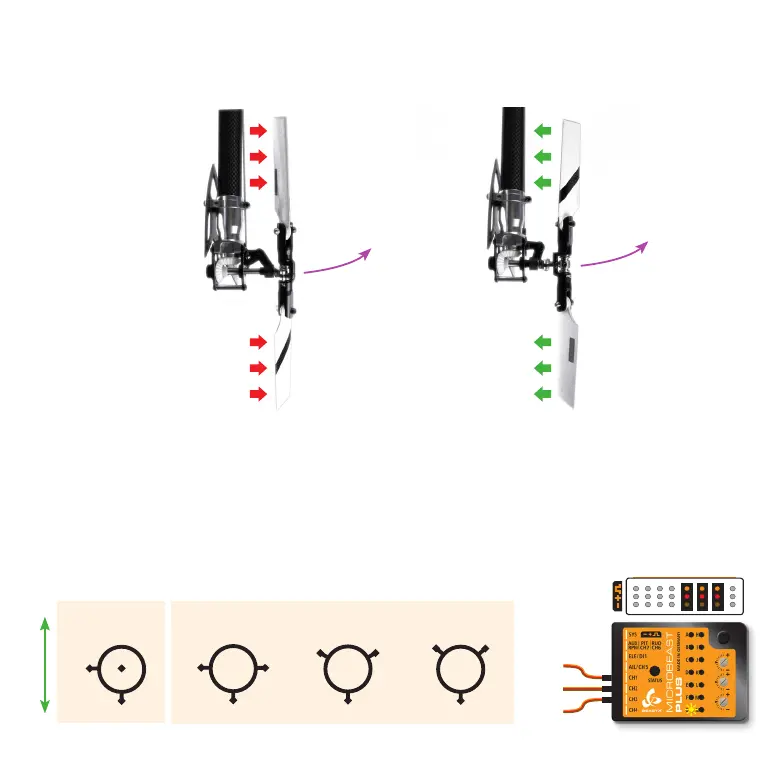
Setup menu point F - Tail gyro direction
Lift the helicopter at the rotorhead and turn it on the vertical axis by hand. Observe in which direction the rudder servo moves
the tail rotor when turning the heli. The tail rotor must produce thrust against the direction of movement so that the rotation
will be stopped by the gyro in flight. For example if you move the helicopter‘s nose to the left the gyro must steer to the right similar as
you would move the rudder stick to the right manually.
Wrong
Correct
Turning heli
to the left
Turning heli
to the left
Gyro steers
left
Gyro steers
to the
right
Note: These pictures are only exemplary. Check your helicopter‘s manual to find out which direction your tail rotor has to move.
If necessary reverse the tail gyro direction by briefly pushing the rudder stick into one direction at menu point F (Status LED
color will change). When finished briefly push the button to proceed with setting up menu point G.
Setup menu point G - Swashplate servo trim
Plug all three swashplate servos to the outputs marked with CH1 to CH3 in the order as shown below. Then put the servo arms
on the servos so that they form roughly an angle of 90 degrees with the linkage rods.
CH1
CH
120°
CH1
CH2CH3
140°
CH1
CH2CH3
Flight direction
90°
CH1
CH H3
2C
2C
H3CH
mechanical
swash mixing
eCCPM
Servo 1
Elevator
Servo 2
Aileron
Servo 3
Pitch/Aileron
top



 To Next Page