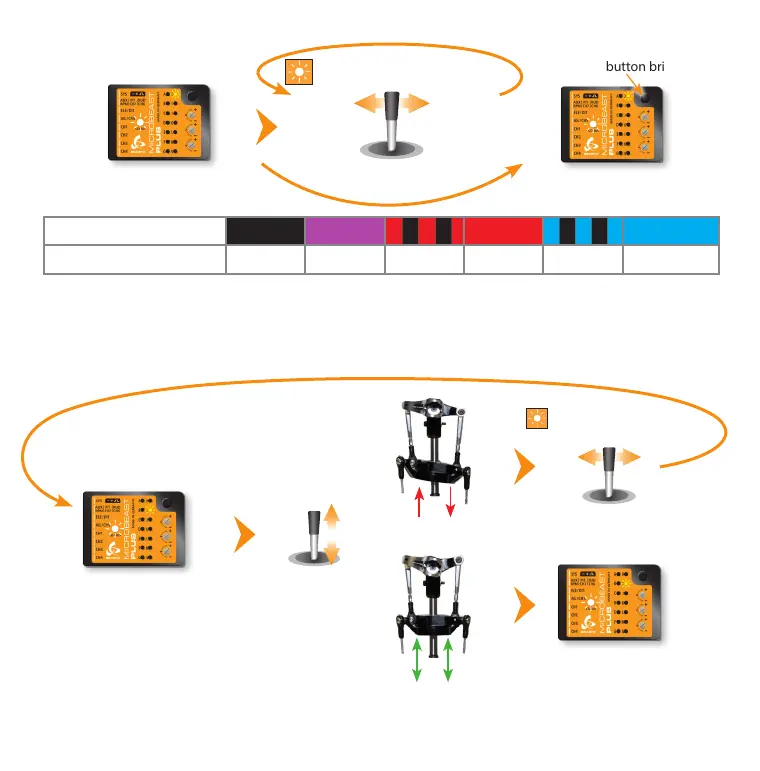
Setup menu point I - Swashplate servo directions
Only move the thrust stick and check if all servos push the swashplate up and down simultaneously. If this is not the case move
the rudder stick into one direction once to switch to the next servo conguration and try again. Repeat this until the servos
move the swashplate correctly. There are four possible congurations and only one will be correct.
Press button briey
Status LED changes color/state
(= changing mixing type)
Move rudder stick
left or right
Status LED shows currently
selected mixing type
Status LED
o purple ashing red red ashing blue blue
H Swashplate mixing type
User dened mechanical 90° 120° 140° 135°/140° (1:1)
Setup menu point H - Swashplate mixing type
Status LED shows currently
selected mixing type
Status LED shows currently
selected servo conguration
Move thrust stick
up and down
Status LED changes color/state
(= changing servo combination)
Move rudder stick
left or right
Now also check if the sticks are moving the swashplate in the correct directions. If one or more directions are wrong use the
servo reverse function of your transmitter to reverse the channel output for the channel which controls the specic function.
Do not use the servo reverse function of MICROBEAST PLUS to change stick directions!
When the swashplate can be controlled as expected briey push the button to skip to menu point J.
Status LED shows currently
selected servo conguration



 To Next Page