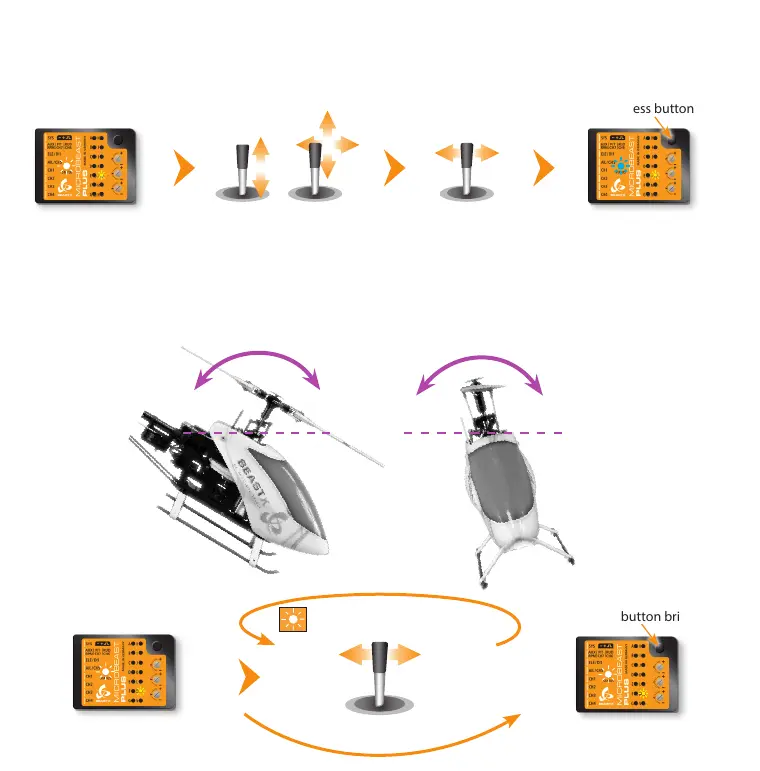
Setup menu point M - Swashplate gyro directions
Lift the helicopter at the rotor head and tilt it by hand forwards and sideways. Watch how the gyro is correcting the swashplate.
The system has to steer against the movement of the helicopter keeping the swashplate level. If the swashplate tilts into
the direction of movement you have to reverse the compensation direction for this axis.
Menu LED L solid
Status LED shows the
amount of limiting
Move thrust, aileron and
elevator sticks carefully to
maximum deection!
Press button briey
Move rudder stick to adjust
the servo limit
Status LED should be
solid blue
(See instruction manual
for further details)
Setup menu point L - Swashplate servo limit
You can remove the pitch gauge now! Simultaneously move the sticks for thrust, aileron and elevator to the maximum
deection and check if the servos, swashplate or linkages get jammed in a certain position. By pushing and holding the
rudder stick left or right you can increase or decrease the limit for the servos! Adjust the limit so that the servos just don‘t get
jammed in any possible stick position but don‘t limit the servos more than necessary.
Status LED shows current
swashplate gyro directions
Press button briey
Status LED changes color
(= changing gyro direction)
Move rudder stick
left or right
Status LED shows current
swashplate gyro directions



 To Next Page