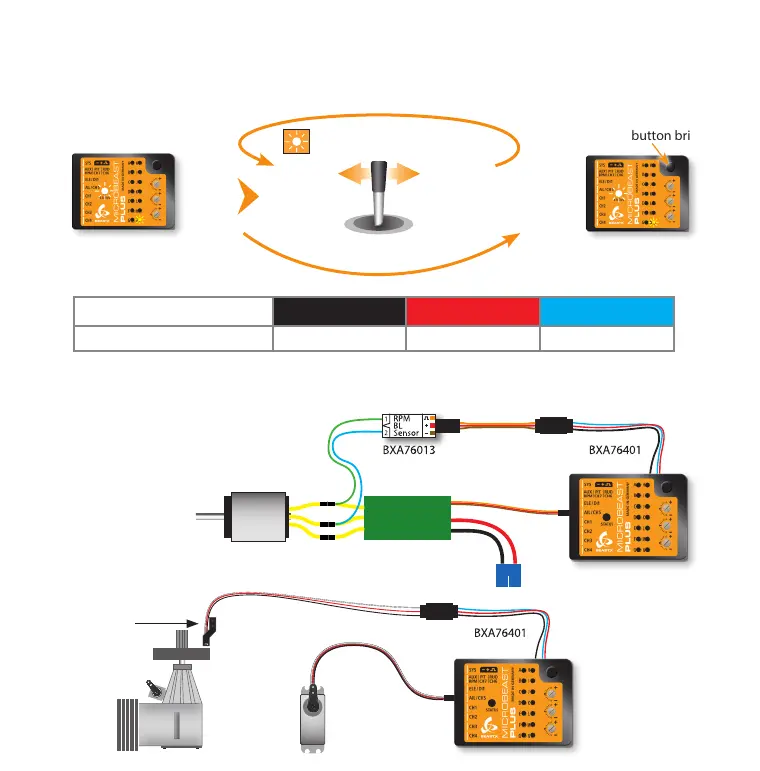
When you‘re using the RPM Governor of MICROBEAST PLUS now connect the RPM sensor (i. e. magnetical, optical or brushless
phase sensor) or the wire for RPM signal of your ESC to the white sensorport on the long side. For this you may need the
optional available BXA76401 adapter.
Setup menu point N - Internal RPM Governor
This menu point is only accessible if you‘re not using a Standard type receiver! Otherwise pressing the button at menu point
M will exit the menu and lead back to operation mode.
Enable the internal RPM Governor function by choosing the type of drive system of your helicopter. If you‘re using the governor
function of the ESC or an external governor or if you want to y without headspeed governing at all, select „Governor o“.
Status LED shows current RPM
Governor mode
Press button briey
Status LED changes color
(= changing RPM Governor mode)
Move rudder stick
left or right
Status LED shows current RPM
Governor mode
Status LED o red blue
N Internal RPM Governor
Governor o* electric heli nitro/gas heli
ESC
Speed controller
connected to CH5
Throttle servo
connected to CH5
Magnetical sensor
mounted close to
clutch bell of motor



 To Next Page