117
TELEPHONE MODE >>>
> D
> GB
> F
> I
> PL
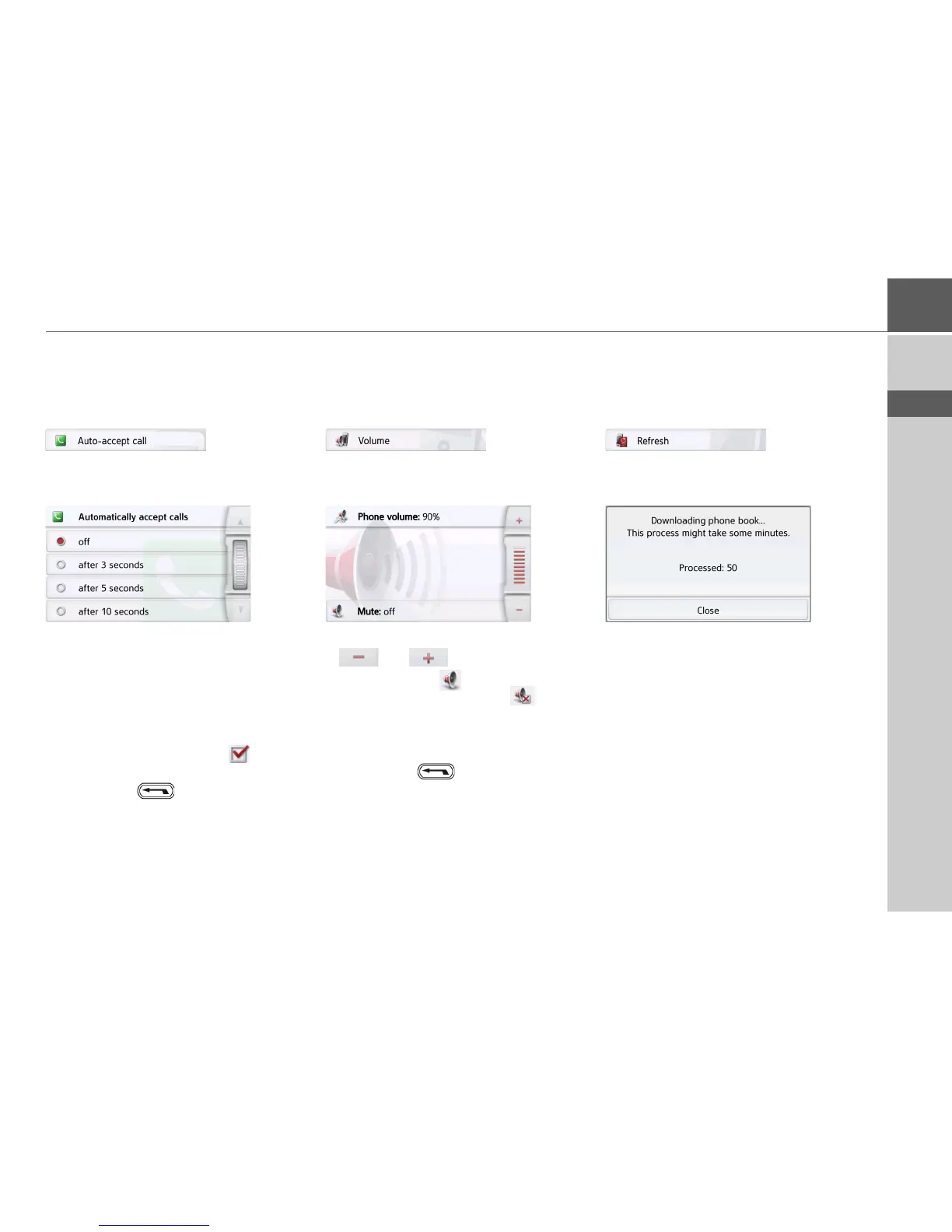
Automatic call acceptance
With this function, you can set whether
or not or after which time an incoming
call is accepted automatically.
> In the settings menu, press the
Auto-
accept call
button.
> Select whether incoming calls will be
accepted automatically after 3, 5 or 10
seconds.
If you select
Off, the function is switched
off.
The setting currently selected is
indicated with a checkmark ( ).
> Confirm your settings by pressing the
back button .
Telephone volume
With this function, you can set the
volume of the ringtone and the volume
of the call.
> In the settings menu, press the
Volume button.
> Select the desired volume with the
and buttons.
> Press the
Mute button to mute the
volume. By pressing the button
again, the telephone volume is
switched back on.
> Confirm your settings by pressing the
back button .
Updating the phonebook
With this function, you can update or
retransfer the stored phonebook entries
in the Navigation device.
> In the settings menu, press the
Refresh button.
Be aware that it may take several
minutes to load the phonebook.





 To Next Page