Controls and Indications
0638.420-071 Issue 06 02/2021 VHF Transceiver 15
AR6201, AR6211, RCU6201, RCU6211
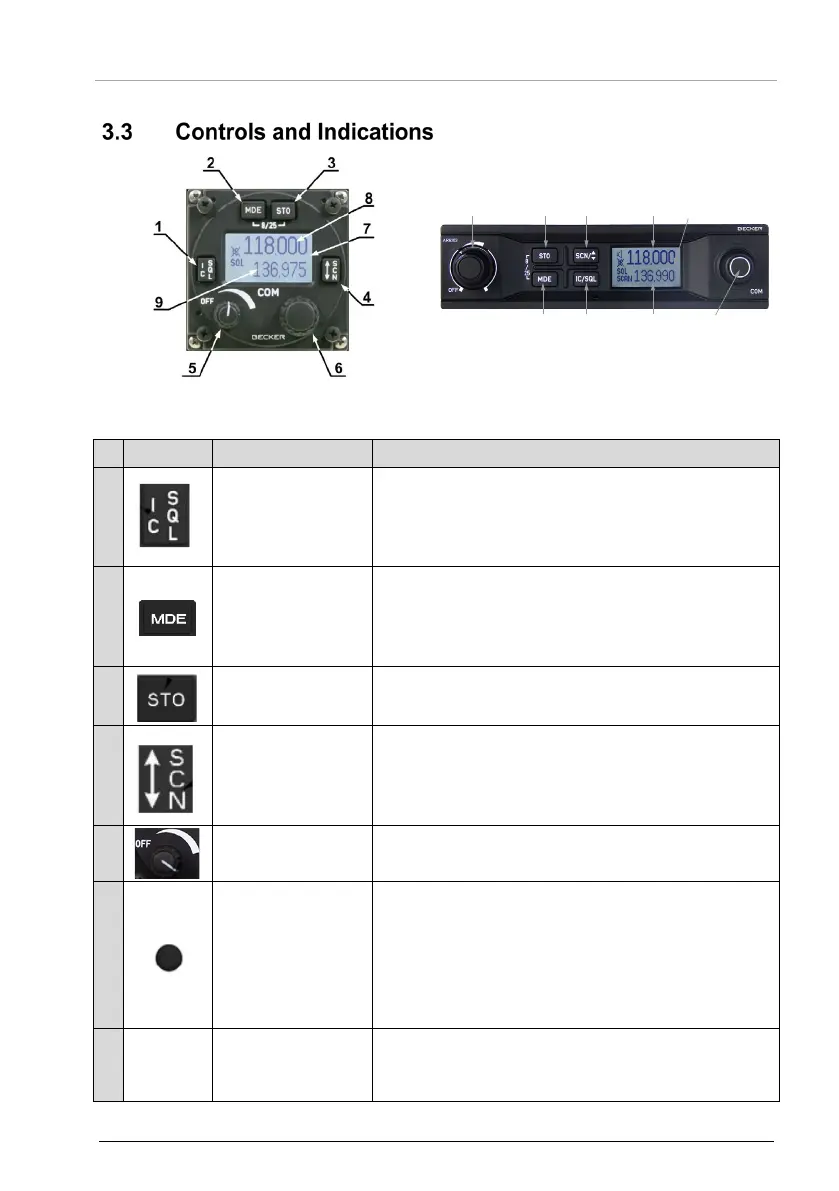
Figure 2: Controls and Indicators
1
(Intercom/
Squelch)
• "Short push" during normal operation = RX -
SQL ON/OFF.
• "Long push" during normal operation starts
the intercom menu.
2
(Mode)
• "Short push" during normal operation
changes to the frequency selection mode.
• "Long push" during normal operation starts
the user menu.
3
(Store)
• "Short push" during normal operation stores
the new value.
4
(Exchange/SCAN)
• "Short push" during standard mode or scan
mode changes between preset and active
frequency.
• "Long push" starts the scan mode.
5
volume
• Turns the transceiver ON/OFF and is used to
adjust the volume level of received signals.
6
• Turn the rotary encoder to change the
selected parameters (frequency, IC-volume,
VOX, …).
• Push the rotary encoder to select the digits.
• Push the rotary encoder to confirm the
adjustment.
-8/25-
channel spacing
• Push and hold the MOD and STO key at the
same time for > 2 s to change 8.33 to 25 kHz
channel spacing and vice versa.



 To Next Page