17
5. DISPLAY FUNCTIONS
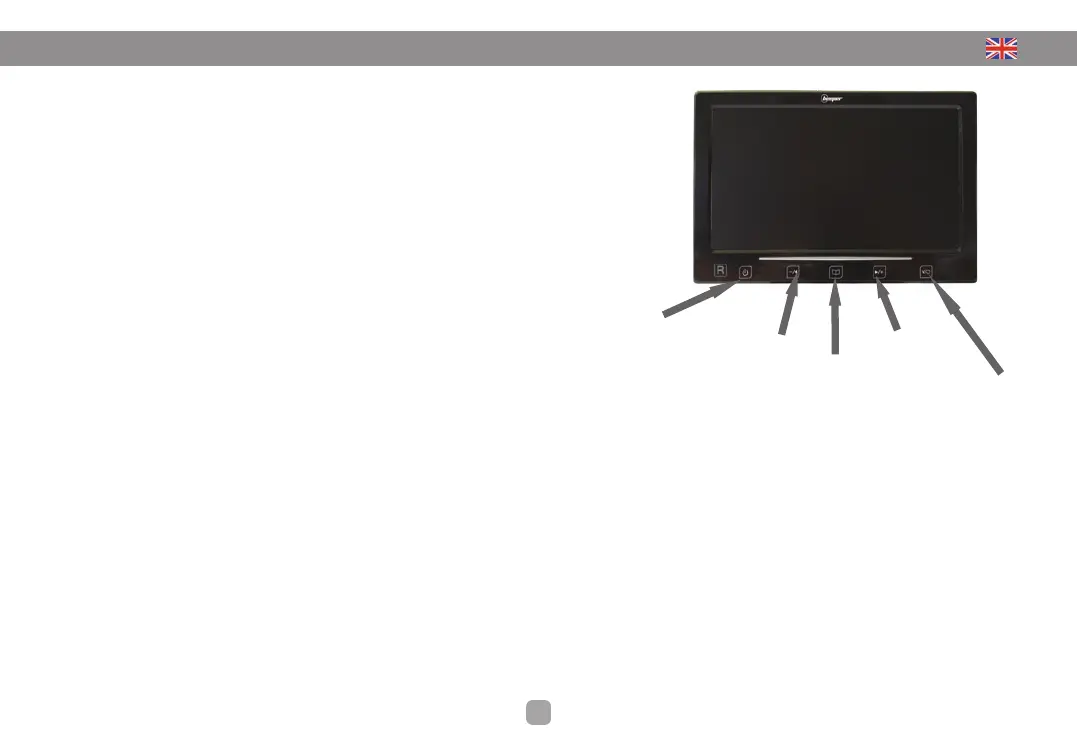
The buttons on the front of the screen allow you to control certain settings screen
BACK • AV1 AV2 + Cam: Selecting the camera or video input
If you have installed 2 or 3 cameras or other video source (DVD player, ...) is connected to the screen,
button to switch to the other video inputs.
Change to the screen (ROTATE): 4 modes are available:
• RD Vision normal rearview camera
• RU Display returned (high to low)
• LU Display returned (high to low) & Mirror (left to right -> front camera)
• LD Mirror (left to right -> front camera)
Menu :
display setting, press the Menu button each passed the following command:
Bright + - Increase / Decrease in the + & - Default setting = 50
Contrast + - Increase / Decrease in the + & - Default setting = 50
Color + - Increase / Decrease in the + & - Default setting = 50
Language + - Change with buttons + & - Default setting = English
HUE
Reset
+ -: Increase & decrease voulme or change of menu functions
Start / Stop: A short press this button activates or stops the screen
Setting volume -
Setting volume +
Long pres :
image rotation
Short press :
Change view
camera, AV1 and
1V2
Menu
Power
On/ Off


 To Next Page