16030_P75445-A_F5D8233-4_V3000_N_RTR_MNL_961008.doc
Page 53 of 108
numbers, or characters. Each client uses the same key to access the network.
Typically this is the mode that will be used in a home environment.
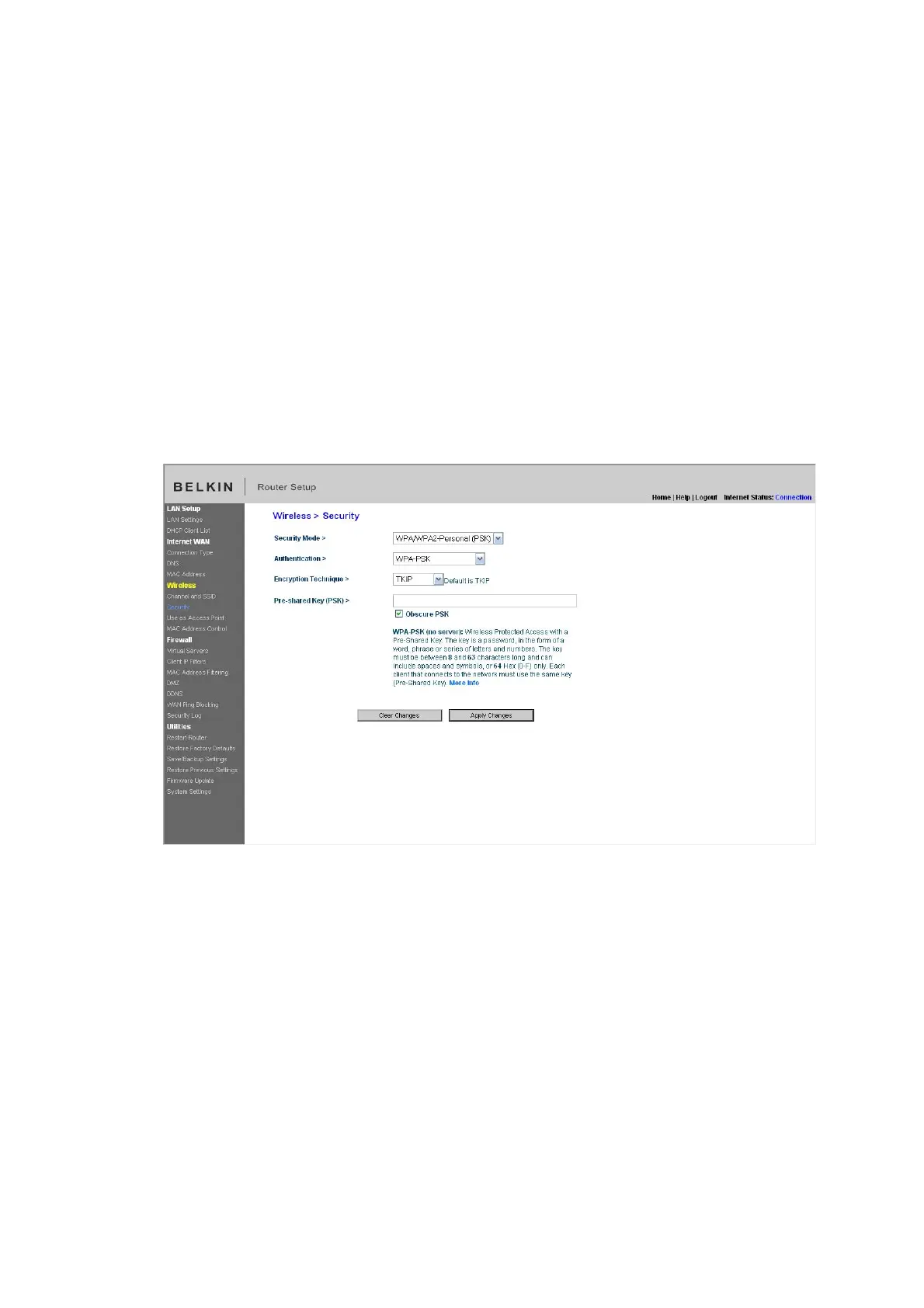
Setting WPA-PSK
1. From the “Security Mode” drop-down menu, select “WPA/WPA-Personal
(PSK)”.
2. For “Encryption Technique”, select “TKIP” or “AES”. This setting will have to
be identical on the clients that you set up.
3. Enter your pre-shared key. This can be from eight to 63 characters and can
be letters, numbers, or symbols. This same key must be used on all of the
clients that you set up.
4. Click “Apply Changes” to finish. You must now set all clients to match these
settings.
[insert Security_WPA.tif]
Setting WEP Encryption
Note to Mac users: The “Passphrase” option will not operate with Apple
®
AirPort
®
. To configure encryption for your Mac computer, set the encryption using
the manual method described in the next section.
1. Select “128-bit WEP” or “64-bit WEP” from the drop-down menu.


 To Next Page