16030_P75445-A_F5D8233-4_V3000_N_RTR_MNL_961008.doc
Page 67 of 108
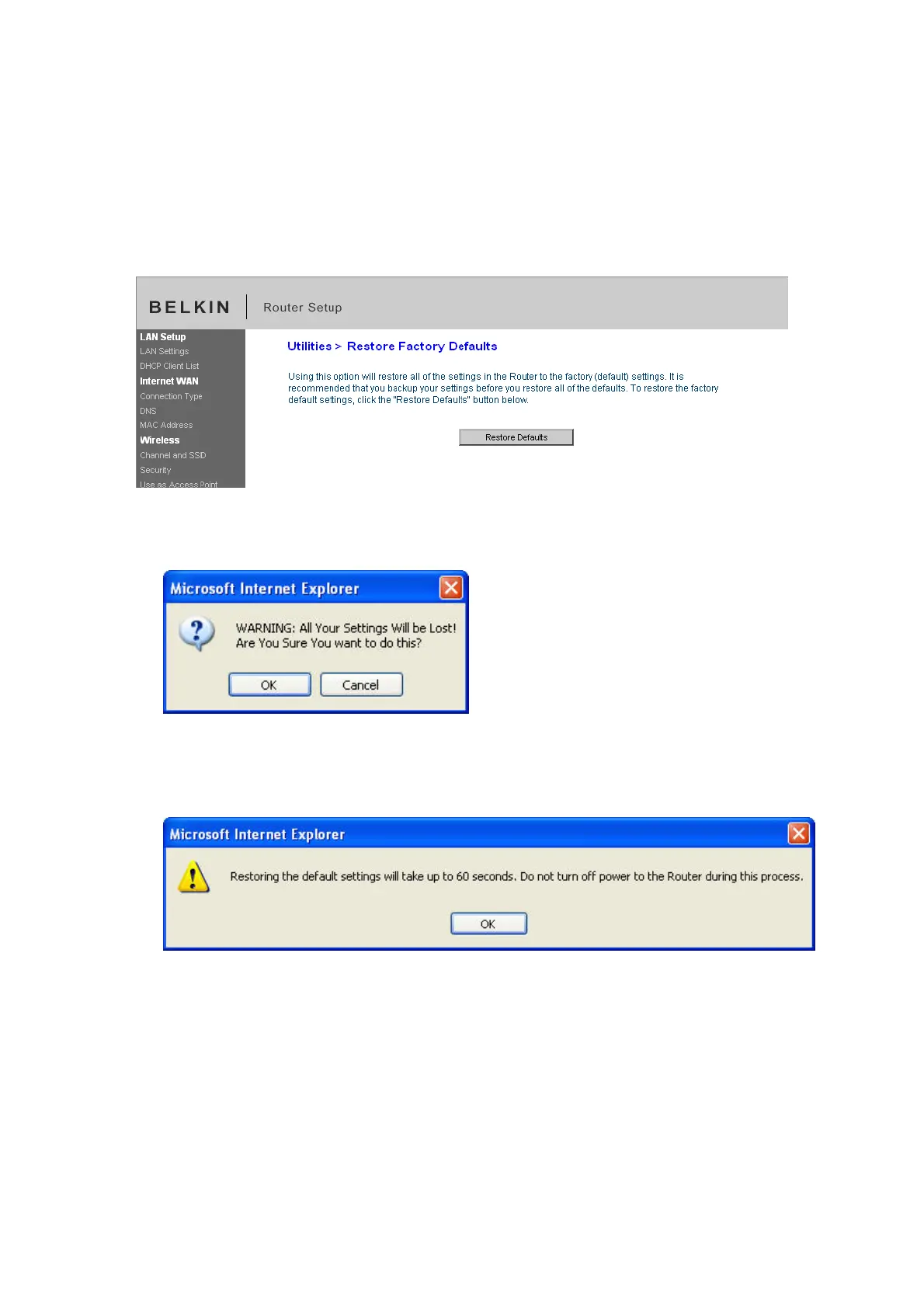
Restoring Factory Default Settings
Using this option will restore all of the settings in the Router to the factory (default)
settings. It is recommended that you back up your settings before you restore all
of the defaults.
[insert restore_Factory default.tif]
1. Click the “Restore Defaults” button.
2. The following message will appear. Click “OK”.
9230_Restore_Factory_Default_Confirmation.jpg[keep]
3. The following message will appear. Restoring the defaults includes restarting
the Router. It can take up to 60 seconds. It is important not to turn the power
to the Router off during the restart.
9230_Restore_Factory_Default_Confirmed.jpg[keep]
4. A 60-second countdown will appear on the screen. When the countdown
reaches zero, the Router’s defaults will be restored. The Router home page
should appear automatically. If it does not, type in the Router’s address
(default = 192.168.2.1) into the navigation bar of your browser.


 To Next Page