EasyManua.ls Logo

Bell System bellissimo - Door Controller DIP Switch Settings; Lock Operate Time Dip SW2 (1-3); Individual Functions DIP SW2 (4-8)

Bell System bellissimo
44 pages
Print Icon
To Next Page IconTo Next Page
To Previous Page IconTo Previous Page
Loading...
bell
issimo
2-72 Way Video Entry System
PD-098 Issue 4B Installation and Operating Manual Page 18 of 44
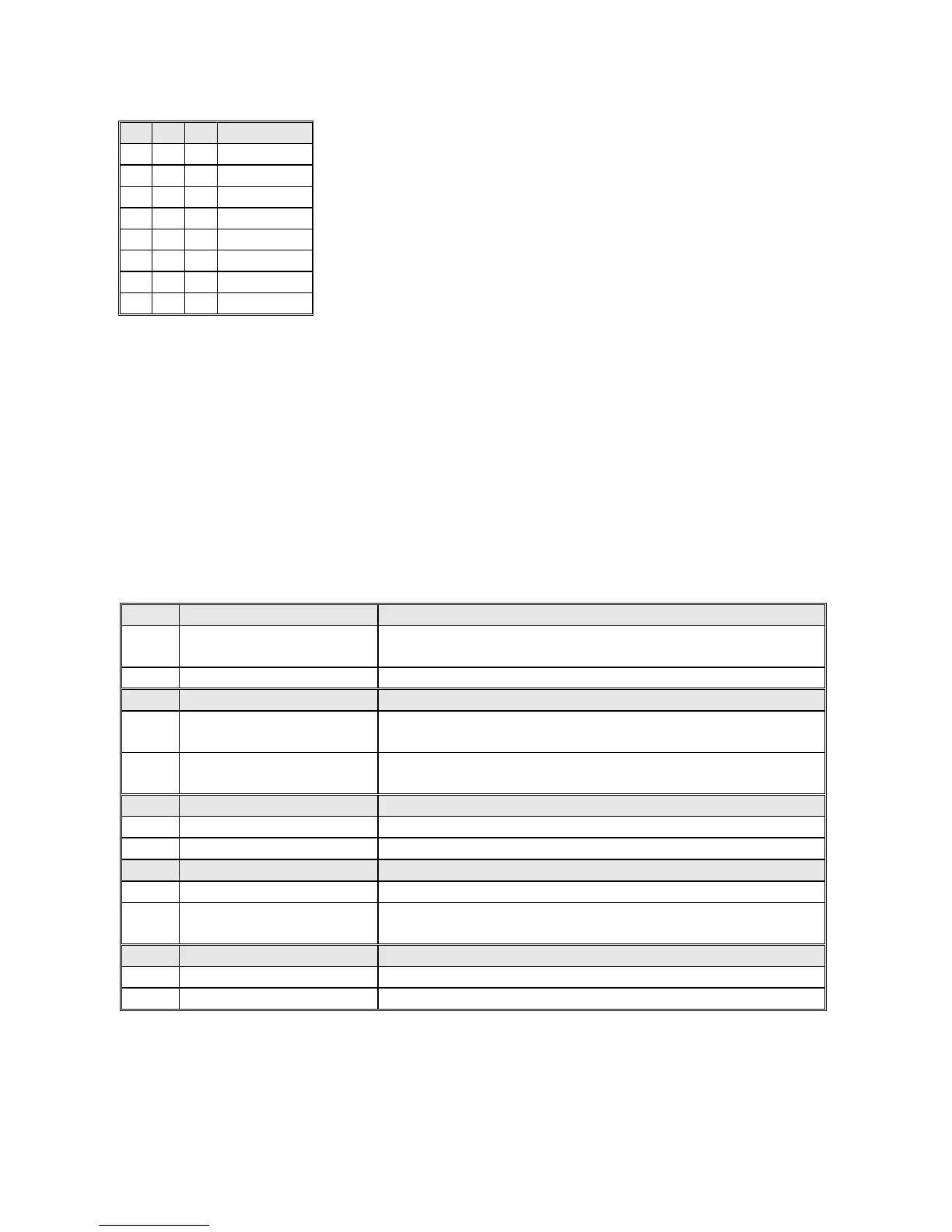
Lock Operate Time Dip SW2 (1-3)
3
2
1
Lock Time
On
On
On
3s*
On
On
Off
4s
On
Off
On
5s
On
Off
Off
6s
Off
On
On
8s
Off
On
Off
10s
Off
Off
On
15s
Off
Off
Off
20s
*Default setting
Individual Functions DIP SW2 (4-8)
SW2-4
Lock Type
Lock behaviour during power failure
*Off
Fail secure lock
Requires alternate mechanical means, key or thumb-turn
to open on power failure
On
Fail safe lock
Lock opens on power failure
SW2-5
Door Status Switch
Monitors doors left open
*Off
Contacts Open when
Door is Closed
The default allows for no switch fitted
On
Contacts Closed when
Door is Closed
Standard normally closed switch
SW2-6
Camera 2
How many cameras at this door
*Off
Camera 1 only
Default single camera per door
On
Enable Camera 2
Second camera at the door
SW2-7
View Function
Camera action when view button pressed
*Off
Local View
View button only selects the camera(s) at this door
On
Global View
(See DIP SW3 below)
View button sequentially selects all cameras
at doors with this switch set

SW2-8
Reserved
*Off
On
*Default setting
SW1
SW2
SW3
(ASDFGHJK)
(123FGHJK)
(ASDFGHJK)
OFF ↔ ON
SW1
SW2
SW3
(ASDFGHJK)
(ASDRTYUI)
(ASDFGHJK)
OFF ↔ ON

Other manuals for Bell System bellissimo

Related product manuals