17
Timer Instructions
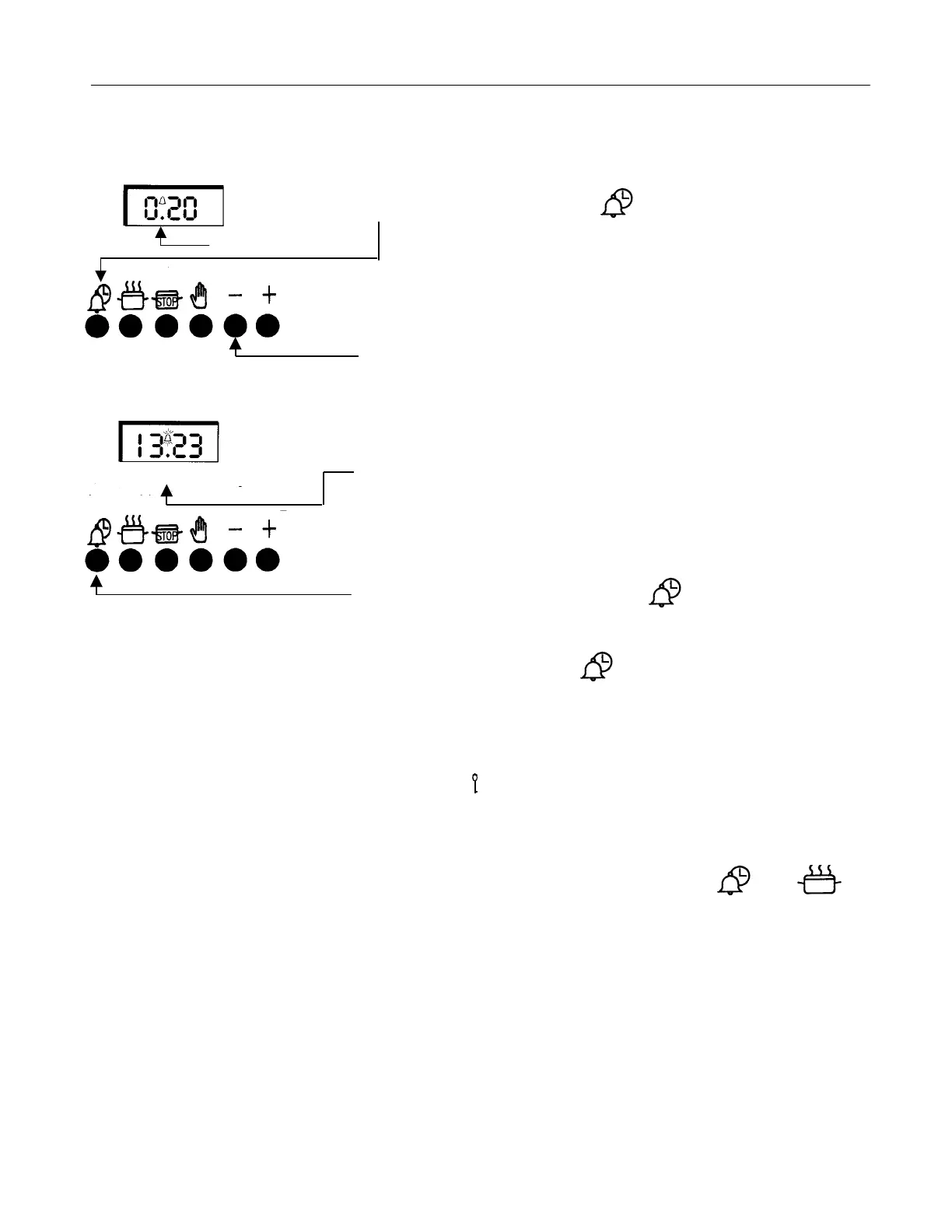
To Set the Minute Minder Step 1 Ensure the time of day is set correctly
Step 2 Press and release the “ “ button. Within 5 seconds
press and hold the “
+ ” button until the required time is set
(A bell symbol will light).
This can be adjusted by pressing the “
- “ button.
On releasing the buttons the timer will revert
back to the time of day.
At the end of the set time a bleeping sound will be heard and the bell
symbol will flash.
This can be cancelled by pressing the “ “.
Note: If necessary the Minute Minder can be cancelled before the tone
sounds by pressing the “ “ button and then press the “-“ button
until 0.00 appears in the display window.
Key Lock This timer is fitted with a locking function. This function overrides the
relays and allows operation of the timer without switching on the
elements. A “ “ key symbol will appear in the display when this
function is set.
NOTE: THE TIMED LARGE OVEN WILL NOT OPERATE IN THIS MODE.
If you require this safety feature, ensure timer is in manual mode and
cancel any active programs. Press and hold the “ “ and “ “
buttons simultaneously for approximately 8 seconds. The display will
read “On”. Release the two pressed buttons and immediately press the
“+” button. The display now reads “Of” and the key symbol appears.
After approx 5 seconds the time of day will show next to the key symbol.
THE KEY LOCK IS NOW ACTIVATED.
To return the timer to manual mode, repeat the setting procedure so
that “Of” is displayed. Press and release the “+” button so that “On” is
displayed and the key symbol has disappeared.
The timer will revert to the time of day after approximately 5 seconds.



 To Next Page