The timer display is in 24 hour clock format.
Ensure that the correct time
of
day is always set before using your
cooker.
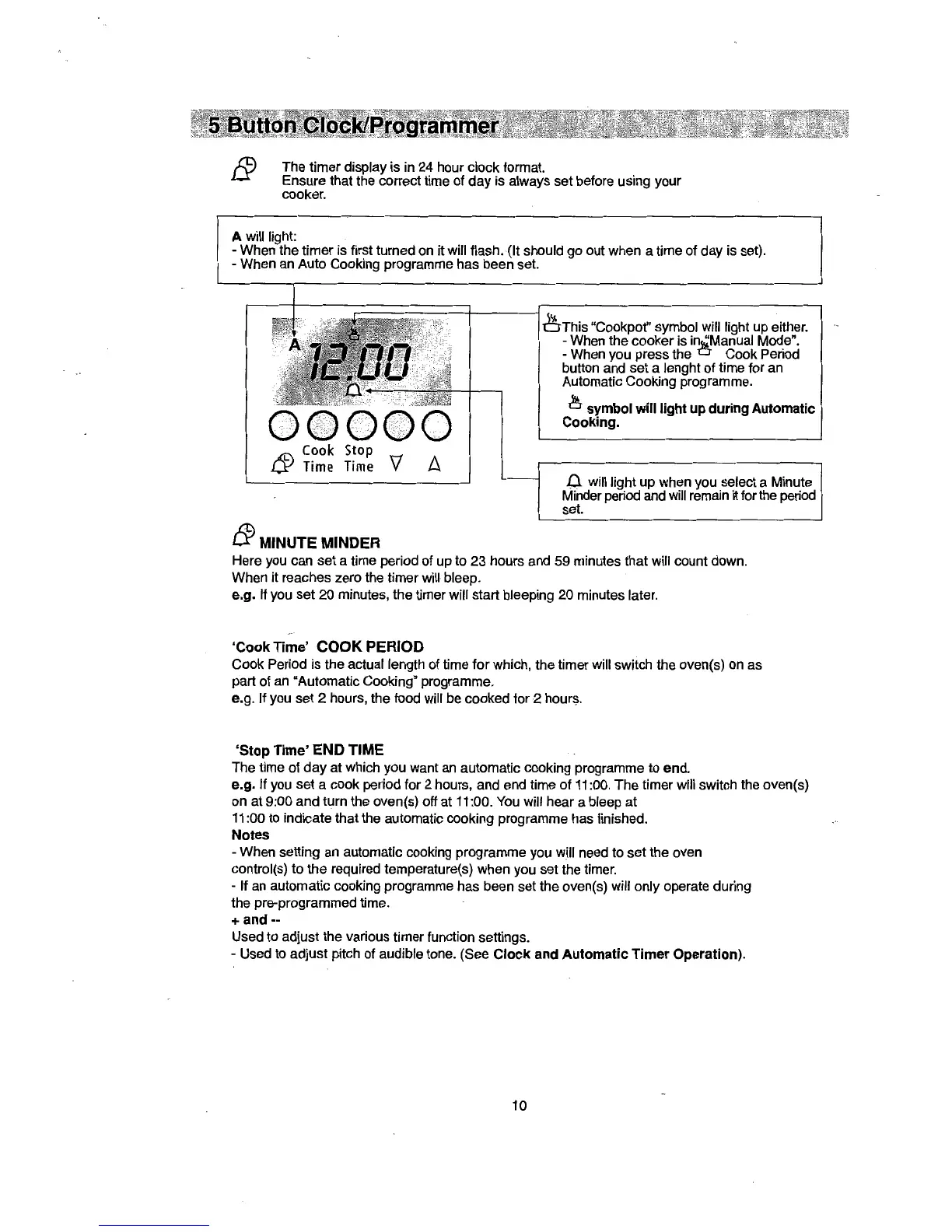
A will light:
- When the timer is first turned on it will flash. (It should go out when a time of day is set).
- When an Auto Cooking programme has been set.
Cook
Stop
Time
Time
tP
MINUTE MINDER
v
"Cookpot" symbol will light up either.
-When
the cooker is Mode".
- When you press the o Cook Period
button and set a lenght
of
time for an
Automatic Cooking programme.
symbol
will
light
up
during
Automatic
Cooking.
.0.
will light up when you select a Minute
Minder period and will remain
it for the period
set.
Here you can set a time period of up to 23 hours and 59 minutes that will count down.
When it reaches zero the timer will bleep.
e.g. If you set
20
minutes, the timer will start bleeping 20 minutes later.
'Cook
Time'
COOK
PERIOD
Cook Period is the actual length of time for which, the timer will switch the oven(s) on as
part of an "Automatic Cooking" programme.
e.g. If you set 2 hours, the food will be cooked for 2
hourl?.
'Stop
Time'
END TIME
The time of
day
at which you want
an
automatic cooking programme to end.
e.g. If you set a cook period for 2 hours, and end time
of
11:00. The timer will switch the oven(s)
on at 9:00 and turn the oven(s) off at
11
:00.
You
will hear a bleep at
11:00 to indicate that the automatic cooking programme has finished.
Notes
- When setting an automatic cooking programme you will need to set the oven
control(s) to the required temperature(s) when you set the timer.
- If an automatic cooking programme has been set the oven(s) will only operate during
the pre-programmed time.
+and--
Used to adjust the various timer function settings.
-Used
to adjust pitch of audible tone. (See
Clock
and
Automatic
Timer
Operation).
10


 To Next Page