3 - 5
Instrument and control functions
EN
3
Handlebar switches
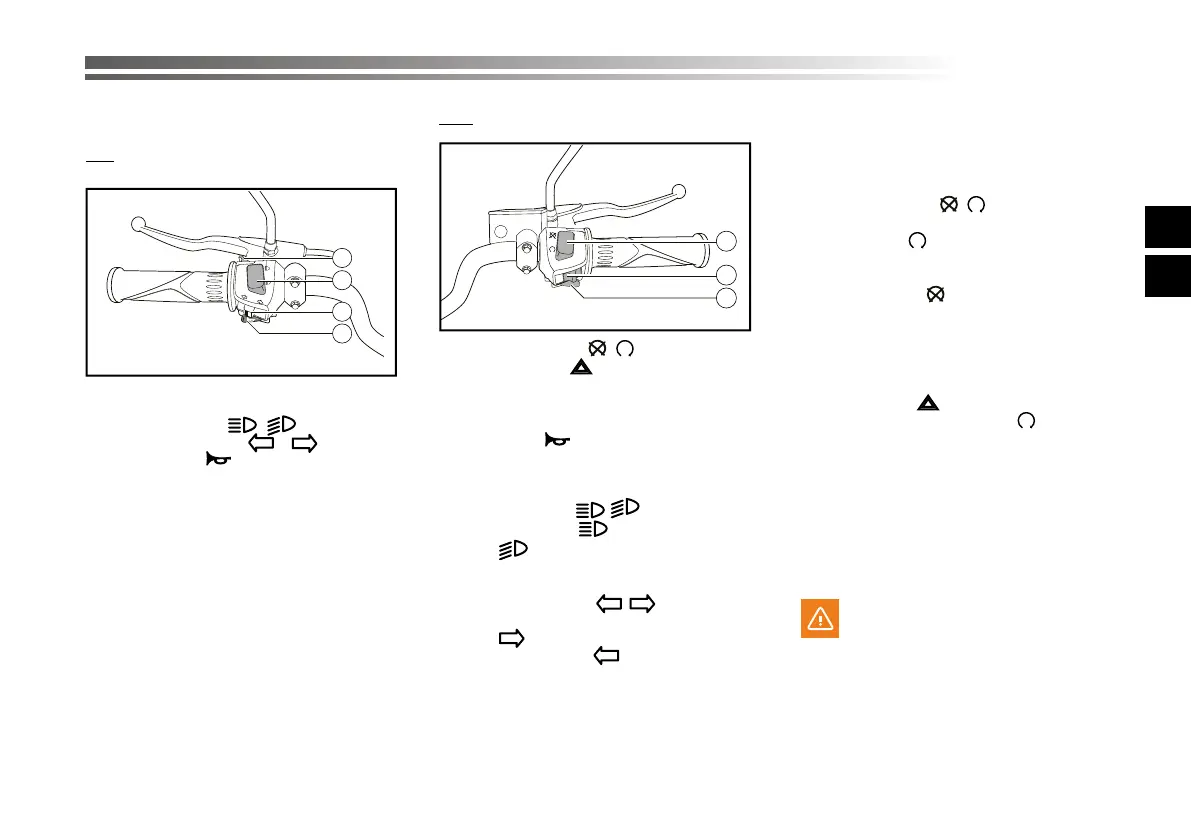
Left
1. Passing button
2. Dimmer/switch “ / “
3. Turn signal switch “ / “
4. Horn switch “ “
Righ
1. Run/Start switch “ / “
2. Hazard switch “ “
3. Electric ignition button
Horn switch “ “
Press this switch to sound the horn.
Dimmer/switch ” / “
Set this switch to “ ” for the high beam
and to “ ” for the low beam.
Turn signal switch “ / ”
To signal a right-hand turn, push this swi-
tch to “ “. To signal a left-hand turn,
push this switch to “ ”. When released,
the switch returns to the center position.
To cancel the turn signal lights, push the
switch in after it has returned to the cen-
ter position.
Passing button
Press this button (daytime) to enable la-
shing lights.
Run/Start switch “ / ”
To crank the engine with the starter, set
this switch to “ ”, see page 5-1 for star-
ting instructions prior to starting the en-
gine.
Set this switch to “ ” to stop the engine in
case of an emergency, such as when the
vehicle overturns or when the throttle
cable is stuck.
Hazard switch “ ”
With the ignition key set to “ ” use this
switch to switch on the emergency lights
(simultaneous lashing of all of the di-
rection indicators).
The emergency lights are used in case of
emergency, to advise the other road users
that your vehicle is about to stop in dan-
gerous trac areas.
WARNING
Do not use the emergency lights when
the engine is o; this is to stop the bat-
tery from becoming at.
1
2
3
1
2
3
4



 To Next Page