7. The display
7.1
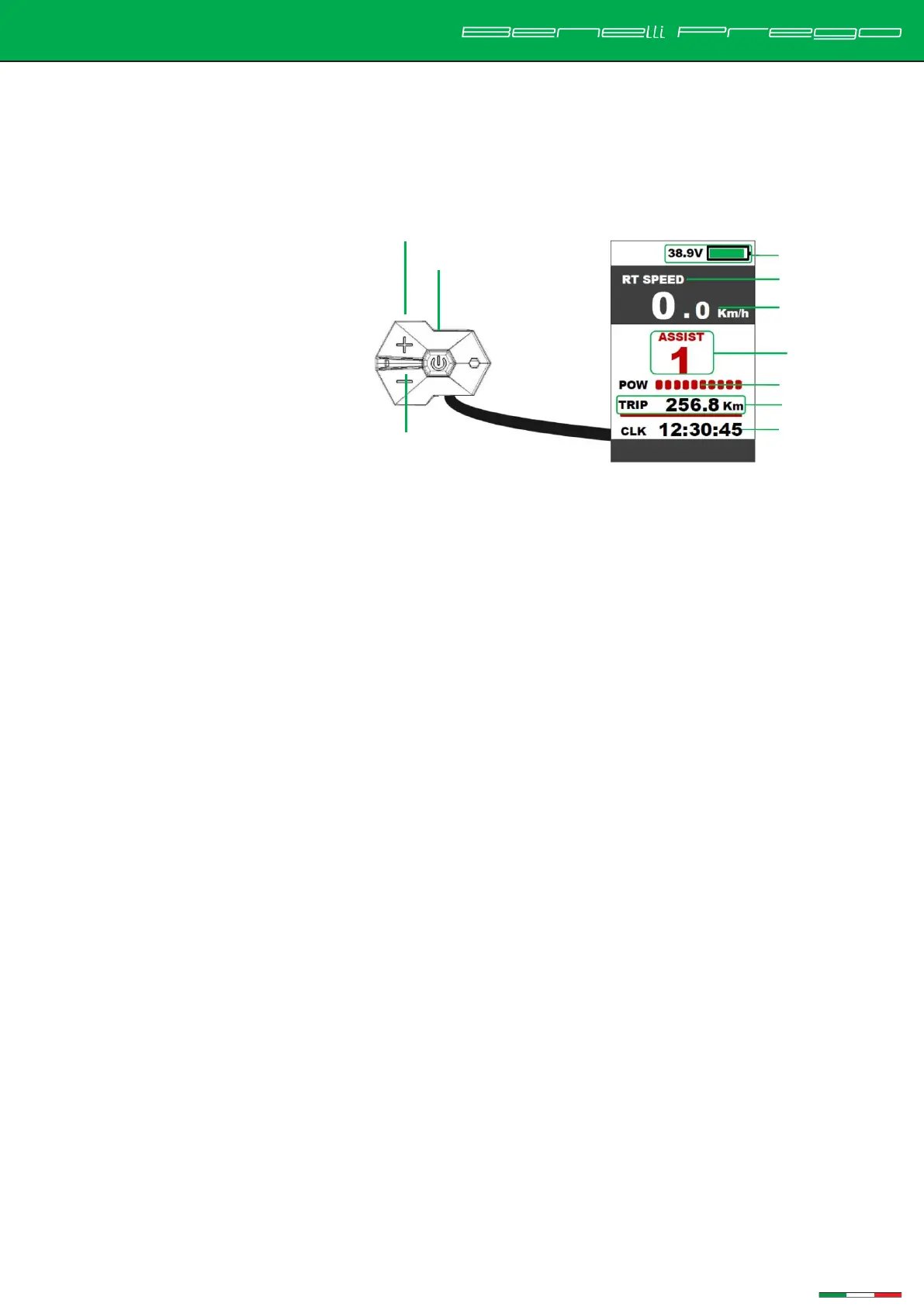
850C button LCD color screen (LCD)
Use function of LCD meter:
Upshift
3.2 inch colour screen
Speed
battery level
Mileage
Time
Headlight
Brake
Pedal Assist level
7.2
ON/OFF operation
1. To turn on/off the battery power, press the power button on the bike frame.
2. To turn on/off the display power, press and hold the power button on handlebar switch for 1
second
3. The display will turn off automatically if the ebike is left idle for more than 5mins .
7.3
Pedal Assist Selection
short press the "+" or "-" button to change the Pedal Assist level. The lowest is Level 0 without any
assistance, and the highest is Level 3 with maximum assistance. The default is Level 1 when the e-bike
is turned on.
7.4
Speed mode and mileage mode switch
1. short press the power button to switch the speed display information and mileage display
mode, and the following information is displayed in a loop: average speed (AVG SPEED) →
maximum speed (MAX SPEED) → real-time speed (RT SPEED) → cruising range (RANGE)→
Cumulative mileage (ODO) →



 To Next Page