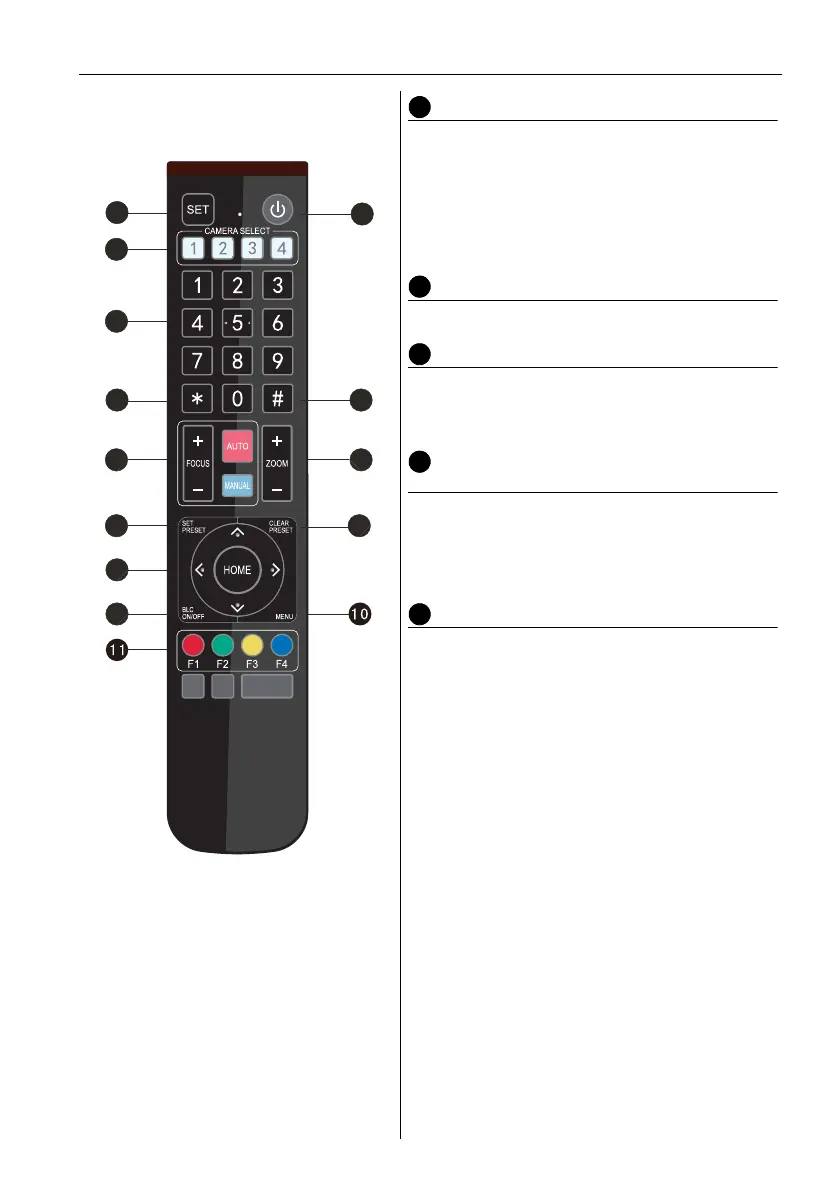
Remote control 19
Pan/Tilt Control Key
Press Key:
Press Key:
Press Key:
Press Key:
“HOME” Key: Return to the middle position or
enter the next level menu.
BLC Control Key
Back Light ON/OFF: Turn on or off the back light
Menu Setting
Open or close the OSD menu
Enter/exit the OSD menu or return to the
previous menu
Camera IR Remote Control Address
Setting
* + # + F1: Camera Address No.1
* + # + F2: Camera Address No. 2
* + # + F3: Camera Address No. 3
* + # + F4: Camera Address No. 4
Key Combination Functions
1. # + # + #: Clear all presets
2. * + # + 6: Restore factory defaults
3. * + # + 9: Flip switch
4. * + # + Auto: Enter the aging mode
5. * + # + 3: Menu set to Chinese
6. * + # + 4: Menu set to English
7. * + # + Manual: Restore the default user
name, password, and IP address.
8. # + # + 0: Switch the video format to
1080P60
9. # + # + 1: Switch the video format to
1080P50
10. # + # + 2: Switch the video format to 1080I60
11. # + # + 3: Switch the video format to 1080I50
12. # + # + 4: Switch the video format to 720P60
13. # + # + 5: Switch the video format to 720P50
14. # + # + 6: Switch the video format to
1080P30
15. # + # + 7: Switch the video format to
1080P25
16. # + # + 8: Switch the video format to 720P30
17. # + # + 9: Switch the video format to 720P25



 To Next Page