Remote control20
Applications
After finishing initialization, it can receive and execute the IR commands. Press the
remote control button, and the indicator light will flash; release the button, and the
indicator light stops flashing. Users can control the pan/tilt/zoom, setting and running
preset positions via the IR remote control.
Key instructions
1. In this instruction, “press the key” means a click rather than a long-press, and a spe-
cial note will be given if a long-press for more than one second is required.
2. When a key-combination is required, do it in sequence. For example, “* + # + F1”
means press “*” first and then press “#” and last press “F1”.
Items Instruction
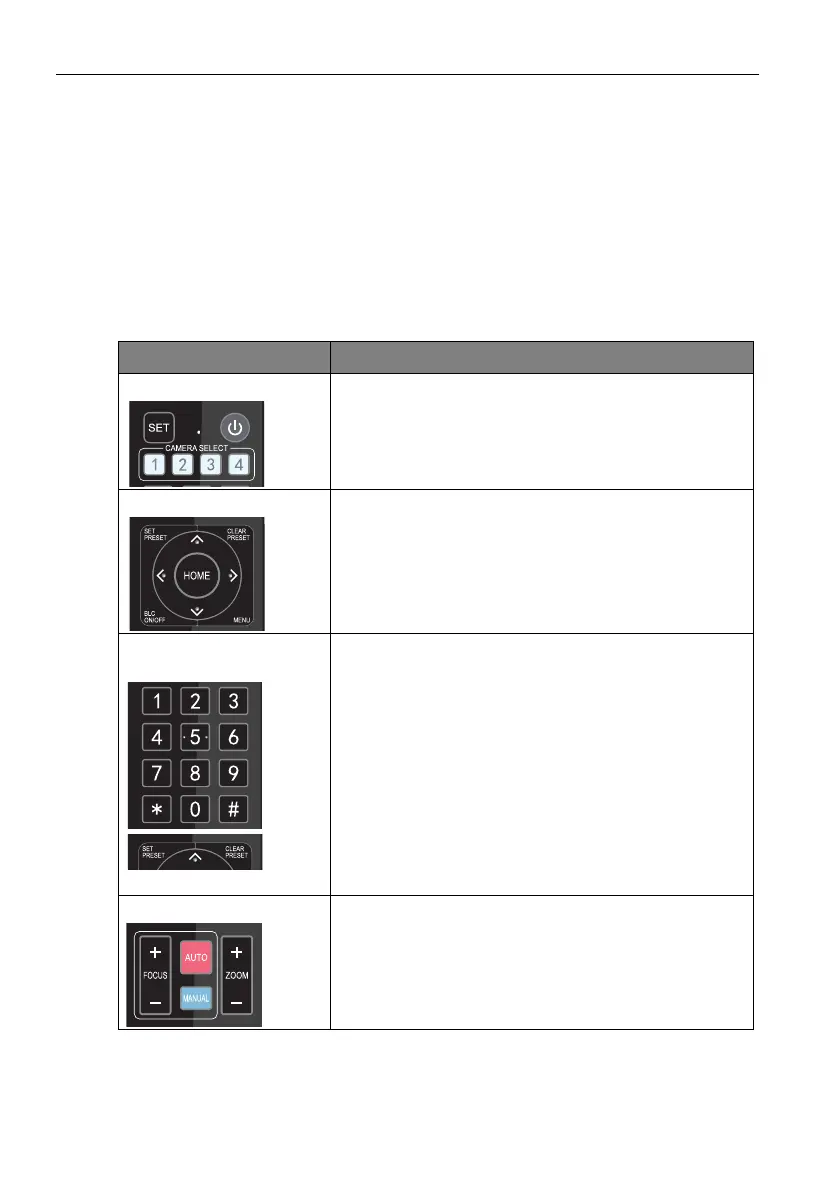
1. Camera Selection
Select the camera address to control.
2. Pan/Tilt Control • Press ///
• Press “HOME” to go back to the middle position
• Press and hold the
/// key, and the pan/tilt will
keep running, from slow to fast, until it runs to the end
point; the pan/tilt running stops as soon as the key is
released.
3. Presets
• Preset setting: To set a preset position, the users
should press the “SET PRESET” key first and then press
the number key 0-9 to set a relative preset.
Note: 10 preset positions in total are available by the remote
control.
• Preset running: Press a number key 0-9 directly to run
a relative preset.
Note: Action in vain if a relative preset position is not existed.
• Preset clearing: To clear a preset position, the user can
press the “CLEAR PRESET” key first and then press the
number key 0-9 to clear the relative preset.
Note: Press the “#” key three times continually to cancel all the
presets.
4. Zoom Control ZOOM IN: Press “ZOOM ” key
ZOOM OUT: Press “ZOOM ” key
Press and hold the key, the camera will keep zooming in
or out and stops as soon as the key is released.



 To Next Page