27 Operation
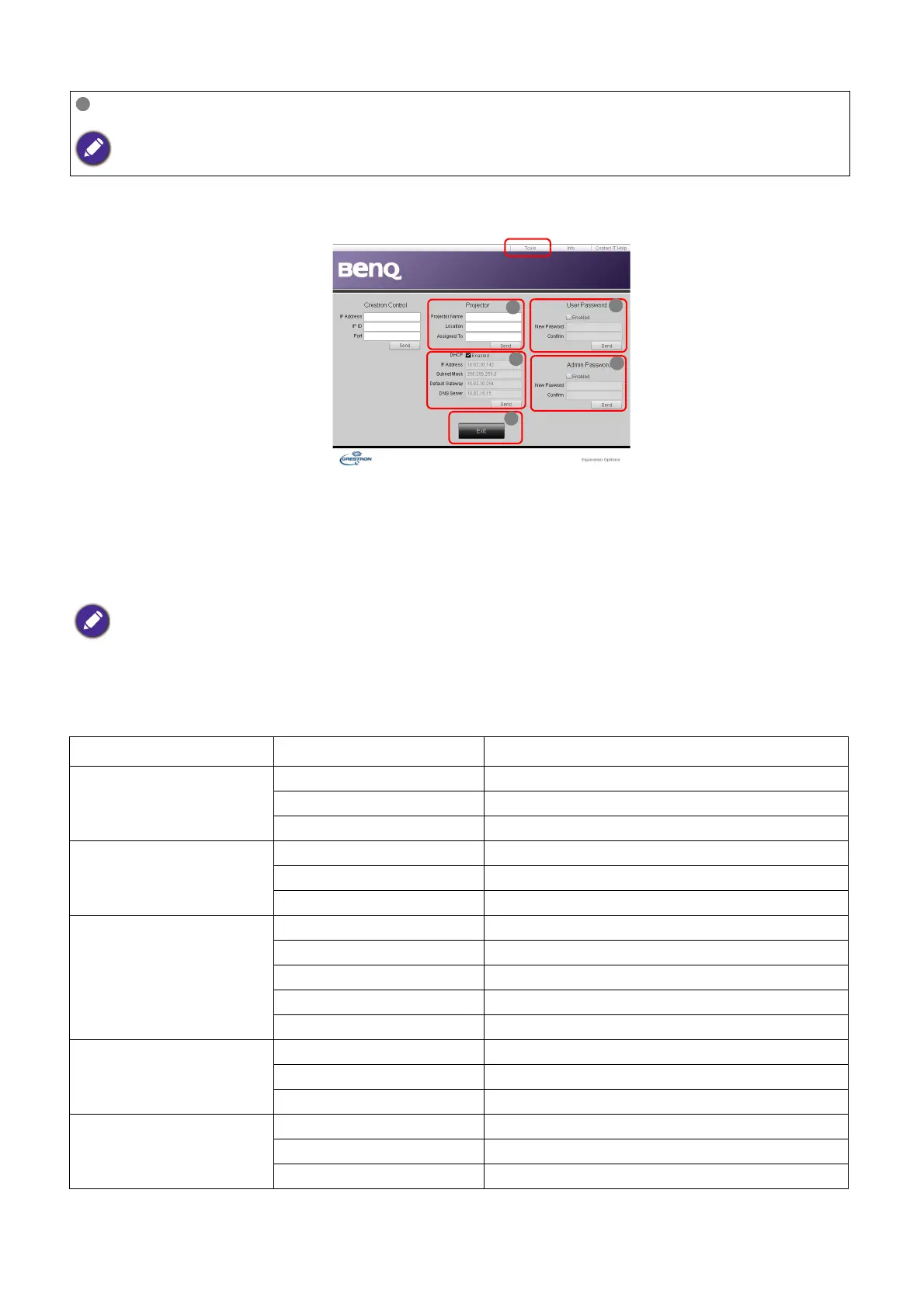
The tools page allows you to manage the projector, configure the Network settings and
secure access of remote network operation on this projector.
i. You can name the projector, keep track of its location and the person in charge of it.
ii. You can adjust the Network settings.
iii. Once set, access to the remote network operation on this projector has been
password-protected.
iv. Once set, access to the tools page has been password-protected.
v. Press Exit to go back to the remote network operation page.
Please pay attention to the limitation of input length (including space and other punctuation
keys) in the list blow:
To switch input source, click on your desired signal.
The source list varies according to the connectors available on the projector. ''Video'' stands for the Video signal.
After making the adjustments, press the Send button and the data will be saved in the projector.
Category Item Input Length Maximum Number of Characters
Crestron Control
IP Address 15
IP ID 4
Port 5
Projector
Projector Name 22
Comment 22
Assigned To 22
Network Configuration
DHCP (Enabled) (N/A)
IP Address 15
Subnet Mask 15
Default Gateway 15
DNS Server 15
User Password
Enabled (N/A)
New Password 15
Confirm 15
Admin Password
Enabled (N/A)
New Password 15
Confirm 15



 To Next Page