Introduction12
Controls and functions
Projector
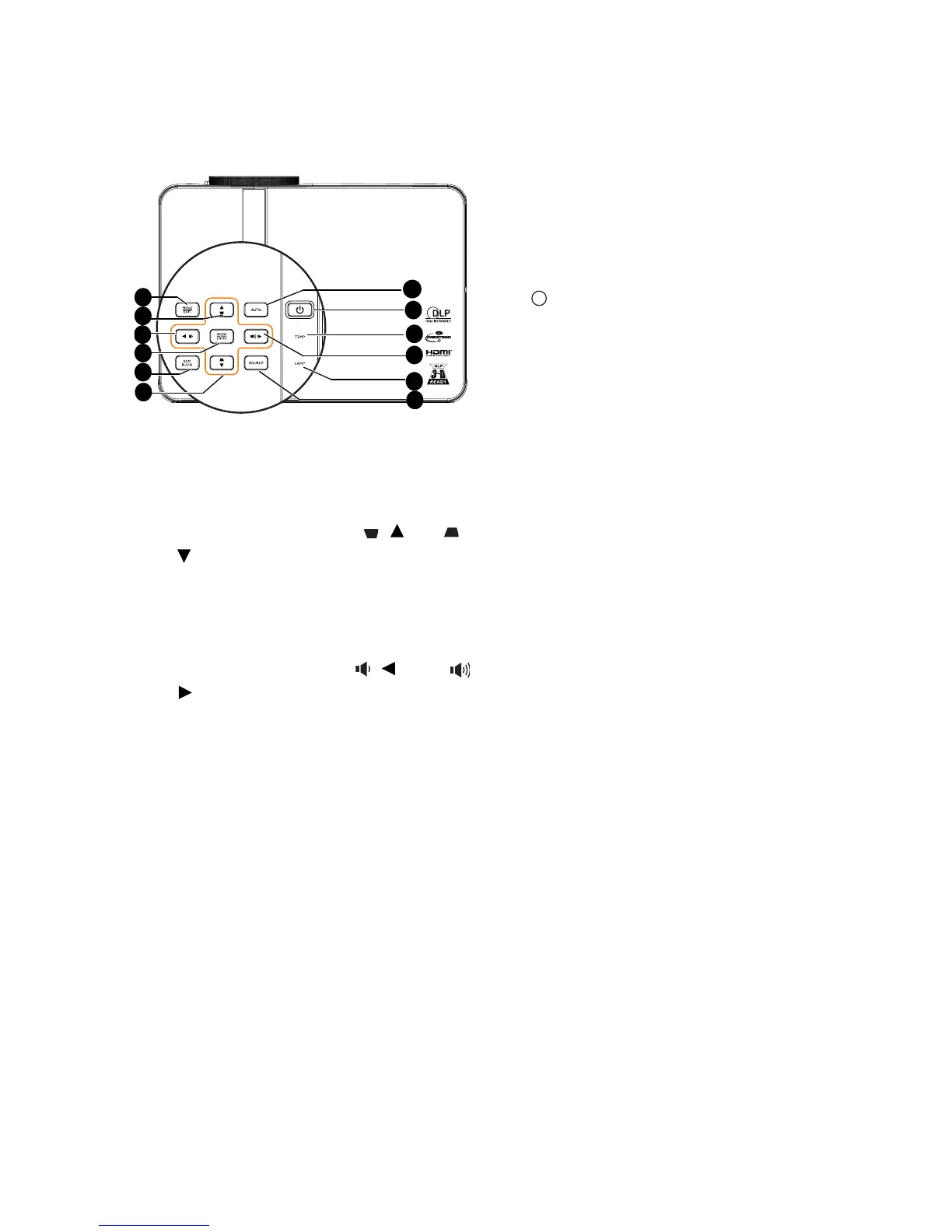
6. AUTO
Automatically determines the best
picture timings for the displayed image.
See "Auto-adjusting the image" on page
30 for details.
7. Power/POWER indicator light
Toggles the projector between standby
mode and on.See "Starting up the
projector" on page 29 for details.
Lights up or flashes when the projector is
under operation. See "Indicators" on
page 96 for detail.
8. TEMPerature indicator light
Lights up red if the projector's
temperature becomes too high. See
"Indicators" on page 96 for details.
9. LAMP indicator light
Indicates the status of the lamp. Lights up
or flashes when the lamp has developed a
problem. See "Indicators" on page 96 for
details.
10. SOURCE
Displays the source selection bar. See
"Switching input signal" on page 36 for
details.
1. MENU/EXIT
Turns on the On-Screen Display (OSD)
menu. Goes back to previous OSD menu,
exits and saves menu settings.
2. Keystone/Arrow keys ( / Up, /
Down)
Manually corrects distorted images
resulting from an angled projection. See
"Correcting keystone" on page 32 for
details.
3. Volume /Arrow keys ( / Left, /
Right)
Adjusts the sound level.
When the On-Screen Display (OSD) menu
is activated, the #2, and #3 keys are used
as directional arrows to select the desired
menu items and to make adjusents. See
"Using the menus" on page 33 for details.
4. MODE/ENTER
Selects an available picture setup mode.
See "Selecting a picture mode" on page 39
for details.
Activates the selected On-Screen Display
(OSD) menu item. See "Using the menus"
on page 33 for details.
5. ECO BLANK
Used to hide the screen picture. See
"Hiding the image" on page 44 for details.
7
6
5
2
8
3
9
10
1
3
4
2
I
I



 To Next Page