Connection 19
Connection
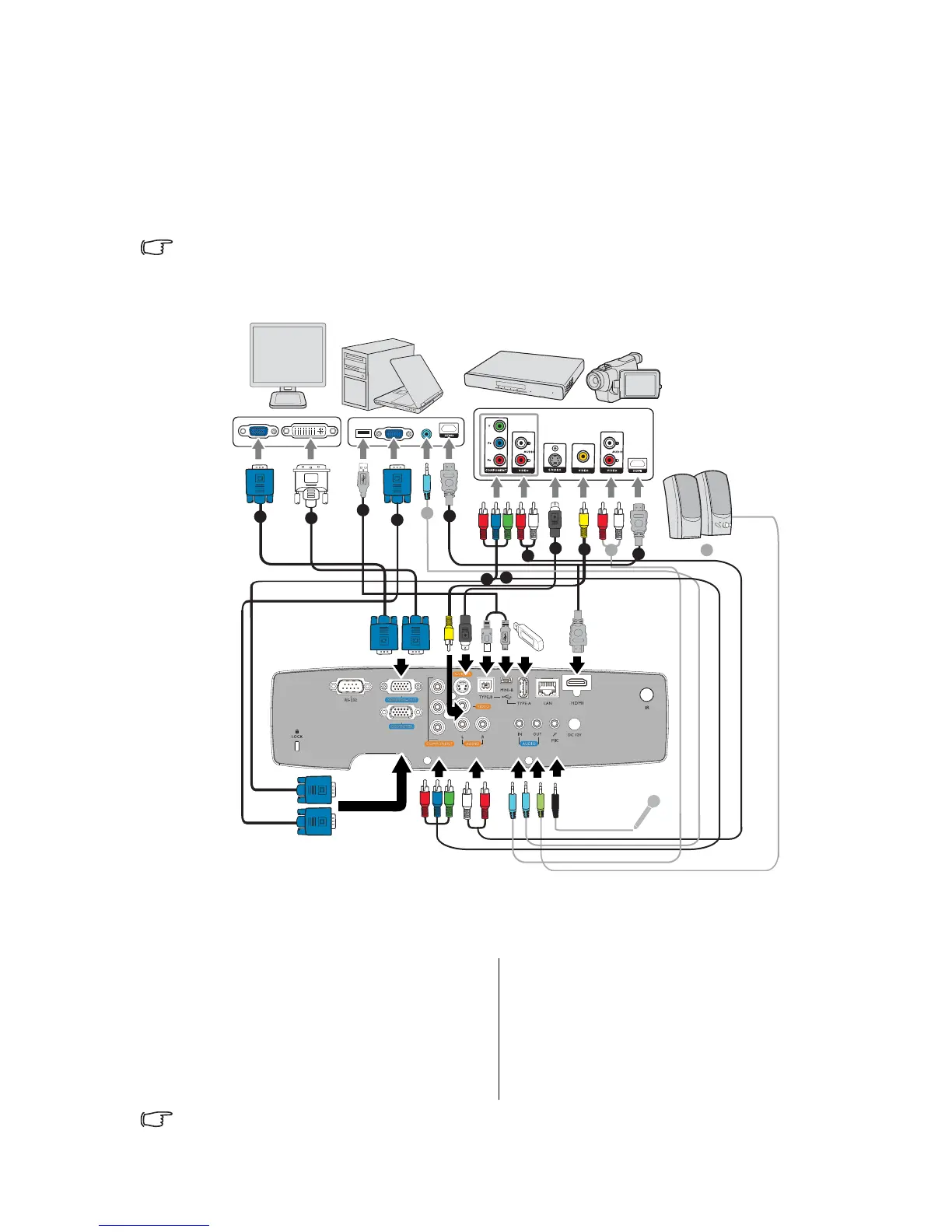
When connecting a signal source to the projector, be sure to:
1. Turn all equipment off before making any connections.
2. Use the correct signal cables for each source.
3. Ensure the cables are firmly inserted.
• In the connections shown below, some cables may not be included with the projector (see
"Shipping contents" on page 8). They are commercially available from electronics stores.
• Many notebooks do not turn on their external video ports when connected to a projector.
Usually a key combo like FN + F3 or CRT/LCD key turns the external display on/off. Locate
1. VGA cable
2. VGA to DVI-A cable
3. USB Cable
4. HDMI cable
5. Component Video to VGA (D-Sub)
adapter cable
6. Component Video cable
7. Audio L/R cable
8. S-Video cable
9. Video cable
10. Audio cable
2
1
1
7
8
9
10 10
4
4
3
5
6
10



 To Next Page