Operation 45
If the IP Address still does not display, contact your ITS administrator.
8. Go back to System Setup: Advanced > Network Settings page.
9. Press ▼ to highlight AMX Device Discovery and press ◄/► to select On or Off.
When AMX Device Discovery is On, the projector can be detected by AMX
controller.
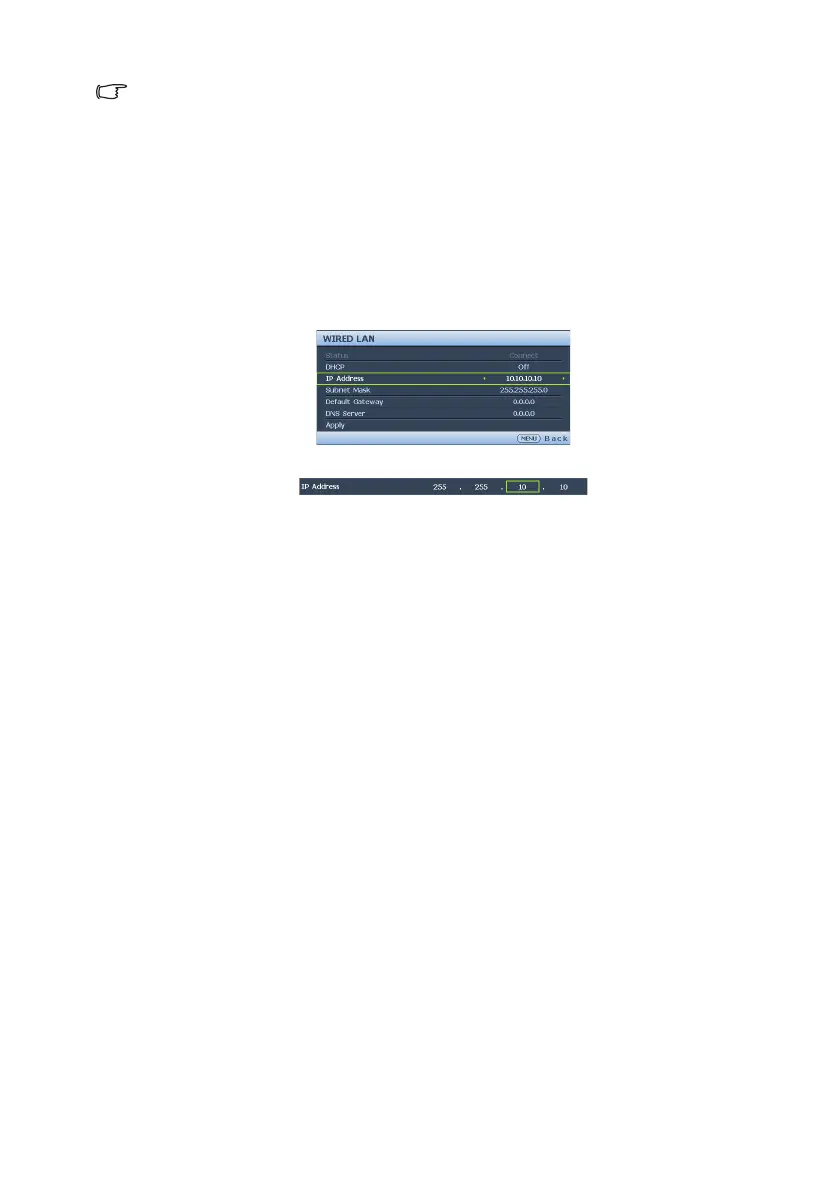
If you are in a non-DHCP environment:
1. Repeat steps 1-4 above.
2. Press ▼ to highlight DHCP and press ◄/► to select Off.
3. Contact your ITS administrator for information on the IP Address, Subnet Mask,
Default Gateway, and DNS Server settings.
4. Press ▼ to select the item you want to modify and press MODE/ENTER.
5. Press ◄/► to move the cursor and then press ▲/▼ to enter the value.
6. To save the setting, press MODE/ENTER. If you do not want to save the setting,
press MENU/EXIT.
7. Press ▼ to highlight Apply and press MODE/ENTER.
8. Press MENU/EXIT to return to Network Settings page, press ▼ to highlight
AMX Device Discovery and press ◄/► to select On or Off.
9. Press MENU/EXIT to exit the menu.


 To Next Page