Operation46
Controlling the projector remotely through a web
browser
Once you have the correct IP address for the projector and the projector is on or in
standby mode, you can use any computer that is on the same local area network to control
the projector.
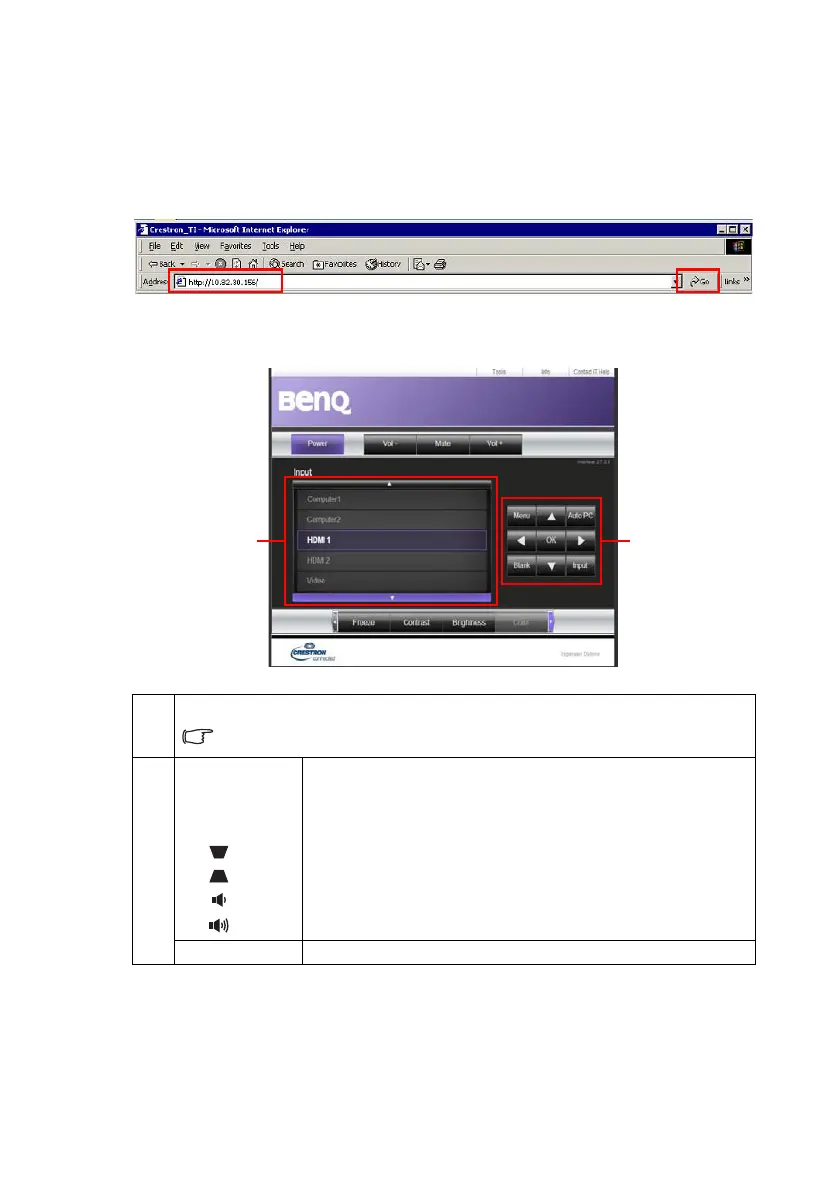
1. Enter the address of the projector in the address bar of your browser and click Go.
2. The remote network operation page opens. This page (Crestron eControl) allows
you to operate the projector as if you were using the remote control or control
panel on the projector.
1
To switch input source, click on your desired signal.
The source list varies according to the connectors available on the projector.
''Video'' stands for the Video signal.
2
Menu
Auto PC
Blank
Input
▲ ()
▼ ()
◄
()
► ()
See
"Remote Control" on page 12
for details.
OK Activates the selected On-Screen Display (OSD) menu item.


 To Next Page