16
Positioning your projector
English
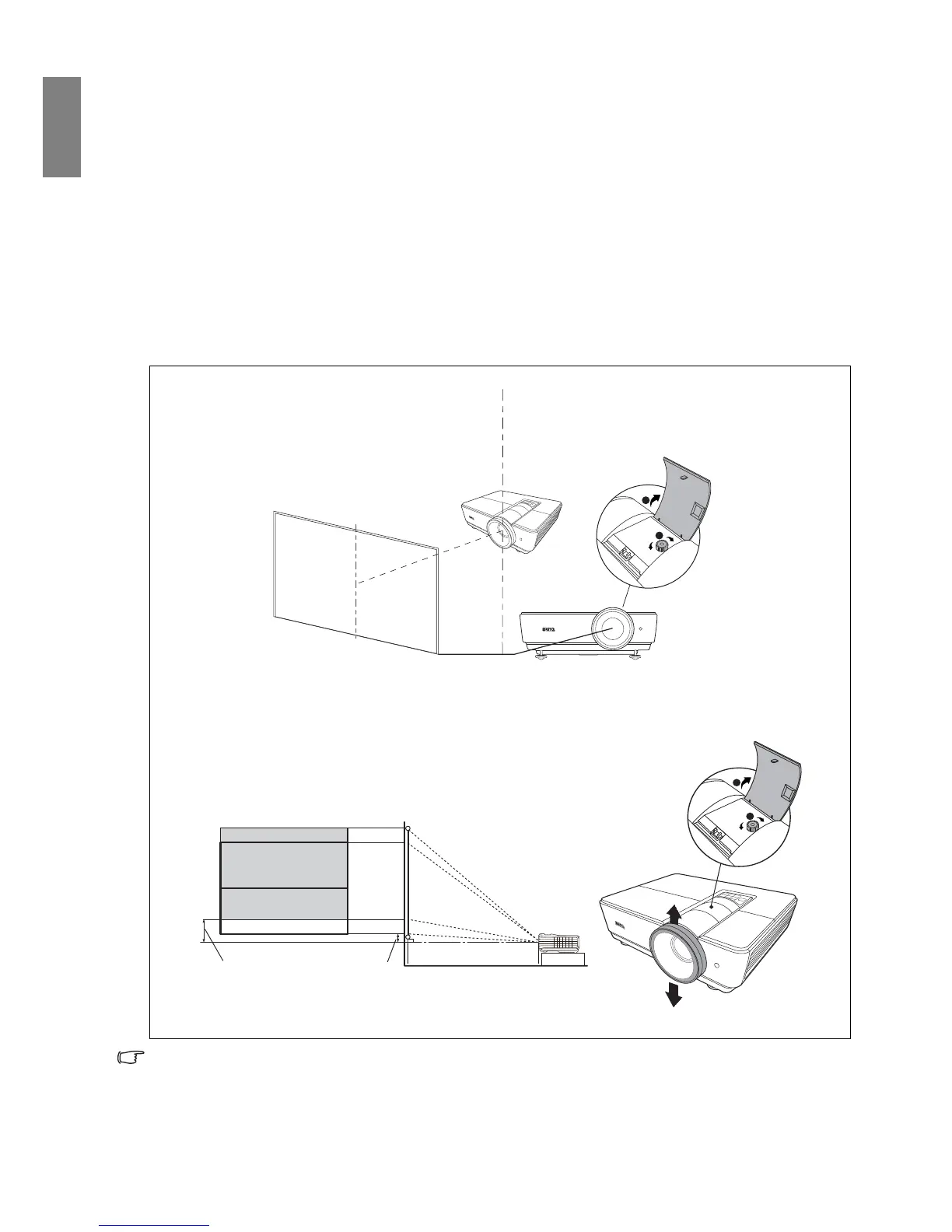
Shifting the projection lens
The lens shift control provides flexibility for installing your projector. It allows the projector to be
positioned off the center of the screen.
The lens shift is expressed as a percentage of the projected image height or width. It is measured as an
offset from the projected image’s vertical or horizontal center. You can shift the projection lens in vertical
directions within the allowable range depending on your desired image position. For SU931, the
maximum vertical shift is 2.5% from the vertical center. For SX930, the maximum vertical shift is 5%
from the vertical center.
To shift the projection lens:
1. Press to open the cover on the projector to expose the lens shift knob.
2. Rotate the knob clockwise or counterclockwise until the screen is positioned where you want it.
• To avoid causing damage to the lens shift device, rotate the screw driver slowly and gently.
• Lens shift adjustment will not result in a degraded picture quality. In the unlikely event that the image
distortion is produced, see "Adjusting the projected image" on page 27 for details.
• When the screen position is fixed
• When the projector position is fixed



 To Next Page