Key Operations
33
1
2
3
4
Select Designs for Embroidery
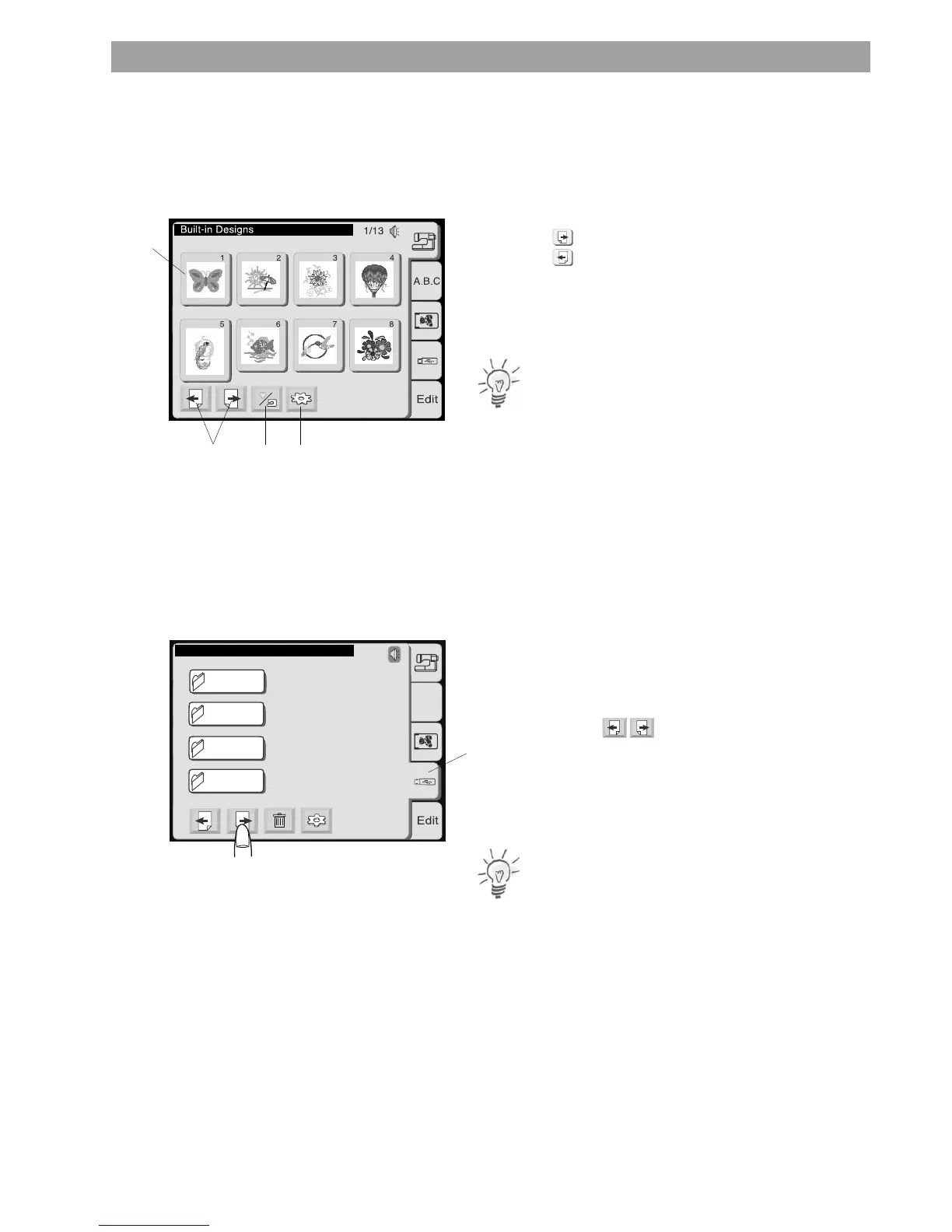
Press the corresponding tab in the Pattern Selection
Window to open designs.
A similar window is used to select designs from the various memory
sources. 8 designs are displayed at once on one page of the screen.
1 Page keys
Press the key to view the next page.
Press the key to view the previous page.
2 Built-in/Personal key
Press this key to switch between
- Built-in designs
- Personal designs from the internal memory.
Note:
This key is only shown when the internal memory tab is selected.
3 Utility key
Press this key to open the utility selection window (refer to page 25
for more details).
4 Design selection keys
The pattern images of the available designs are shown on the
pattern selection keys.
To select a design, press the corresponding key.
The display will switch to the embroidery window.
Folders on USB Stick
USB Sticks may contain design folders as well as design files. If so,
the first pages of the Pattern Selection Window will show the
folders.
Use the Page keys to scroll to the pages with indiviual
design files
or
Press the corresponding folder key to access design files contained in
this particular folder.
Note:
The design file location is displayed in the status line.
USB : \ Embf5
A.B.C
2/4
FOLDR9
FOLDR10
FOLDR 11
FOLDR12
5










 To Next Page