Basic Functions
Defrosting by weight (automatic)
Use this function to defrost meat, poultry, fish, fruit and bread quickly.
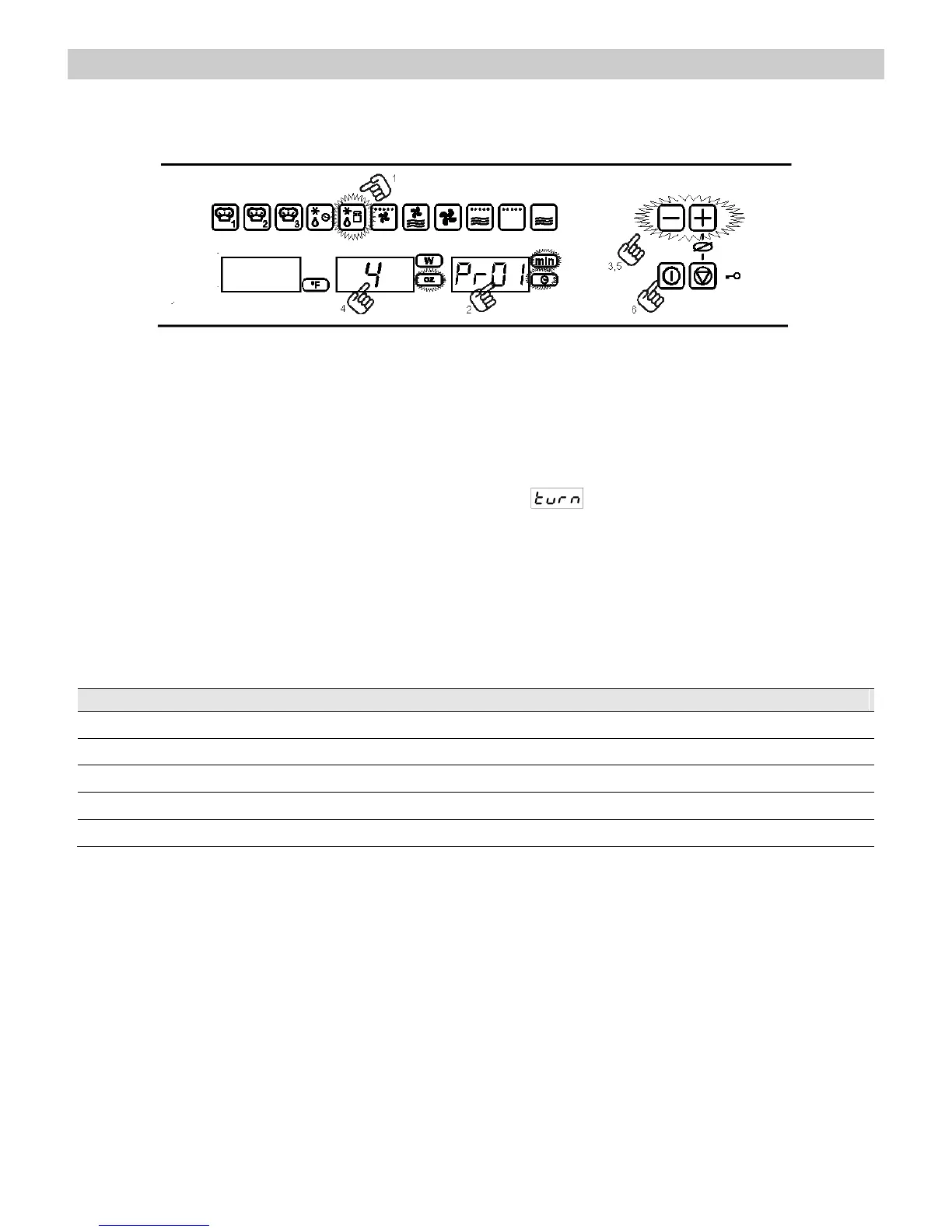
1. Press the function key Defrosting by
weight. The function key lights up.
2. Press the Food Type selection key to
change the food type. The respective
lights will flash.
3. Press key “-” and “+”, to change the
programme, e.g. “Pr 01” (see following
table).
4. Press the Weight Selection key to define
the food weight. The respective light will
flash.
5. Press key “-” and “+”, to change the
weight.
6. Press the Start key. The oven will start to
operate.
7. Turn the food whenever the oven lets out
a beep, and the display flashes de word
. Press the Start key to resume.
The following table shows the defrosting by weight function programmes, indicating weight
intervals, and defrosting and standing times (in order to ensure the food is of a uniform
temperature).


 To Next Page