17
Starting measurement
1.
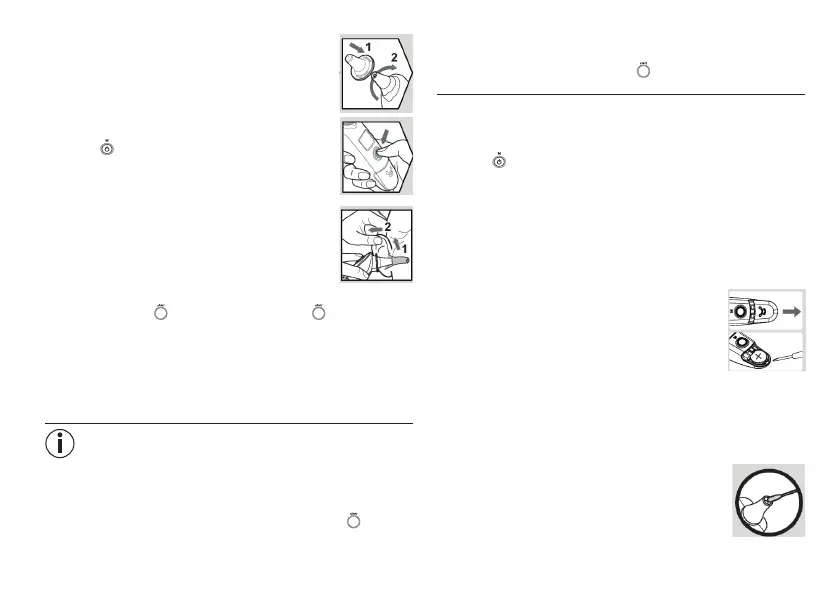
Twist a clean protective cap onto the device until you
feel and hear it click fi rmly into place.
2. Press the ON/OFF/memory button to switch on the
device (
).
3. As the ear canal is slightly curved, you have to pull
the ear slightly up and backwards before inserting
the sensor tip. This is important so that the tip of the
protective cap can be pointed directly at the eardrum.
4. Insert the tip of the protective cap carefully and press the start but-
ton for 1 second (
). Release the start button ( ). The end of the
measuring time is signalled with a short beep and the measured value
appears on the LCD display. If the measured temperature is above
37.5 °C (99.5 °F), the display fl ashes and four short acoustic signals
are emitted. If the measured temperature is above 42.2 °C (108 °F),
“Hi” appears on the LCD display and four short acoustic signals are
emitted.
Note
If you keep getting di erent measurement results, you should measure
the temperature in the test mode.
To measure the temperature in the test mode proceed as follows:
•
During the measurement hold down the start button ( ) for three
seconds.
•
Twist the measuring probe from side to side while taking the meas-
urement to register the whole auditory canal or fi nd the highest tem-
perature. Release the start button ( ) again when you hear a long
acoustic signal. The measurement is complete.
5.
For the next measurement, remove the old protective cap and put
on a new one.
6. To switch the device o again, press and hold the ON/OFF/memory
button ( ) for approx. three seconds. If you do not press a button
on the device for over one minute it will automatically switch o .
7. Clean the device after every use as described in the “Cleaning and
storage” chapter.
8. Replacing the battery
Before replacing the battery, ensure that the device is switched o .
1. Open the battery compartment lid: Hold the device
fi rmly and slide the battery out using a screwdriver.
2.
Place the new battery under the metal fl ap and press
the battery down until you hear it click into place.
3. Place the battery compartment lid back on.
4. When inserting the battery, ensure that the positive
terminal (+) is facing upwards and the negative terminal (-) is facing
downwards.
9. Cleaning and storage
The measuring probe is the most sensitive part of the ear
thermometer. Work carefully when cleaning the meas-
uring probe to avoid causing any damage. Use a clean
cloth or cotton bud that can be moistened with disin-
fectant, alcohol or warm water.


 To Next Page