17
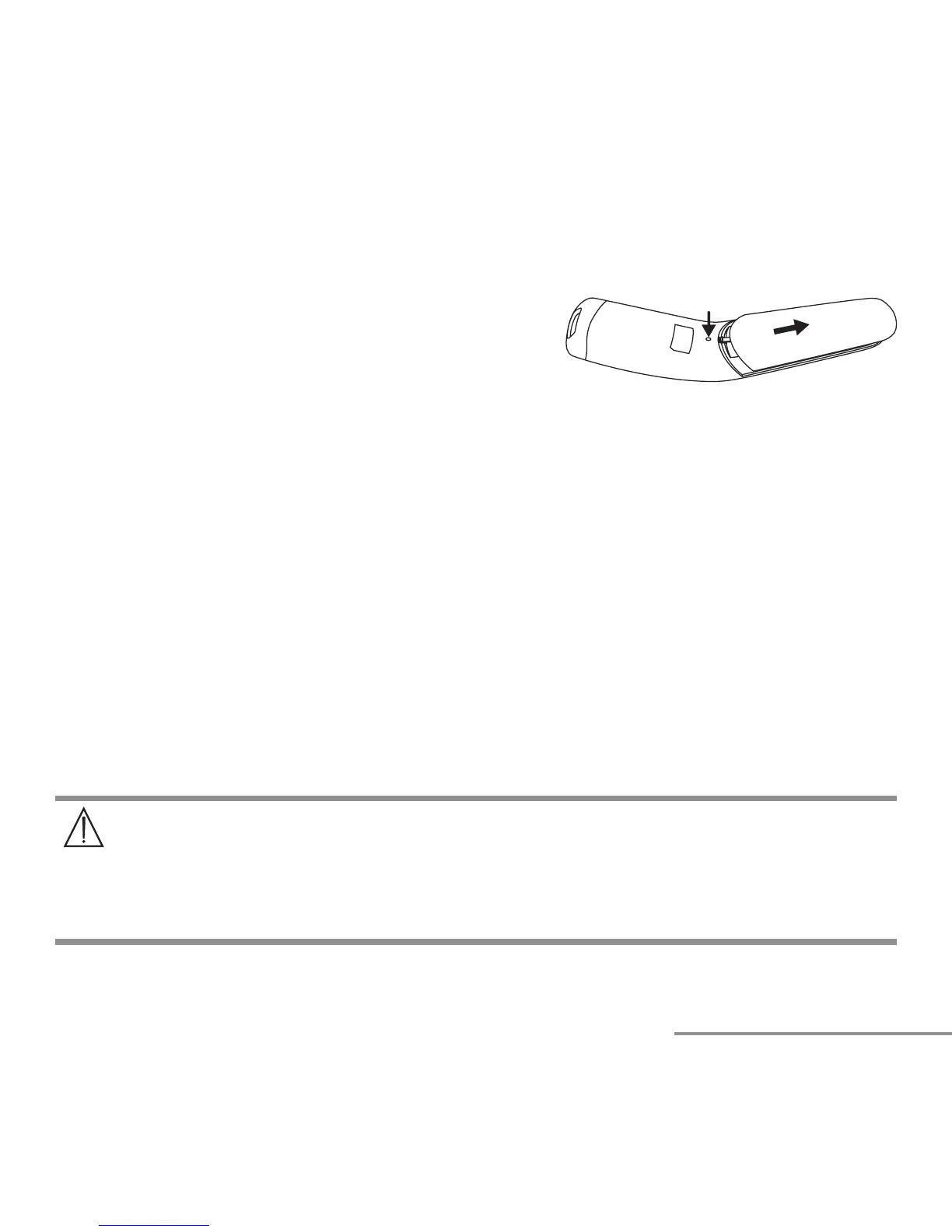
The device requires two AAA (LR03) batteries.
•
Open the battery compartment.
Use a pointed object to press down on the battery
compartment lock and at the same time slide the
battery compartment downwards.
• Take the used batteries out of the battery compartment.
• Insert new batteries.
Make sure that the batteries are inserted the right way round.
• Close the battery compartment.
11. Cleaning the device
NOTICE:
• Do not subject the device to mechanical impacts.
• When not in use, store the thermometer in the provided storage case.
• Do not expose the device to liquids. The device is not waterproof. Avoid all direct
contact with water or other liquids.
• Do not expose the device to direct sunlight.
• Clean the measuring sensor before each use.
• Do not touch the measuring sensor with fingers.
• The measuring sensor is the most sensitive part of the thermometer. Take great
care of the measuring sensor when cleaning the device.
• Do not use any harsh cleaning products.
• Always observe all safety notes for user and device.
Safety notes
w
Page 3 – 6.
Clean the measuring sensor after each use. Use a clean cloth or cotton bud that can be
moistened with disinfectant or 70 % alcohol.


 To Next Page