36
2. MCS 50 Discussion control unit
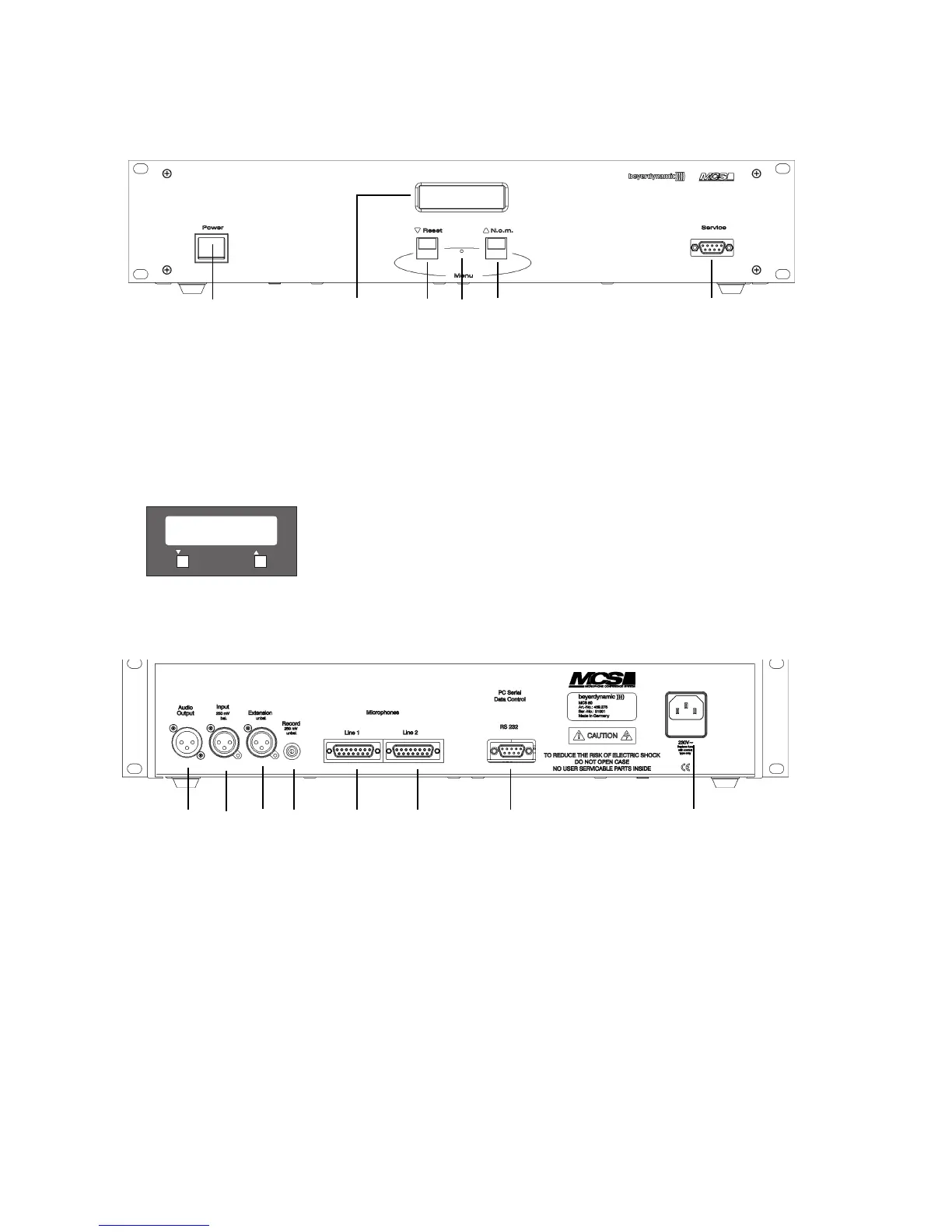
Front view
(1) Power switch
(2) LC-Display
(3) Master-Reset-button. If this button is pressed, the manufacturer specific parameters (average adjustments) are loaded. They
guarantee a system operation even if the user carries out an incorrect adjustment. As the Master-Reset-button is countersunk use
a pen or something like that for pressing.
Two multi-function buttons:
(4) Left button “Reset” pressed alone for approximately 12 seconds resets all adjustable parameters to user specific adjustments
(refer to chapter 5.3).
(5) Right button “N.o.m.” pressed alone shows the maximum number of switchable delegate microphone units for approximately
10 seconds.
(6) Serviceport, RS 232 interface for system configuration with the MCS-Editor via PC
Rear view
(7) Audio output: 3-pin XLR output for the connection of amplifiers, mixing consoles etc.
(8) Input, 3-pin XLR, balanced (250 mV)
(9) Extension input, 3-pin XLR, unbalanced (1,55 V)
(10) Record: Connection to record documentations (250 mV)
(11) Microphones Line 1, 15-pin Sub-D socket
(12) Microphones Line 2, 15-pin Sub-D socket (MCS 50/64 version only!)
(13) RS 232 for the connection of an operator’s PC (operation via mouse or touchscreen) or other available conference systems such
as AMX
®
, Crestron
®
.
(14) Mains












 To Next Page