34
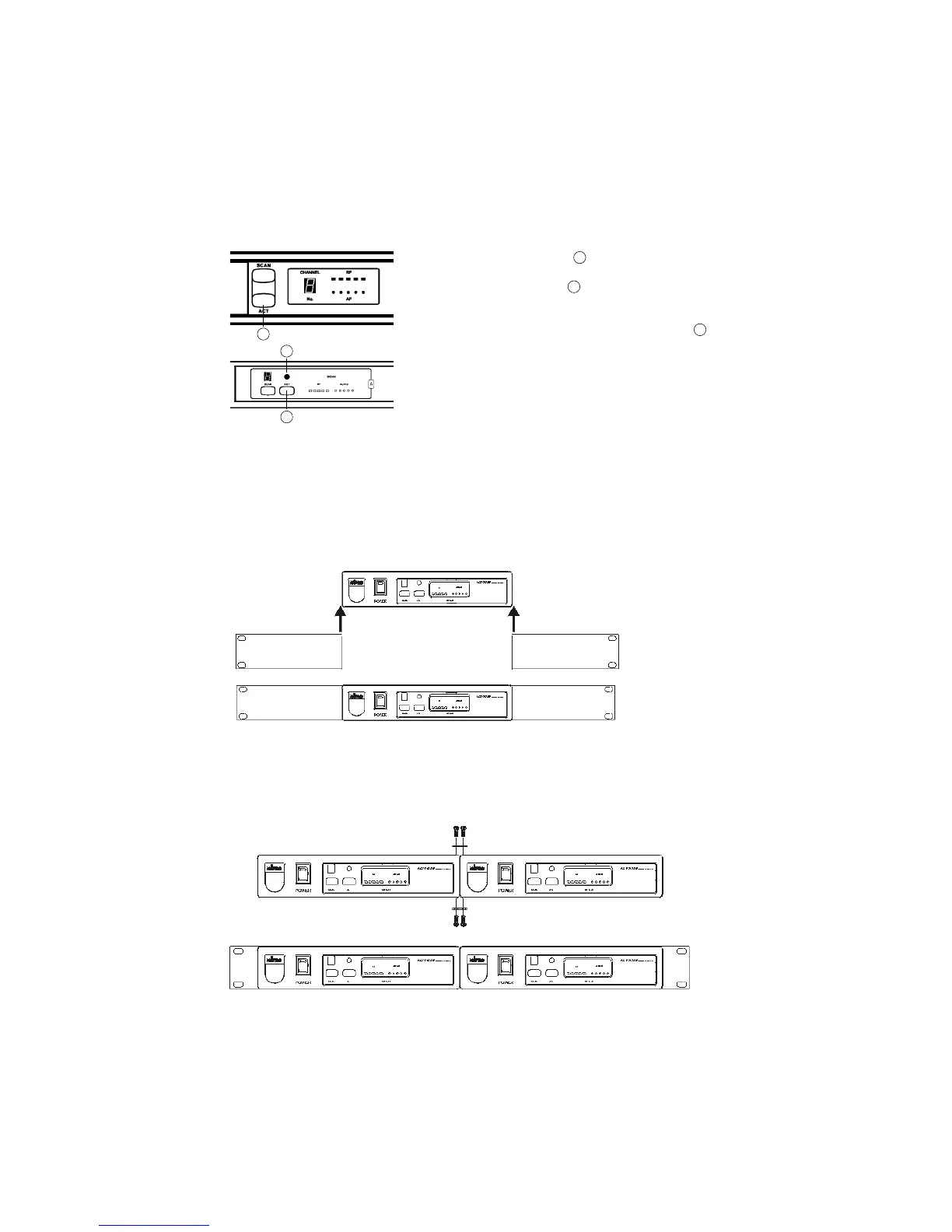
• Using the ACT button the frequency of the
receiver will be transmitted to the transmitter.
• Press the ACT button and hold the switched on
transmitter with the ACT mark or infra red point in
front of the infrared diode between the ACT and
Scan button (NE 300 S) or the ACT indicator
(NE 300 D).
• As soon as the frequency has been transmitted to
the transmitter, the ACT function will be finished
automatically.
1.9 How to install the Receiver into a 19"-Rack
One Receiver
• To mount the receiver into a 19"-rack push the optional FB-11 mounting bracket
upwards until it is firmly attached to the receiver.
Two Receivers
• Mount the connecting plates between the top and bottom of the two receivers.
• After joining the two receivers together, push the optional FB-12 mounting bracket
upwards, until it is firmly attached to the receiver.
1.8 How to transmit the Frequency to the Transmitter / ACT-Function
7
7
5
7
7
5
NE 300 S
NE 300 D





 To Next Page