EasyManua.ls Logo

Beyerdynamic Opus 300 - User Manual

Beyerdynamic Opus 300
77 pages
Go to English
Print Icon
To Next Page IconTo Next Page
Loading...
BEDIENUNGSANLEITUNG
OPERATING INSTRUCTIONS
NOTICE D’UTILISATION
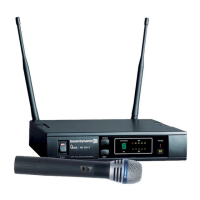
Opus 300
Drahtloses UHF-System
Wireless UHF System
Système sans fil UHF

Questions and Answers

  • W
    Wesley MayerAug 1, 2025
    What to do if my Beyerdynamic Transceiver has no reception?
    • M
      Monica BerryAug 1, 2025
      If your Beyerdynamic Transceiver has no reception, first ensure the transmitter is switched on. If it is on, check that the transmitter is working on the correct channel and adjust the frequency using the ACT function. Also, if you are using remote antennae, inspect the antenna cables for any defects.
  • P
    patricia49Aug 9, 2025
    What to do if my Beyerdynamic Transceiver has no sound but RF-indication is okay?
    • E
      Eric PetersonAug 9, 2025
      If your Beyerdynamic Transceiver shows RF-indication but no AF-indication during modulation, it could be due to strong interference signals causing a wrong indication. Try choosing another receiving channel. Also ensure that a suitable microphone is connected.
  • R
    Richard TateAug 15, 2025
    Why is the sound distorted on my Beyerdynamic Transceiver?
    • R
      Rodney OneillAug 15, 2025
      If you are experiencing distorted sound with your Beyerdynamic Transceiver, the input amplifier of the connected mixer might be overloaded. Try using the gain control on the mixer or adjust the volume to resolve this issue.
  • S
    samuel96Aug 22, 2025
    How to fix a Beyerdynamic Transceiver with no function?
    • K
      Kim SmithAug 23, 2025
      If your Beyerdynamic Transceiver has no function, it might be due to an interrupted power supply. Ensure the power supply unit is properly connected to both the mains and the receiver. Connect the receiver to AC power.

Summary

OPERATING INSTRUCTIONS

Safety Instructions for Receivers

Guidelines for safe usage and handling of the receiver unit to prevent electric shock and damage.

Safety Instructions for Transmitters

Guidelines for safe usage and handling of transmitter units, including battery and microphone care.

NE 300 Diversity Receiver

Controls and Indicators

Identification and function of front and rear panel controls and indicators on the receiver.

How to connect the Antennae

Procedure for connecting and positioning the system's antennae for optimal reception.

Where to place the Receiver

Recommendations for optimal placement of the receiver unit to avoid interference.

Connections

Instructions for connecting the receiver audio outputs to mixers or amplifiers.

Setting up

Step-by-step guide for initial setup and power-on procedures for the receiver.

How to adjust the Squelch

Procedure for adjusting the squelch control to minimize noise and interference.

Channel; Frequency Selection

Instructions on how to select and change operational frequencies for interference-free use.

How to transmit the Frequency to the Transmitter; ACT-Function

Guide to using the ACT function for automatic frequency synchronization with transmitters.

How to install the Receiver into a 19-Rack

Instructions for mounting the receiver unit into a standard 19-inch equipment rack.

Connecting and Positioning of remote Antennae

Recommendations for connecting and positioning remote antennae for improved signal coverage.

ZAS 800 Antenna Splitter

Controls and Indicators

Overview of the controls and indicator lights on the ZAS 800 antenna splitter.

Installation

Step-by-step guide for installing and connecting the ZAS 800 antenna splitter.

General Information

Important technical details and usage notes for the ZAS 800 antenna splitter.

SDM 360; SDM 369; SEM 381 Handheld Transmitters

Controls and Indicators

Description of controls and indicators on the handheld transmitter units.

How to insert the Battery

Procedure for correctly inserting or replacing the battery in the handheld transmitters.

Setting up

Instructions for setting up and powering on the handheld transmitter.

How to adjust the Sensitivity

Guide to adjusting the microphone sensitivity on the handheld transmitter models.

Maintenance

Cleaning and care instructions for the handheld transmitter units.

TS 300 Beltpack Transmitter

Controls and Indicators

Overview of the controls and indicators on the TS 300 beltpack transmitter.

How to insert or change the Battery

Procedure for inserting or changing the battery in the TS 300 beltpack transmitter.

Setting up

Instructions for setting up the TS 300 beltpack transmitter and ensuring frequency synchronization.

Adjusting Input Gain

Guide to adjusting the input gain for optimal audio levels without clipping.

AF Connection

Details on connecting different types of microphones and audio sources to the transmitter.

General Instructions for all Transmitters

Battery Change

Guidelines for changing batteries in all transmitter types, including disposal advice.

Before the Soundcheck

Preparation steps before a soundcheck, including battery checks and placement.

Positioning of Transmitters if Interference occurs

Troubleshooting steps for interference by repositioning transmitters and checking frequencies.

Trouble Shooting

NE 300 Diversity Receiver

Common problems and solutions for the NE 300 diversity receiver unit.

Handheld and Beltpack Transmitter

Common problems and solutions for handheld and beltpack transmitter units.

Maintenance

Licensing

Sets

Optional Accessories

Technical Specifications

Approved Frequencies

EC-DECLARATION OF CONFORMITY

Beyerdynamic Opus 300 Specifications

General IconGeneral
BrandBeyerdynamic
ModelOpus 300
CategoryMicrophone
LanguageEnglish

Related product manuals