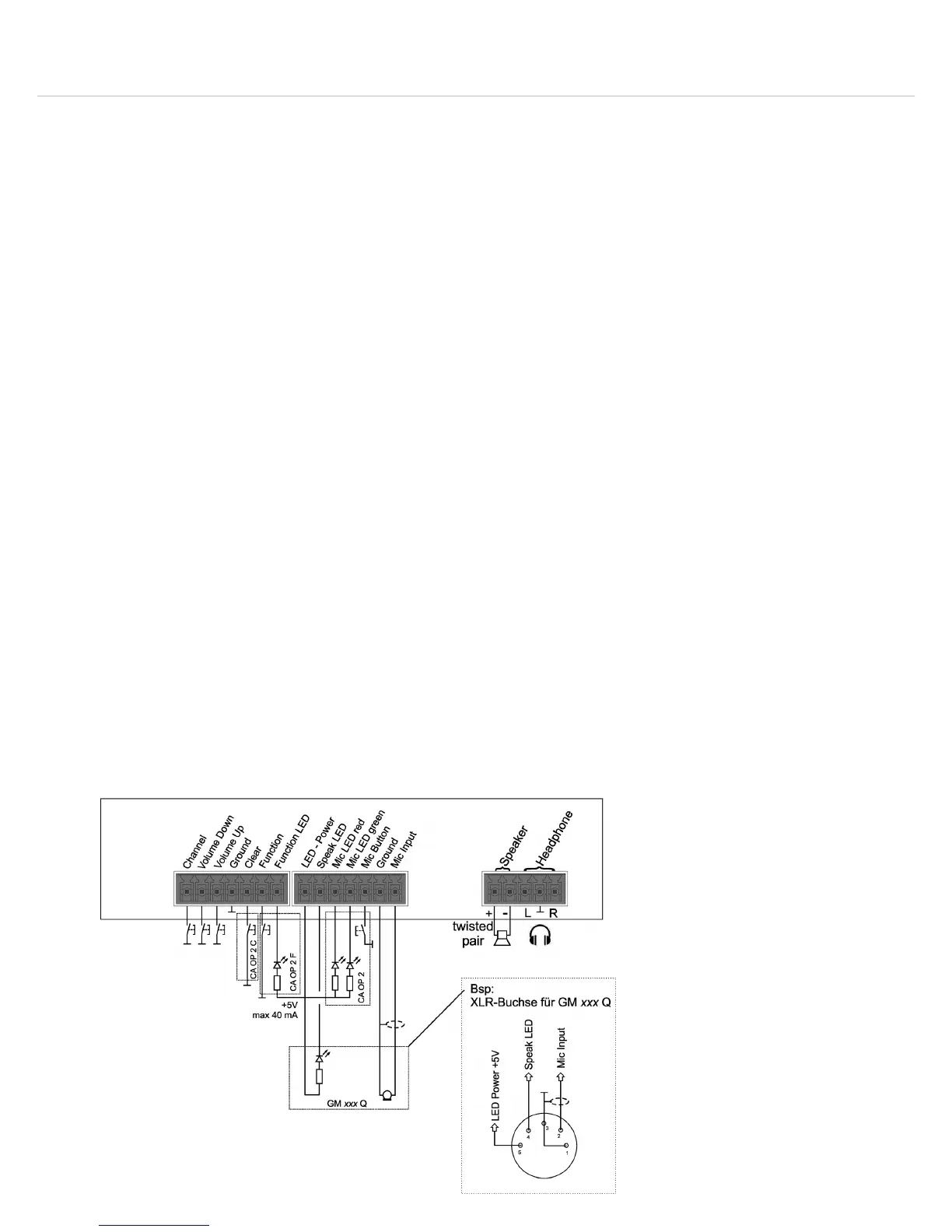
Orbis – System Unit
13
7-pin Phoenix connector
Individual buttons can be connected to the 7-pin Phoenix connector.
Function LED: connection of an external LED which displays the function mode of a chairman
microphone unit
Function: depending on the configuration via the Orbis CU control unit the function button has
the function “Normal” or “Mute” or “Function” via an external media control system.
Clear: in order to turn on the chairman microphone units while turning off the active or
registered delegate microphone unit. Depending on the operating mode the requests to speak are
cleared or not
Ground: ground
Volume Up and Volume Down: to set the volume of a connected headphone
Channel: to set the language channel of a connected headphone
7-pin Phoenix connector
For example a gooseneck microphone, a microphone button or external indicating elements can
be connected to the 7-pin Phoenix connector.
Mic Input: connector for a microphone
Ground: ground
Mic Button: connector for a microphone button button
Mic LED Green: connector for an external LED, which displays a released microphone
Mic LED Red: connector for an external LED, which displays a registered but not yet released
microphone
Speak LED: connector for an external LED, which displays the ready-to-speak status of the
microphone
LED-Power: voltage source for the external LED
5-pin Phoenix connector
Via the 5-pin Phoenix connector you can connect a headphone and loudspeaker to the Orbis SU 63
system unit.
Headphone R and Headphone L: headphone connector
Ground: ground
Speaker - und Speaker +: connector for a loudspeaker
Wiring 5-pin Phoenix connector
Wiring 7-pin Phoenix connector
Wiring 7-pin Phoenix connector












 To Next Page