EasyManua.ls Logo

BFGoodrich PS-823 - Page 47

Default Icon
344 pages
Print Icon
To Next Page IconTo Next Page
To Previous Page IconTo Previous Page
Loading...
BFGoodrich
Avionics Systems,
Inc.
Component Maintenance
Manual
P/N
101-1075-()
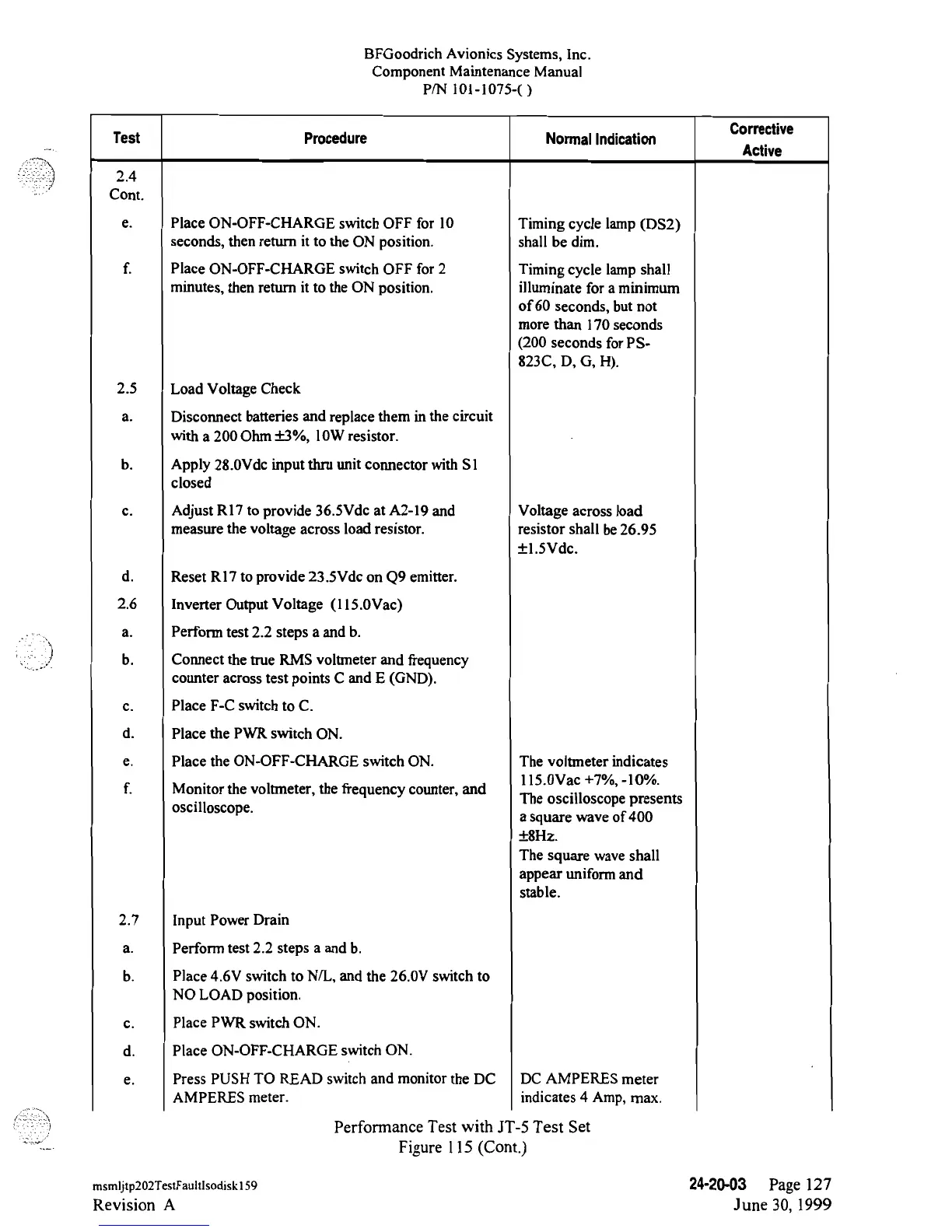
Corrective
Test
Procedure Normal
Indication
Active
Cont.
e.
Place
ON-OFF-CHARGE
switch
OFF
for
10
Timing
cycle lamp
(DS2)
seconds,
then
return it to the
ON
position. shall be
dim.
f.
Place
ON-OFF-CHARGE
switch
OFF
for 2 Timing cycle lamp shall
minutes,
then
return it to the
ON
position.
illuminate
for a
minimum
of
60
seconds,
but
not
more than
170 seconds
(200
seconds
for
PS-
823C,
D,
G,
H).
2.5 Load
Voltage Check
a.
Disconnect
batteries
and
replace
them
in
the circuit
with
a
200
Ohm±3%,
10W
resistor.
b.
Apply
28.0Vde
input thru
unit
connector
with S1
closed
c. Adjust
R17
to
provide
36.SVde
at
A2-19
and
Voltage
across
load
measure
the
voltage
across
load
resistor.
resistor
shall
be26.95
±1.SVdc.
d.
Reset
RI7
to
provide
23.5Vdc on
Q9emitter.
2.6
Inverter
Output Voltage
(ll5.0Vac)
a.
Perform
test
2.2 steps a and b.
b.
Connect
the
true RMS
voltmeter and frequency
counter across test points
C
and E (GND).
c.
Place
F-C
switch to C.
d. Place
the PWR switch
ON.
e.
Place
the
ON-OFF-CHARGE
switch
ON.
The voltmeter indicates
llS.0Vac+7%,-10%.
f.
Monitor
the
voltmeter,
the
frequency
counter, and
The oscilloscope presents
oscilloscope.
a
square
wave
of 400
±8Hz.
The square
wave
shall
appear uniform and
stable.
2.7
Input Power Drain
a.
Perform test
2.2
steps a and b.
b.
Place 4.6V switch
to N/L,
and
the 26.0V switch
to
NO
LOAD
position.
c.
Place PWR switch
ON.
d.
Place
ON-OFF-CHARGE
switch ON.
e.
Press PUSH TO
READ switch
and
monitor the
DC
DC AMPERES
meter
AMPERES
meter.
indicates 4
Amp,
max.
Performance
Test with
JT-5
Test
Set
Figure
l
15
(Cont.)
msmijtp202TestFaultisodiskl59
24-20-03
Page
127
Revision
A
June
30, 1999

Table of Contents