English
7
27
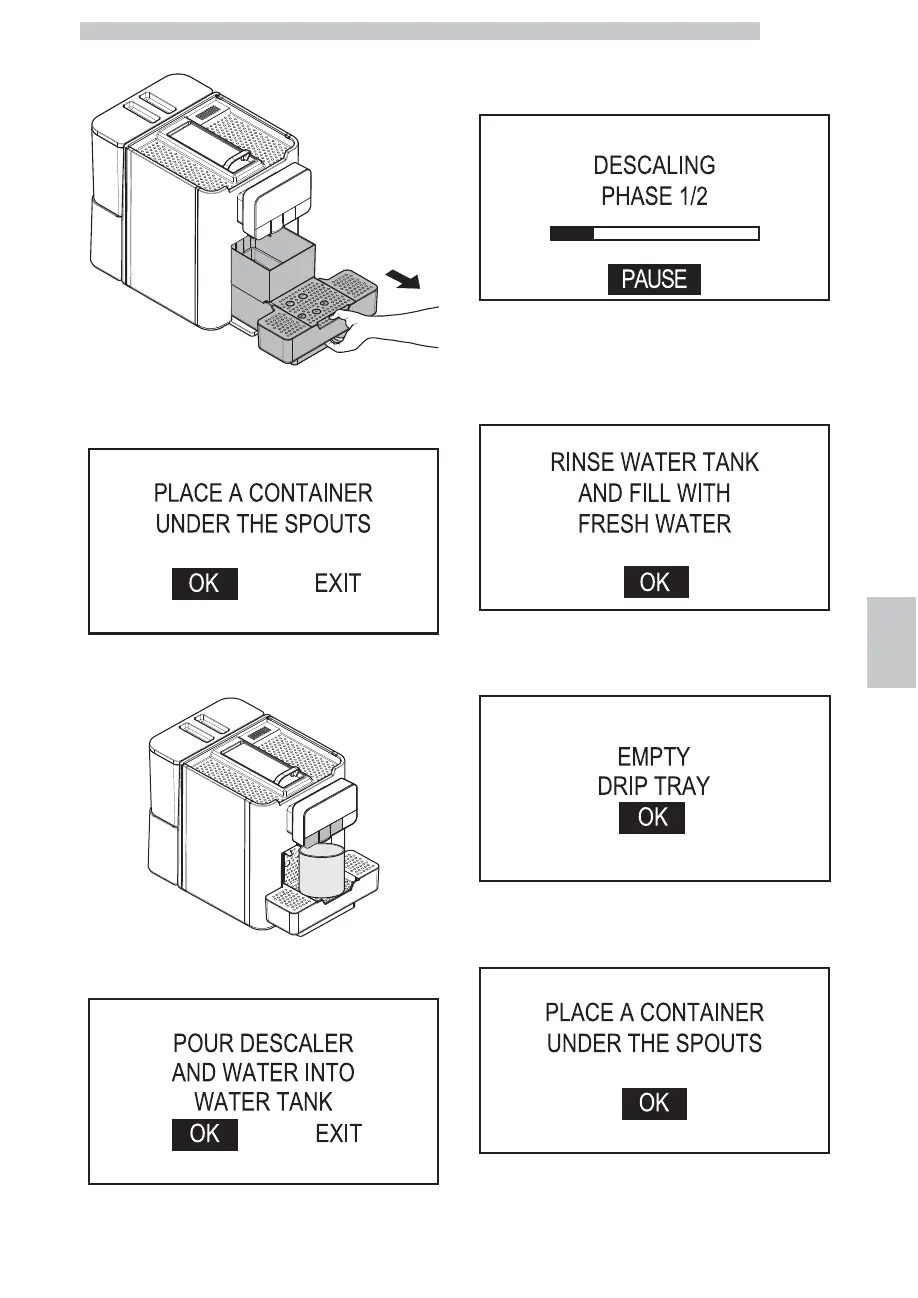
Remove and empty the drip tray.
After emptying it put the drip tray back into place. Select
"OK" and press the "OK" button. The following screen is
displayed:
Place a large container under the dispensing spouts (hot
water, coffee and cappuccino).
Select "OK" and press the "OK" button. The following
screen is displayed:
Pour 250 ml of descaling solution and 750 ml of water into
the water tank. Select "OK" and press the "OK" button.
The following screen is displayed:
The first descaling phase starts. Press the “OK” button to
pause the operation. Press the “OK” button again to
resume the operation. When the descaling solution in the
tank is finished, the machine requests to rinse the tank
with fresh drinking water.
Rinse the water tank thoroughly and fill it with fresh
drinking water up to the MAX level. Press the "OK"
button. The following screen is displayed:
Remove the drip tray. After emptying it put the drip tray
back into place. Press the "OK" button. The following
screen is displayed:


 To Next Page