GENERAL INFORMATION 83
automatically when turning on this
function or changing the distance.
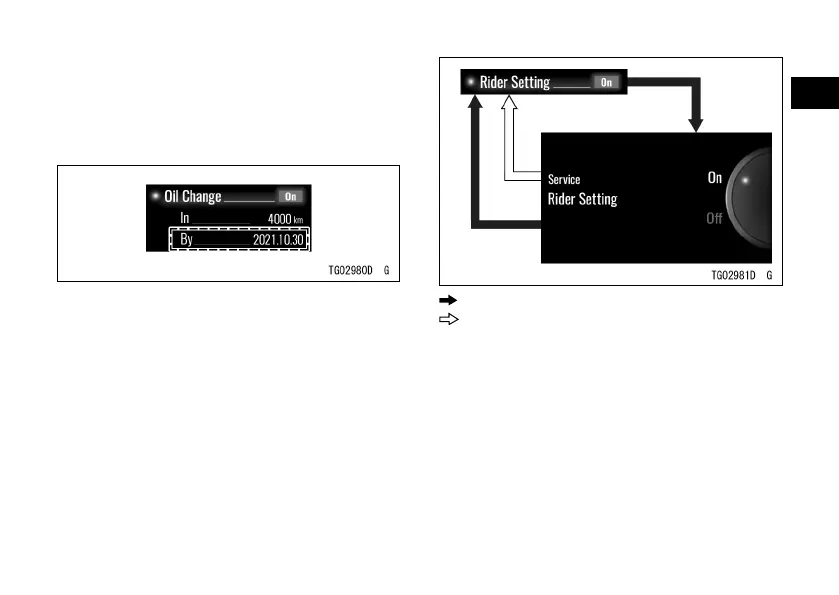
For example, when the current date is
“2020.10.30,” it sets to “2021.10.30.”
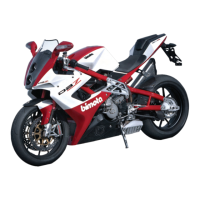
Rider Setting
This allows the rider to set the
distance for certain maintenance item.
ÿ Highlight “Rider Setting” using the
upper or lower MODE button.
ÿ Push the SELECT button to shift to
the next screen.
ÿ Choose on or o using the upper or
lower MODE button.
ÿ Push the SELECT or RESET button.
: Flow when pushing SELECT button
: Flow when pushing RESET button
ÿ Highlight “In” under “Rider Setting”
using the upper or lower MODE
button.
ÿ Push the SELECT button to shift to
the next screen.
ÿ Set the desired distance using the
upper or lower MODE button and the
ÿ SELECT button.


 To Next Page