①
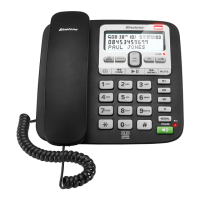
HOOKSWITCH
HOOKSWITCHHOOKSWITCH
HOOKSWITCH
Press to end a call on a corded
Pressed down to end a call on a corded handset
when replacing the corded handset on the base.
Released to enter dialling mode or answer a call,
when picking up the corded handset off the
message playback on the answering machine.
During message playback, press to stop playback
and return to standby mode.
During message playback, p
In standby mode, press to acc
(CID).
In standby mode, press and hold to set date and
time.
In settings mode, press to confirm a setting.
In standby mode, press and hold to turn
base ringer On/Off.
When dialling, press and hold to add a dialling
In standby mode, press and hold to switch the
Phonebook.
Press and hold to enter the phonebook
During a call, press to send a
called Recall) for network services.
⑪
LCD screen
LCD screenLCD screen
LCD screen











 To Next Page