
 Need help?
Do you have a question about the Binatone E3300 and is the answer not in the manual?
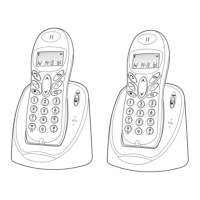
Functionality for ending calls, locking keypad, and clearing display.
Used for starting programming and making notes in the Notebook.
For repeat calls, viewing Caller Display, and creating pauses.
Initiates intercom calls between handsets.
Used to scroll through long numbers displayed on the screen.
Adjusts earpiece volume during calls and navigates lists.
Answers, makes calls, and confirms selections during programming.
Used with PBX systems or specific BT services.
Stores and retrieves numbers from memory.
Makes all registered handsets ring to locate them.
Displays the signal strength between the handset and base unit.
Appears when there are missed incoming calls.
Shows when a handset is ringing for or connected to an intercom call.
Indicates when numbers are being stored or accessed from memory.
Appears when dialling via an alternative provider's network.
Shows when using the Last Number Redial feature.
Appears when checking or dialling from Caller Display records.
Indicates the keypad is locked or a number is barred.
Shows the current battery charge status.
Selecting an appropriate location for the base unit.
Connecting the mains power lead and telephone line cord to the base unit.
Connecting the mains adapter to the power socket.
Instructions for connecting charger pods for additional handsets.
Turning on the power supply to the base unit and charger pods.
Installing the rechargeable battery pack into each handset.
Initial charging procedure for handset batteries before first use.
Connecting the base unit to the telephone line socket.
Important safety guidelines regarding water and thunderstorms.
Explains causes of interference and how to resolve them.
What to do if the handset goes out of range from the base unit.
Procedure to power the handset on or off.
How to lock and unlock the handset's keypad to prevent accidental use.
Steps for dialling a phone number and initiating a call.
Procedure for receiving an incoming call.
Steps to disconnect from an ongoing call.
How to adjust the volume level during a call.
Instructions for dialling a number stored in memory.
Methods for saving phone numbers into the phone's memory.
Using memory for parts of numbers or long-distance codes.
Procedure for modifying a phone number already stored in memory.
Making a repeat call to the most recently dialled number.
Accessing and redialling from the last five numbers dialled.
Removing numbers from the Last Number Redial list.
How to view incoming call records and details.
Steps to redial a number from the Caller Display.
Procedure to remove records from the Caller Display memory.
Saving a Caller Display number to permanent memory.
How to initiate a call between two handsets.
Procedure for receiving an intercom call on another handset.
How to disconnect an intercom call.
Moving an external call from one handset to another.
Switching between an outside call and an intercom call.
How to establish a conference call with three parties.
Notification of an incoming call during an intercom call.
Making all registered handsets ring to locate them.
Steps to add a new handset to the base unit.
Procedure to remove a handset from the base unit.
Manually choosing a base unit when multiple are registered.
Instructions for registering the handset to a GAP-compatible base unit.
Notes on using the menu for customising handset and base unit settings.
Setting and managing the personal identification number for the handset.
Configuring the handset to automatically answer incoming calls.
Adjusting the ringer volume and selecting melodies for incoming calls.
Enabling or disabling the audible feedback for key presses.
Procedure to enable or disable the Direct Call function.
Erasing all stored numbers and data from the handset.
Setting and managing the personal identification number for the base unit.
Programming up to two emergency numbers for quick dialling.
Customising the ringer sound for incoming calls on the base unit.
Configuring restrictions on making certain types of calls.
Setting restrictions for outside calls or international calls.
Configuring the date and time for display and record keeping.
Erasing all stored Caller Display records.
Restoring base unit settings to factory defaults.
Entering the access code provided by the alternative network provider.
Defining special codes for local calls not using the network access code.
Enabling or disabling the Indirect Network feature on the handset.
Troubleshooting steps for call connection and reception issues.
Diagnosing and resolving issues preventing outgoing calls.
Steps to take when handset buttons do not function.
Troubleshooting inability to connect to outside lines after dialling.
Diagnosing why the phone is not ringing for incoming calls.
Resolving issues after a call is cut off due to being out of range.
Troubleshooting signal interference and poor line quality.
Diagnosing the cause of beeping sounds during a call.
Steps to resolve issues with the Caller Display feature.
Troubleshooting the busy tone when attempting to make a call.
Adjusting and resolving low volume issues in the earpiece.
Troubleshooting rapid battery drain or low battery warnings.
Steps to resolve problems with battery charging.
Troubleshooting the R (Recall) button functionality.
Resolving issues with LNR and memory dialling on PBX systems.
Procedure for returning the unit for repair while under warranty.
Procedure for obtaining repairs after the warranty period has ended.
 General
| Type | Cordless Telephone |
|---|---|
| Talk Time | Up to 10 hours |
| Standby Time | Up to 100 hours |
| Number of Ringtones | 10 |
| Phonebook Capacity | 50 entries |
| Ringer type | Polyphonic |
| Range | Up to 300 meters outdoors, 50 meters indoors |
| Additional Features | Caller ID, Call waiting, Mute function |











 To Next Page