11
If there is a mains power failure or if the binding machine stops functioning for
some other reason, documents that have just been put in and other unbound
documents can be removed as described below. If there are unfinished documents
in the machine when the power supply is restored, the machine will automatically
move them into the output tray. Then they can be put into the input bay again.
If the binding machine breaks down, any documents should be cleared and remo-
ved from the machine before it is sent for service.
Clearing
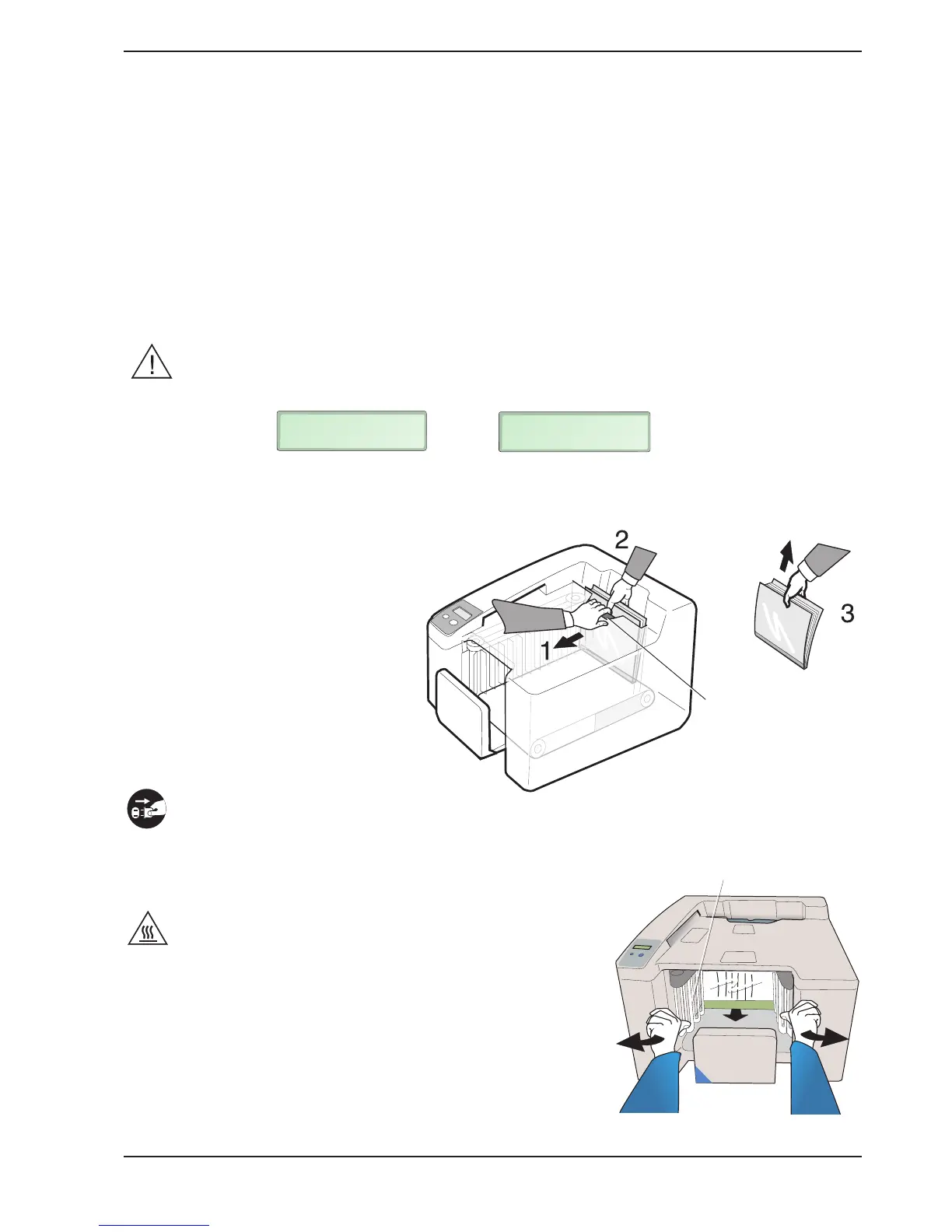
To facilitate removal of the documents, the machine is equipped with a jam clearance door.
Pull the jam clearance door away with one hand (1). Firmly grip the document(s) in the input bay
with the other hand (2) and lift them out of the machine (3).
The binding machine should then automatically
return to the normal position. However,
if it does not, press the RESTART button.
7. Clearing and emptying
Emptying
The binding machine only needs to be emptied manually in exceptional
cases (e.g. if the machine breaks down or if there is an extended power
failure). Unbound documents can be removed from the
machine so that they do not fall into the wrong hands.
Disconnect the mains cable before emptying the machine.
Then wait for a while until the heating zone in the machine
has cooled down.
Stand at the output end of the machine and hold both hands
in the output tray, as shown in the figure below. Turn the
outermost drivers on both sides outward using your thumbs
so that the document is manually fed one step forward. This
operation may prove difficult but you need not be afraid to
use some force. The drivers are designed to bend
considerably. Repeat the procedure to move the remaining
documents forward. Remove the unbound document from the
machine and repeat the procedure again until the binding
machine is empty.
Jam clearance
door
Driver
If the display shows or remove all documents from
the input bay.
INPUT JAM
REMOVE DOC
DO NOT INSERT
REMOVE DOC


 To Next Page