8
5.1 Choosing the language
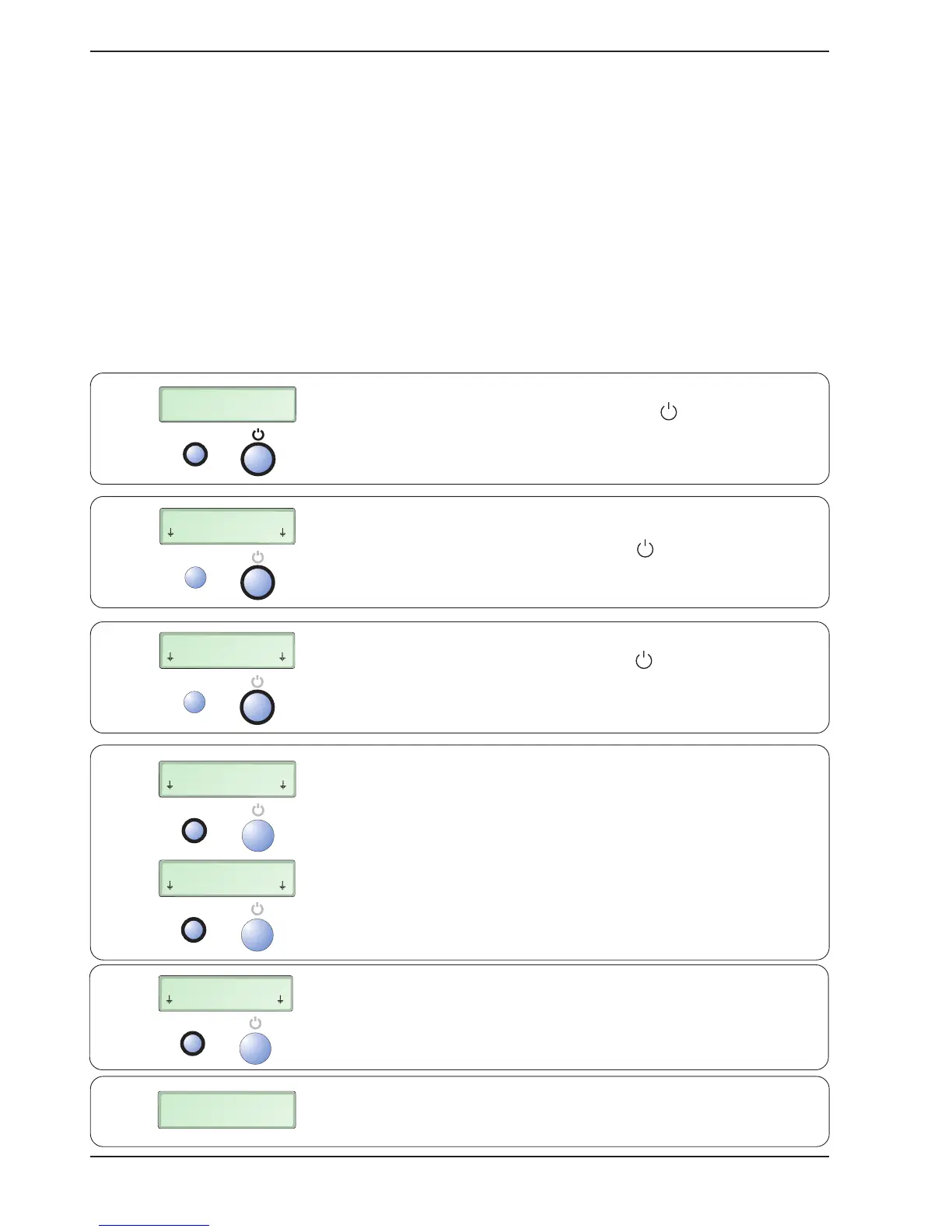
The default language setting for your Bindomatic 101 DFS upon delivery is English. You can,
however, choose between a number of languages.
Note that the English language is always used in the “User Settings” mode. Choose the language
as follows:
Press and hold down the RESTART and buttons for at least
2 seconds. The temporary function of these two buttons is now
shown on the lower line of the display.
Press the button under More (i.e. the button)
repeatedly
until the desired language is shown on the display.
5. User settings
The user can select the display language and one of two alternative times before the machine
switches to the energy-saving mode.
MEASURE DOCUMENT
SEE PICTURE 1
RESTART
RESTART
CUSTOM SETTINGS
BACK Enter
RESTART
ENGLISH
SELECT MORE
RESTART
SWEDISH
SELECT MORE
RESTART
ENERGY SAVER 4h
SELECT MORE
RESTART
CUSTOM SETTINGS
BACK Enter
> 2 s
1 x
>1 x
2 x
1 x
MEASURE DOCUMENT
SEE PICTURE 1
Press the button under Select (i.e. the
RESTART button)
twice
.
When satisfied with the settings, press the button
under Back (i.e. the RESTART button)
once
.
The desired language has now been selected.
Press the button under Enter (i.e. the button)
once
.
6.
5.
4.
3.
2.
1.


 To Next Page