Biodom 33
Biodom 33Biodom 33
Biodom 33
|
| |
| instructions for use, maintenance and installation | version 1.0 July 2017
27
9.4. TIME PROGRAMME SETTING
Press and hold (until TEN displays) MENU button to access time programme menu.
By setting ON or OFF, the time programme activates or deactivates.
Accurate time and current day of the week (1 is Monday etc.) must be set and then, 6 programme
periods and temperatures must be programmed.
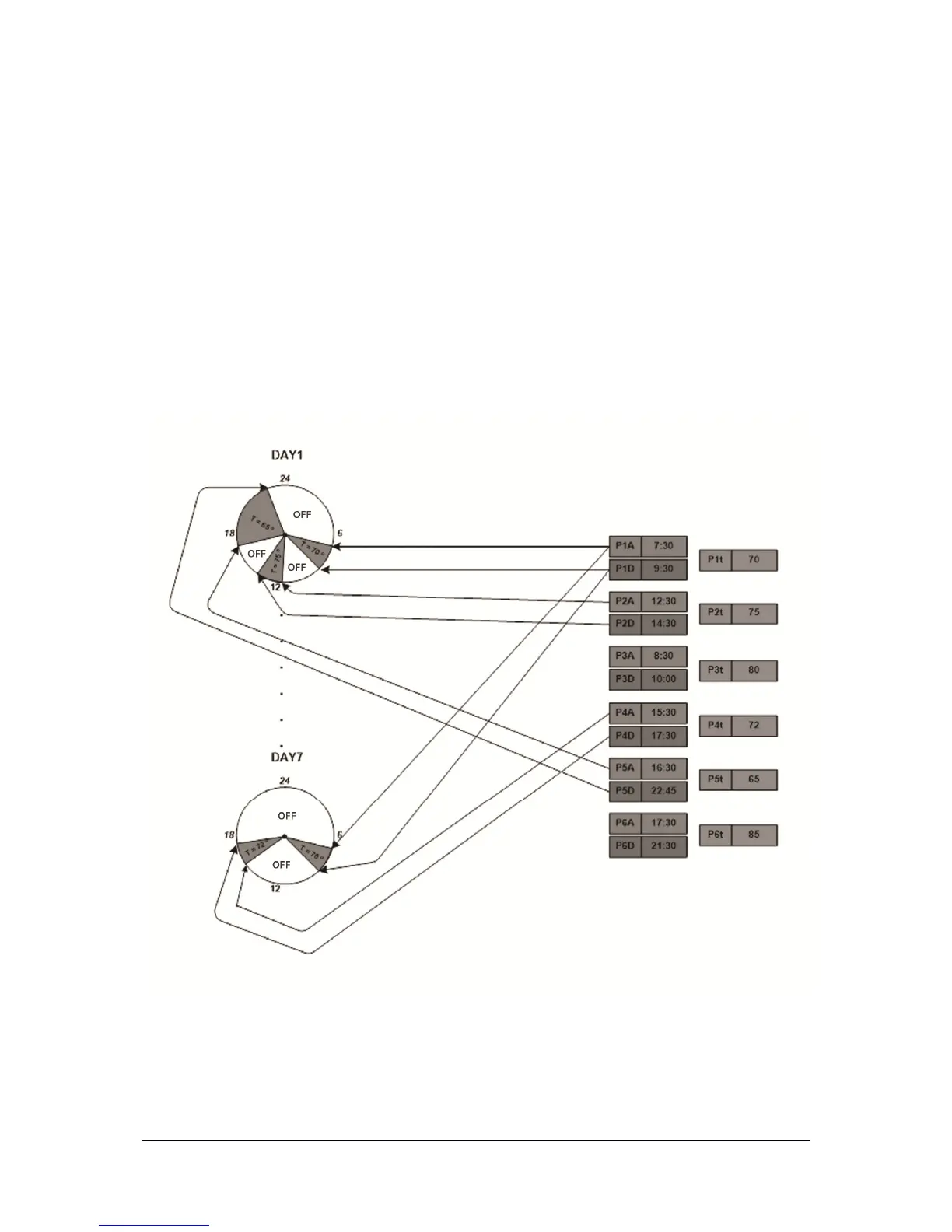
Each of 6 time period is determined by start (P1a – programme 1 start time) and end time (P1d –
programme 1 end time). In this period, the boiler is active and operates by maintaining water
temperature in the boiler (P1t).
Then select up to 3 time periods for each day of the week.
Example (Tuesday): upper display shows DAY2, and lower P1, P3 and P6, which means that the boiler
will be active on Tuesday in periods, programmed with programmes P1, P3 and P6.
Figure 12: Diagram of timer settings


 To Next Page