Biodom 33
Biodom 33Biodom 33
Biodom 33
|
| |
| instructions for use, maintenance and installation | version 1.0 July 2017
29
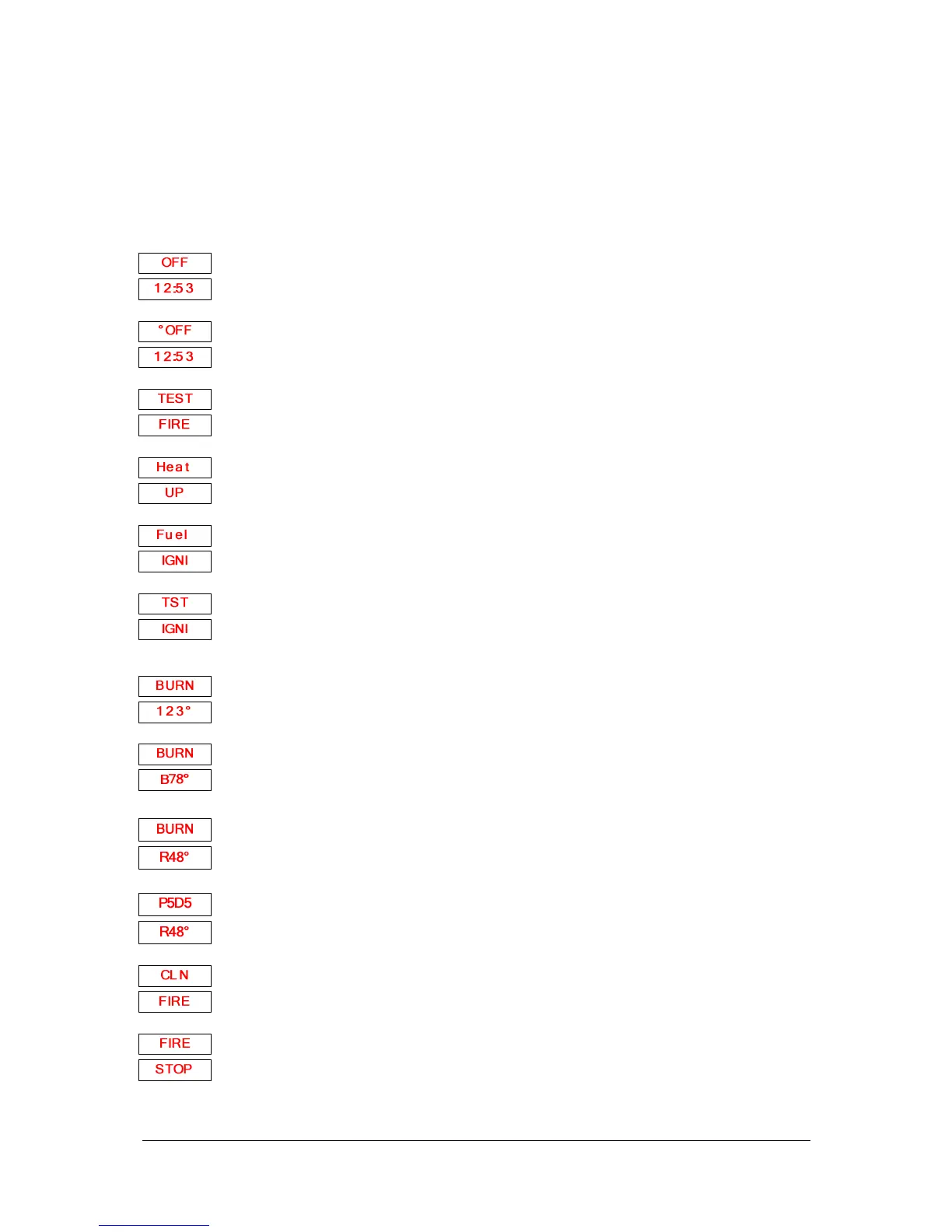
9.5. INDICATIONS AND MESSAGES ON DISPLAY
Explanation of message and status of the boiler
The boiler is at a standstill
The boiler is at a standstill
but the time programme is active and will start
automatically, as set with time programme.
The boiler checks if there is a flame in the firebox and for proper combustion this
sequence starts after power supply outage.
In ignition phase, when the dosing screw filled the f
phase, the boiler ignites pellets. No dosing in this phase
At the end of ignition phase, the boiler shuts off the spark plug and tests,
ignition was successful and if combustion is correct and temperatures rise
correctly.
Lower display shows temperature of smoke
gases at exit from the boiler.
Lower display shows water temperature in the boiler
Lower display shows temperature of return water
Upper display shows current power of the
power of the boiler (Dx).
Fans blow out ash and other residues from the firebox. This
phase starts automatically from time to time during burning phase.
boiler is in stopping sequence and is cooling down


 To Next Page